openEuler 22.03 LTS x86_64 cephadm 部署ceph16.2.14【4】重装 内网 离线部署 解决ceph orch device ls 没有数据返回问题!(安装不完整)
接上篇前面一些列操作,osd基本凉凉,重装这三个节点的osd,重新初始化。
接上篇
openEuler 22.03 LTS x86_64 cephadm 部署ceph18.2.0 未完成 笔记-CSDN博客
openEuler 22.03 LTS x86_64 cephadm 部署ceph16.2.14 【2】添加mon-CSDN博客
openEuler 22.03 LTS x86_64 cephadm 部署ceph16.2.14【3】添加存储osd Created no osd(s) on host already created-CSDN博客
前面一些列操作,osd基本凉凉,重装这三个节点的osd,重新初始化
当前状态
[root@node-1 ~]# systemctl status firewalld
○ firewalld.service - firewalld - dynamic firewall daemon
Loaded: loaded (/usr/lib/systemd/system/firewalld.service; disabled; vendor preset: enabled)
Active: inactive (dead)
Docs: man:firewalld(1)
[ceph: root@node-1 /]# ceph -s
cluster:
id: 4466c6c0-8828-11ee-b74e-08002726ce7d
health: HEALTH_WARN
clock skew detected on mon.node-2
1/3 mons down, quorum node-1,node-2
Reduced data availability: 1 pg inactive
1436 slow ops, oldest one blocked for 1441 sec, daemons [mon.node-2,mon.node-3] have slow ops.
services:
mon: 3 daemons, quorum node-1,node-2 (age 5m), out of quorum: node-3
mgr: node-1.tmiabs(active, since 23m)
osd: 4 osds: 1 up (since 136y), 2 in (since 14m)
data:
pools: 1 pools, 1 pgs
objects: 0 objects, 0 B
usage: 291 MiB used, 50 GiB / 50 GiB avail
pgs: 100.000% pgs unknown
1 unknown
[ceph: root@node-1 /]# ceph health detail
HEALTH_WARN clock skew detected on mon.node-2; 1/3 mons down, quorum node-1,node-2; Reduced data availability: 1 pg inactive; 1441 slow ops, oldest one blocked for 1446 sec, daemons [mon.node-2,mon.node-3] have slow ops.
[WRN] MON_CLOCK_SKEW: clock skew detected on mon.node-2
mon.node-2 clock skew 28799.1s > max 0.05s (latency 0.00470714s)
[WRN] MON_DOWN: 1/3 mons down, quorum node-1,node-2
mon.node-3 (rank 2) addr [v2:10.47.76.96:3300/0,v1:10.47.76.96:6789/0] is down (out of quorum)
[WRN] PG_AVAILABILITY: Reduced data availability: 1 pg inactive
pg 1.0 is stuck inactive for 23m, current state unknown, last acting []
[WRN] SLOW_OPS: 1441 slow ops, oldest one blocked for 1446 sec, daemons [mon.node-2,mon.node-3] have slow ops.
[ceph: root@node-1 /]# ceph osd tree
ID CLASS WEIGHT TYPE NAME STATUS REWEIGHT PRI-AFF
-1 0.04880 root default
-3 0.04880 host node-1
1 hdd 0.04880 osd.1 up 1.00000 1.00000
0 0 osd.0 down 0 1.00000
2 0 osd.2 down 0 1.00000
3 0 osd.3 down 1.00000 1.00000
[ceph: root@node-1 /]# ceph osd metadata
[
{
"id": 0
},
{
"id": 1,
"arch": "x86_64",
"back_addr": "[v2:10.47.76.94:6802/3167398630,v1:10.47.76.94:6803/3167398630]",
"back_iface": "",
"bluefs": "1",
"bluefs_dedicated_db": "0",
"bluefs_dedicated_wal": "0",
"bluefs_single_shared_device": "1",
"bluestore_bdev_access_mode": "blk",
"bluestore_bdev_block_size": "4096",
"bluestore_bdev_dev_node": "/dev/dm-2",
"bluestore_bdev_devices": "sdb",
"bluestore_bdev_driver": "KernelDevice",
"bluestore_bdev_partition_path": "/dev/dm-2",
"bluestore_bdev_rotational": "1",
"bluestore_bdev_size": "53682896896",
"bluestore_bdev_support_discard": "0",
"bluestore_bdev_type": "hdd",
"bluestore_min_alloc_size": "4096",
"ceph_release": "pacific",
"ceph_version": "ceph version 16.2.14 (238ba602515df21ea7ffc75c88db29f9e5ef12c9) pacific (stable)",
"ceph_version_short": "16.2.14",
"ceph_version_when_created": "ceph version 16.2.14 (238ba602515df21ea7ffc75c88db29f9e5ef12c9) pacific (stable)",
"container_hostname": "node-1",
"container_image": "quay.io/ceph/ceph:v16",
"cpu": "Intel(R) Core(TM) i5-9600K CPU @ 3.70GHz",
"created_at": "2023-11-27T07:18:52.190657Z",
"default_device_class": "hdd",
"device_ids": "sdb=VBOX_HARDDISK_VBfa988fe4-ea372ddc",
"device_paths": "sdb=/dev/disk/by-path/pci-0000:00:0d.0-ata-3",
"devices": "sdb",
"distro": "centos",
"distro_description": "CentOS Stream 8",
"distro_version": "8",
"front_addr": "[v2:10.47.76.94:6800/3167398630,v1:10.47.76.94:6801/3167398630]",
"front_iface": "",
"hb_back_addr": "[v2:10.47.76.94:6806/3167398630,v1:10.47.76.94:6807/3167398630]",
"hb_front_addr": "[v2:10.47.76.94:6804/3167398630,v1:10.47.76.94:6805/3167398630]",
"hostname": "node-1",
"journal_rotational": "1",
"kernel_description": "#1 SMP Wed Mar 30 03:12:24 UTC 2022",
"kernel_version": "5.10.0-60.18.0.50.oe2203.x86_64",
"mem_swap_kb": "5242876",
"mem_total_kb": "5454004",
"network_numa_unknown_ifaces": "back_iface,front_iface",
"objectstore_numa_unknown_devices": "sdb",
"os": "Linux",
"osd_data": "/var/lib/ceph/osd/ceph-1",
"osd_objectstore": "bluestore",
"osdspec_affinity": "None",
"rotational": "1"
},
{
"id": 2
},
{
"id": 3
}
]
删掉osd
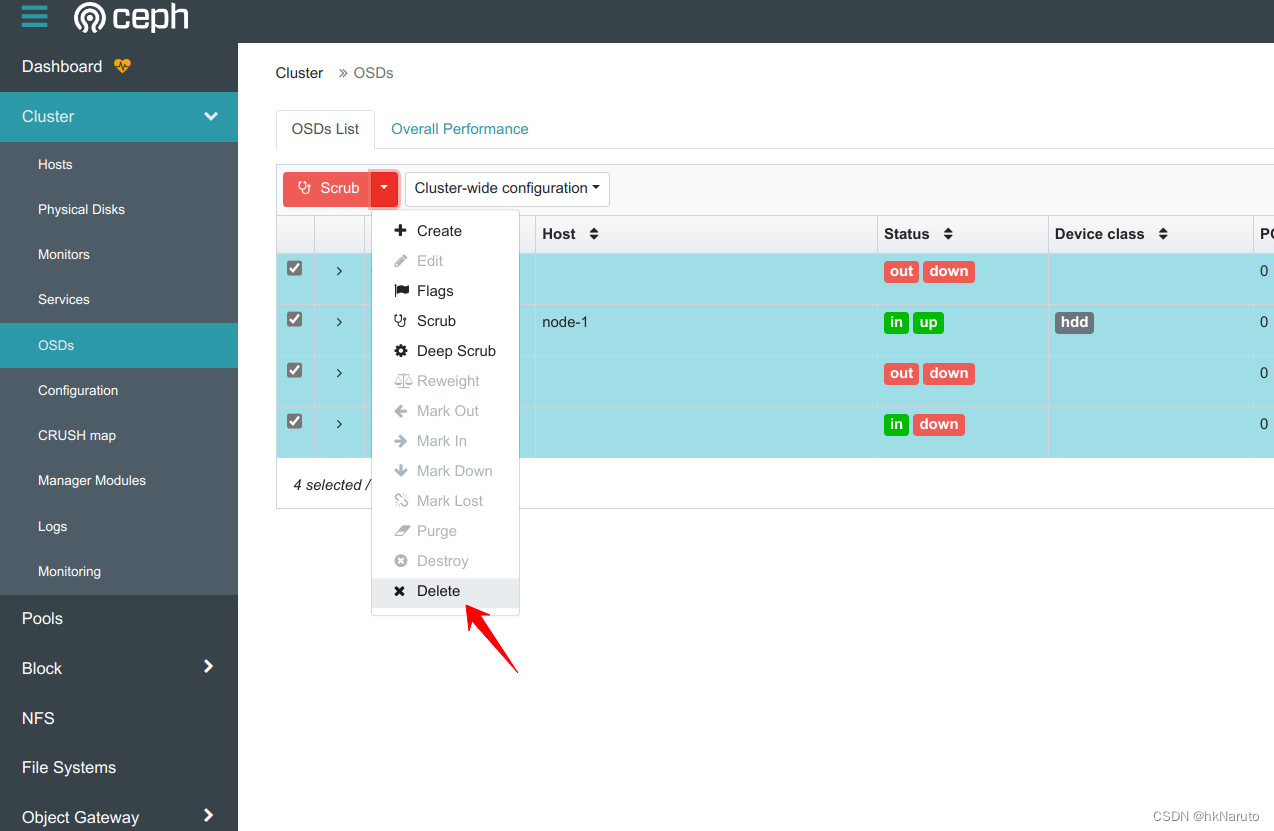
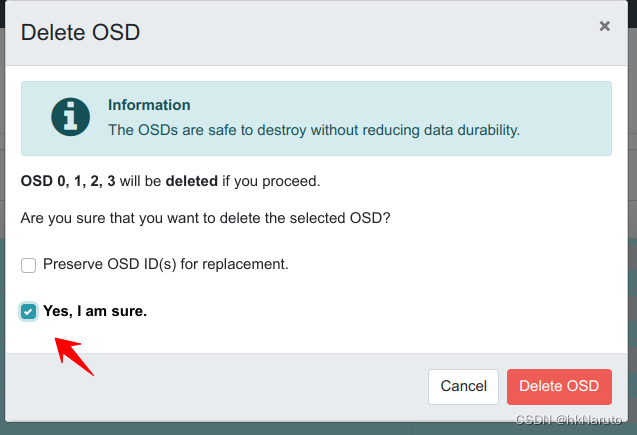
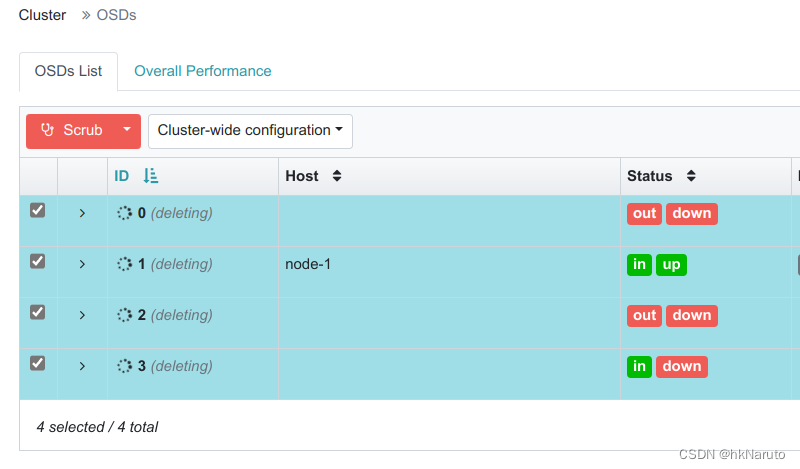
一直处理deleting
深度清理
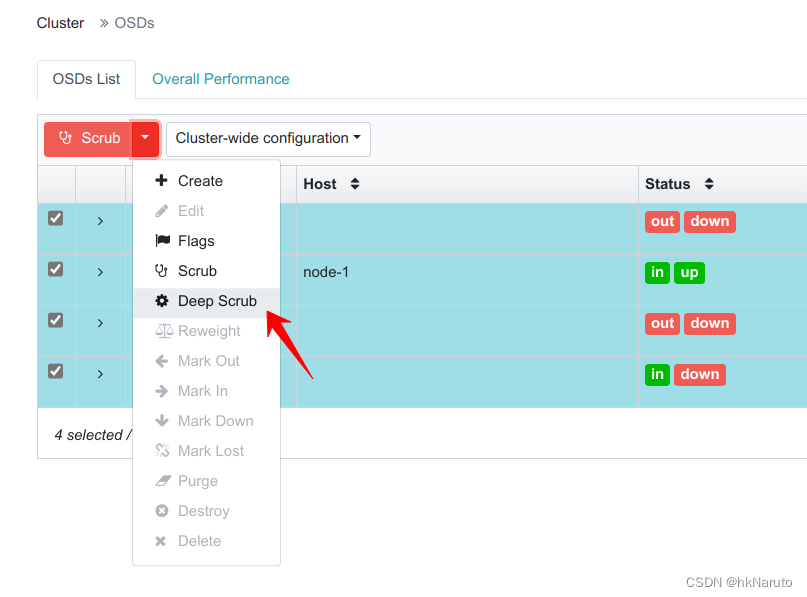
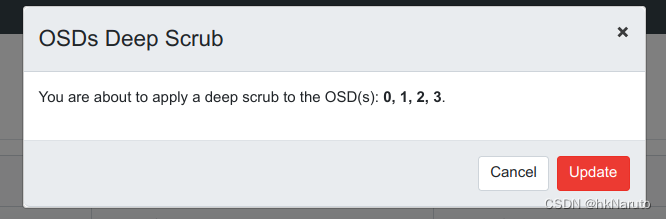
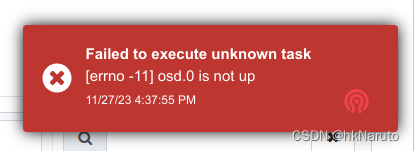
报错
重启
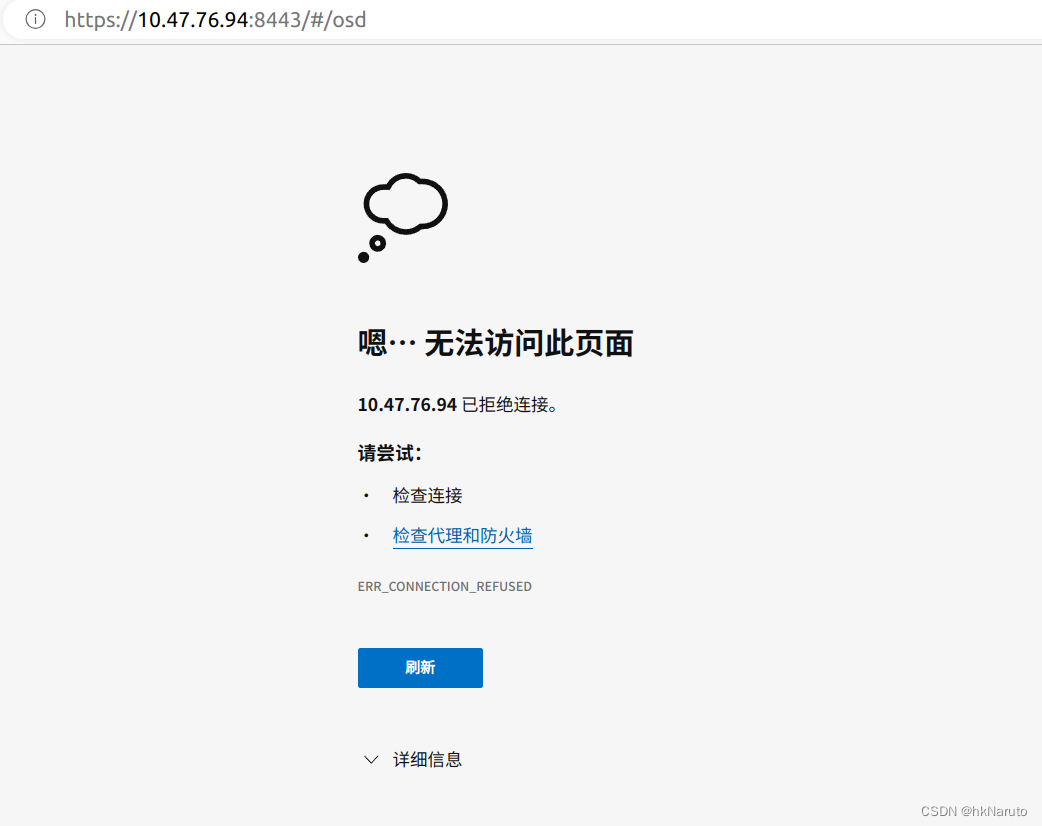
dashboard凉了。。。
手动删除osd
[ceph: root@node-1 /]# ceph osd rm 0
removed osd.0
[ceph: root@node-1 /]# ceph osd rm 1
^CInterrupted
[ceph: root@node-1 /]# ceph osd rm 2
removed osd.2
[ceph: root@node-1 /]# ceph osd rm 3
removed osd.3
[ceph: root@node-1 /]# ceph osd rm 1
Error EBUSY: osd.1 is still up; must be down before removal.
[ceph: root@node-1 /]# ceph osd down 1
marked down osd.1.
[ceph: root@node-1 /]# ceph osd rm 1
removed osd.1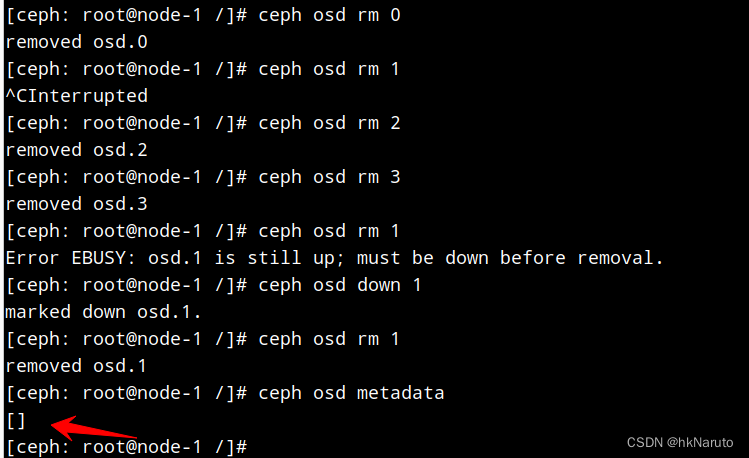
osd服务状态已经显示正常,但是数据盘还有50G,等等看
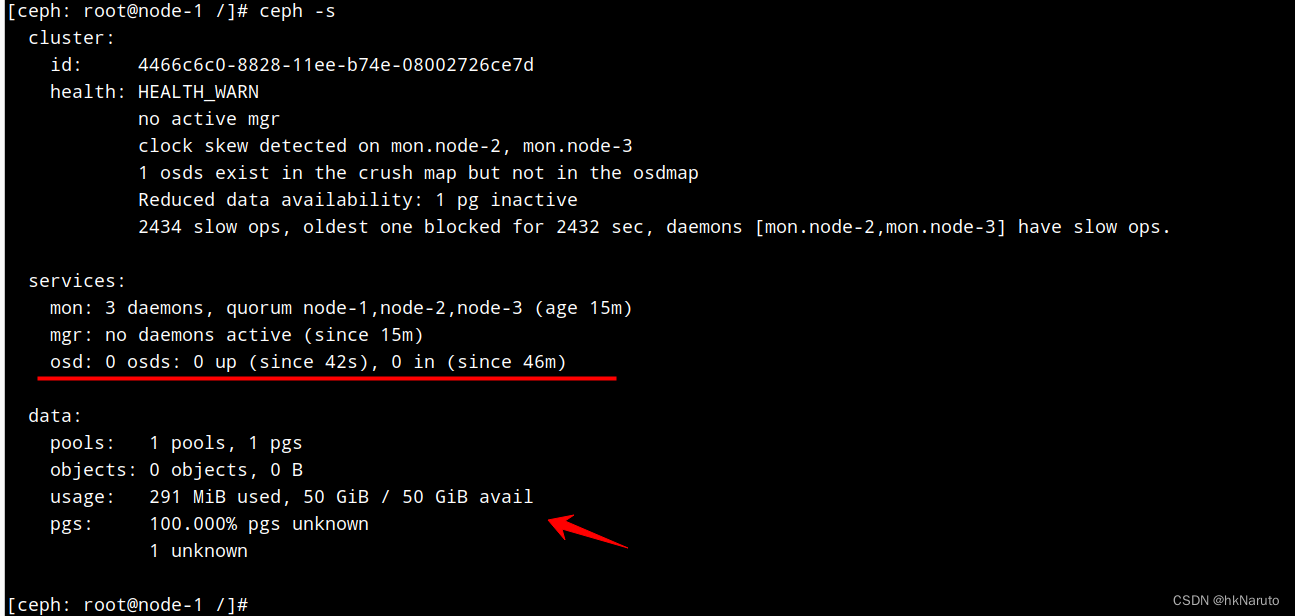
删除osd crush
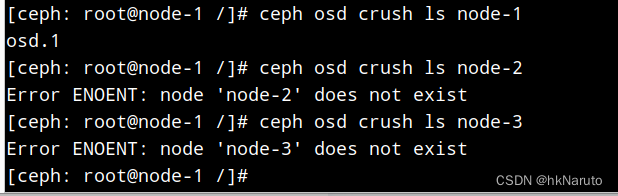
[ceph: root@node-1 /]# ceph osd crush rm osd.1
removed item id 1 name 'osd.1' from crush map
osd purge 卡主
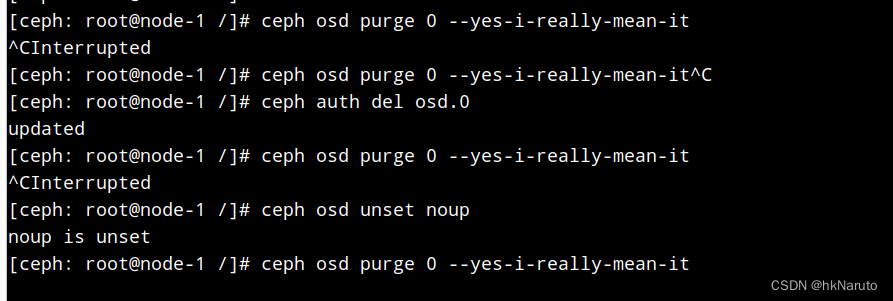
又是一轮重启,继续,当前状态
[ceph: root@node-1 /]# ceph -s
cluster:
id: 4466c6c0-8828-11ee-b74e-08002726ce7d
health: HEALTH_WARN
no active mgr
clock skew detected on mon.node-2, mon.node-3
Reduced data availability: 1 pg inactive
2434 slow ops, oldest one blocked for 2432 sec, daemons [mon.node-2,mon.node-3] have slow ops.
services:
mon: 3 daemons, quorum node-1,node-2,node-3 (age 4m)
mgr: no daemons active (since 23m)
osd: 0 osds: 0 up (since 9m), 0 in (since 55m)
data:
pools: 1 pools, 1 pgs
objects: 0 objects, 0 B
usage: 291 MiB used, 50 GiB / 50 GiB avail
pgs: 100.000% pgs unknown
1 unknown
没明白,osd都是0了,哪里来的50G空间
zap
[ceph: root@node-1 /]# sgdisk --zap-all /dev/sdb
Warning: Partition table header claims that the size of partition table
entries is 0 bytes, but this program supports only 128-byte entries.
Adjusting accordingly, but partition table may be garbage.
Warning: Partition table header claims that the size of partition table
entries is 0 bytes, but this program supports only 128-byte entries.
Adjusting accordingly, but partition table may be garbage.
Creating new GPT entries.
GPT data structures destroyed! You may now partition the disk using fdisk or
other utilities.
dd
[ceph: root@node-1 /]# dd if=/dev/zero of=/dev/sdb bs=1M count=100 oflag=direct,sync
100+0 records in
100+0 records out
104857600 bytes (105 MB, 100 MiB) copied, 0.372352 s, 282 MB/s
dmsetup
[ceph: root@node-1 /]# ls /dev/mapper/ceph-* | xargs -i% -- dmsetup remove %
wipefs
wipefs -af /dev/sdb
状态
[ceph: root@node-1 /]# pvs
PV VG Fmt Attr PSize PFree
/dev/sda2 openeuler lvm2 a-- <49.00g 0
[ceph: root@node-1 /]# lsblk
NAME MAJ:MIN RM SIZE RO TYPE MOUNTPOINT
sda 8:0 0 50G 0 disk
|-sda1 8:1 0 1G 0 part
`-sda2 8:2 0 49G 0 part
|-openeuler-root 253:0 0 44G 0 lvm /var/lib/ceph/crash
`-openeuler-swap 253:1 0 5G 0 lvm [SWAP]
sdb 8:16 0 50G 0 disk
sr0 11:0 1 1024M 0 rom
时间同步(之前没有部署!)
三个节点均执行
[root@node-1 ~]# yum install -y ntpdate
[root@node-1 ~]# ntpdate asia.pool.ntp.org
28 Nov 09:21:34 ntpdate[5809]: step time server 95.216.192.15 offset +56969.173206 sec
[root@node-1 ~]# date
Tue Nov 28 09:22:29 AM CST 2023
时间同步后,data数据正常了!!!
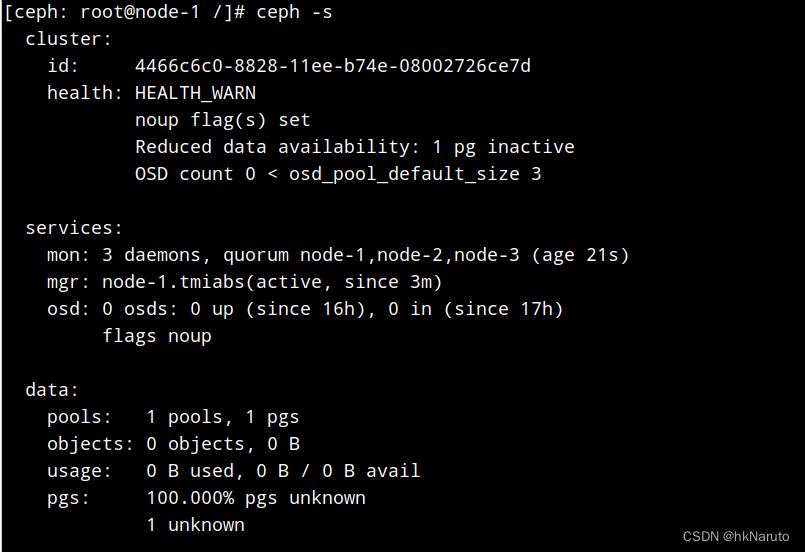
添加osd daemon
删除日志,方便观察
[root@node-1 ~]# rm /var/log/ceph/4466c6c0-8828-11ee-b74e-08002726ce7d/ceph-osd*.log
rm: remove regular file '/var/log/ceph/4466c6c0-8828-11ee-b74e-08002726ce7d/ceph-osd.0.log'? y
rm: remove regular file '/var/log/ceph/4466c6c0-8828-11ee-b74e-08002726ce7d/ceph-osd.1.log'? y
[root@node-1 ~]# rm /var/log/ceph/4466c6c0-8828-11ee-b74e-08002726ce7d/ceph-volume.log
rm: remove regular file '/var/log/ceph/4466c6c0-8828-11ee-b74e-08002726ce7d/ceph-volume.log'? y
[ceph: root@node-1 /]# ceph orch daemon add osd node-1:/dev/sdb
Created no osd(s) on host node-1; already created?
[ceph: root@node-1 osd]# ceph osd tree
ID CLASS WEIGHT TYPE NAME STATUS REWEIGHT PRI-AFF
-1 0 root default
-3 0 host node-1
0 0 osd.0 down 1.00000 1.00000
[ceph: root@node-1 osd]# ceph osd set nodown
nodown is set
[ceph: root@node-1 osd]# ceph osd ls
0
[ceph: root@node-1 osd]# ceph osd tree
ID CLASS WEIGHT TYPE NAME STATUS REWEIGHT PRI-AFF
-1 0 root default
-3 0 host node-1
0 0 osd.0 down 1.00000 1.00000
[ceph: root@node-1 osd]# ceph osd in 0
marked in osd.0.
故障already created
[ceph: root@node-1 osd]# ceph orch daemon add osd node-1:/dev/sdb
Created no osd(s) on host node-1; already created?
没有执行wipefs
故障Unable to create a new OSD id EEXIST: entity osd.2 exists but key does not match
[ceph: root@node-1 ceph]# ceph orch daemon add osd node-1:/dev/sdb
Error EINVAL: Traceback (most recent call last):
File "/usr/share/ceph/mgr/mgr_module.py", line 1447, in _handle_command
return self.handle_command(inbuf, cmd)
File "/usr/share/ceph/mgr/orchestrator/_interface.py", line 171, in handle_command
return dispatch[cmd['prefix']].call(self, cmd, inbuf)
File "/usr/share/ceph/mgr/mgr_module.py", line 414, in call
return self.func(mgr, **kwargs)
File "/usr/share/ceph/mgr/orchestrator/_interface.py", line 107, in <lambda>
wrapper_copy = lambda *l_args, **l_kwargs: wrapper(*l_args, **l_kwargs) # noqa: E731
File "/usr/share/ceph/mgr/orchestrator/_interface.py", line 96, in wrapper
return func(*args, **kwargs)
File "/usr/share/ceph/mgr/orchestrator/module.py", line 841, in _daemon_add_osd
raise_if_exception(completion)
File "/usr/share/ceph/mgr/orchestrator/_interface.py", line 228, in raise_if_exception
raise e
RuntimeError: cephadm exited with an error code: 1, stderr:Inferring config /var/lib/ceph/4466c6c0-8828-11ee-b74e-08002726ce7d/mon.node-1/config
Non-zero exit code 1 from /bin/podman run --rm --ipc=host --stop-signal=SIGTERM --net=host --entrypoint /usr/sbin/ceph-volume --privileged --group-add=disk --init -e CONTAINER_IMAGE=quay.io/ceph/ceph:v16 -e NODE_NAME=node-1 -e CEPH_USE_RANDOM_NONCE=1 -e CEPH_VOLUME_OSDSPEC_AFFINITY=None -e CEPH_VOLUME_SKIP_RESTORECON=yes -e CEPH_VOLUME_DEBUG=1 -v /var/run/ceph/4466c6c0-8828-11ee-b74e-08002726ce7d:/var/run/ceph:z -v /var/log/ceph/4466c6c0-8828-11ee-b74e-08002726ce7d:/var/log/ceph:z -v /var/lib/ceph/4466c6c0-8828-11ee-b74e-08002726ce7d/crash:/var/lib/ceph/crash:z -v /dev:/dev -v /run/udev:/run/udev -v /sys:/sys -v /run/lvm:/run/lvm -v /run/lock/lvm:/run/lock/lvm -v /var/lib/ceph/4466c6c0-8828-11ee-b74e-08002726ce7d/selinux:/sys/fs/selinux:ro -v /:/rootfs -v /etc/hosts:/etc/hosts:ro -v /tmp/ceph-tmpi8w2k9qo:/etc/ceph/ceph.conf:z -v /tmp/ceph-tmp2b0h6fb7:/var/lib/ceph/bootstrap-osd/ceph.keyring:z quay.io/ceph/ceph:v16 lvm batch --no-auto /dev/sdb --yes --no-systemd
/bin/podman: stderr --> passed data devices: 1 physical, 0 LVM
/bin/podman: stderr --> relative data size: 1.0
/bin/podman: stderr Running command: /usr/bin/ceph-authtool --gen-print-key
/bin/podman: stderr Running command: /usr/bin/ceph --cluster ceph --name client.bootstrap-osd --keyring /var/lib/ceph/bootstrap-osd/ceph.keyring -i - osd new c0af7e99-845b-46b1-a1ee-46ec8bf48787
/bin/podman: stderr stderr: Error EEXIST: entity osd.2 exists but key does not match
/bin/podman: stderr Traceback (most recent call last):
/bin/podman: stderr File "/usr/sbin/ceph-volume", line 11, in <module>
/bin/podman: stderr load_entry_point('ceph-volume==1.0.0', 'console_scripts', 'ceph-volume')()
/bin/podman: stderr File "/usr/lib/python3.6/site-packages/ceph_volume/main.py", line 41, in __init__
/bin/podman: stderr self.main(self.argv)
/bin/podman: stderr File "/usr/lib/python3.6/site-packages/ceph_volume/decorators.py", line 59, in newfunc
/bin/podman: stderr return f(*a, **kw)
/bin/podman: stderr File "/usr/lib/python3.6/site-packages/ceph_volume/main.py", line 153, in main
/bin/podman: stderr terminal.dispatch(self.mapper, subcommand_args)
/bin/podman: stderr File "/usr/lib/python3.6/site-packages/ceph_volume/terminal.py", line 194, in dispatch
/bin/podman: stderr instance.main()
/bin/podman: stderr File "/usr/lib/python3.6/site-packages/ceph_volume/devices/lvm/main.py", line 46, in main
/bin/podman: stderr terminal.dispatch(self.mapper, self.argv)
/bin/podman: stderr File "/usr/lib/python3.6/site-packages/ceph_volume/terminal.py", line 194, in dispatch
/bin/podman: stderr instance.main()
/bin/podman: stderr File "/usr/lib/python3.6/site-packages/ceph_volume/decorators.py", line 16, in is_root
/bin/podman: stderr return func(*a, **kw)
/bin/podman: stderr File "/usr/lib/python3.6/site-packages/ceph_volume/devices/lvm/batch.py", line 444, in main
/bin/podman: stderr self._execute(plan)
/bin/podman: stderr File "/usr/lib/python3.6/site-packages/ceph_volume/devices/lvm/batch.py", line 463, in _execute
/bin/podman: stderr c.create(argparse.Namespace(**args))
/bin/podman: stderr File "/usr/lib/python3.6/site-packages/ceph_volume/decorators.py", line 16, in is_root
/bin/podman: stderr return func(*a, **kw)
/bin/podman: stderr File "/usr/lib/python3.6/site-packages/ceph_volume/devices/lvm/create.py", line 26, in create
/bin/podman: stderr prepare_step.safe_prepare(args)
/bin/podman: stderr File "/usr/lib/python3.6/site-packages/ceph_volume/devices/lvm/prepare.py", line 240, in safe_prepare
/bin/podman: stderr self.prepare()
/bin/podman: stderr File "/usr/lib/python3.6/site-packages/ceph_volume/decorators.py", line 16, in is_root
/bin/podman: stderr return func(*a, **kw)
/bin/podman: stderr File "/usr/lib/python3.6/site-packages/ceph_volume/devices/lvm/prepare.py", line 280, in prepare
/bin/podman: stderr self.osd_id = prepare_utils.create_id(osd_fsid, json.dumps(secrets), osd_id=self.args.osd_id)
/bin/podman: stderr File "/usr/lib/python3.6/site-packages/ceph_volume/util/prepare.py", line 176, in create_id
/bin/podman: stderr raise RuntimeError('Unable to create a new OSD id')
/bin/podman: stderr RuntimeError: Unable to create a new OSD id
Traceback (most recent call last):
File "/var/lib/ceph/4466c6c0-8828-11ee-b74e-08002726ce7d/cephadm.f6868821c084cd9740b59c7c5eb59f0dd47f6e3b1e6fecb542cb44134ace8d78", line 9397, in <module>
main()
File "/var/lib/ceph/4466c6c0-8828-11ee-b74e-08002726ce7d/cephadm.f6868821c084cd9740b59c7c5eb59f0dd47f6e3b1e6fecb542cb44134ace8d78", line 9385, in main
r = ctx.func(ctx)
File "/var/lib/ceph/4466c6c0-8828-11ee-b74e-08002726ce7d/cephadm.f6868821c084cd9740b59c7c5eb59f0dd47f6e3b1e6fecb542cb44134ace8d78", line 1950, in _infer_config
return func(ctx)
File "/var/lib/ceph/4466c6c0-8828-11ee-b74e-08002726ce7d/cephadm.f6868821c084cd9740b59c7c5eb59f0dd47f6e3b1e6fecb542cb44134ace8d78", line 1881, in _infer_fsid
return func(ctx)
File "/var/lib/ceph/4466c6c0-8828-11ee-b74e-08002726ce7d/cephadm.f6868821c084cd9740b59c7c5eb59f0dd47f6e3b1e6fecb542cb44134ace8d78", line 1978, in _infer_image
return func(ctx)
File "/var/lib/ceph/4466c6c0-8828-11ee-b74e-08002726ce7d/cephadm.f6868821c084cd9740b59c7c5eb59f0dd47f6e3b1e6fecb542cb44134ace8d78", line 1868, in _validate_fsid
return func(ctx)
File "/var/lib/ceph/4466c6c0-8828-11ee-b74e-08002726ce7d/cephadm.f6868821c084cd9740b59c7c5eb59f0dd47f6e3b1e6fecb542cb44134ace8d78", line 5454, in command_ceph_volume
out, err, code = call_throws(ctx, c.run_cmd())
File "/var/lib/ceph/4466c6c0-8828-11ee-b74e-08002726ce7d/cephadm.f6868821c084cd9740b59c7c5eb59f0dd47f6e3b1e6fecb542cb44134ace8d78", line 1661, in call_throws
raise RuntimeError('Failed command: %s' % ' '.join(command))
RuntimeError: Failed command: /bin/podman run --rm --ipc=host --stop-signal=SIGTERM --net=host --entrypoint /usr/sbin/ceph-volume --privileged --group-add=disk --init -e CONTAINER_IMAGE=quay.io/ceph/ceph:v16 -e NODE_NAME=node-1 -e CEPH_USE_RANDOM_NONCE=1 -e CEPH_VOLUME_OSDSPEC_AFFINITY=None -e CEPH_VOLUME_SKIP_RESTORECON=yes -e CEPH_VOLUME_DEBUG=1 -v /var/run/ceph/4466c6c0-8828-11ee-b74e-08002726ce7d:/var/run/ceph:z -v /var/log/ceph/4466c6c0-8828-11ee-b74e-08002726ce7d:/var/log/ceph:z -v /var/lib/ceph/4466c6c0-8828-11ee-b74e-08002726ce7d/crash:/var/lib/ceph/crash:z -v /dev:/dev -v /run/udev:/run/udev -v /sys:/sys -v /run/lvm:/run/lvm -v /run/lock/lvm:/run/lock/lvm -v /var/lib/ceph/4466c6c0-8828-11ee-b74e-08002726ce7d/selinux:/sys/fs/selinux:ro -v /:/rootfs -v /etc/hosts:/etc/hosts:ro -v /tmp/ceph-tmpi8w2k9qo:/etc/ceph/ceph.conf:z -v /tmp/ceph-tmp2b0h6fb7:/var/lib/ceph/bootstrap-osd/ceph.keyring:z quay.io/ceph/ceph:v16 lvm batch --no-auto /dev/sdb --yes --no-systemd
[ceph: root@node-1 ceph]#
再次重试
ceph osd out 0
ceph osd crush remove osd.0
ceph auth del osd.0
ceph osd rm 0


# umount /var/lib/ceph/osd/ceph-0
dmsetup remove_all

wipefs -af /dev/sdb
ceph-volume lvm zap /dev/sdb --destroy


lsblk -f

ceph -s

ceph orch daemon add osd node-1:/dev/sdb
仍然报错already created?
分析osd.py源码
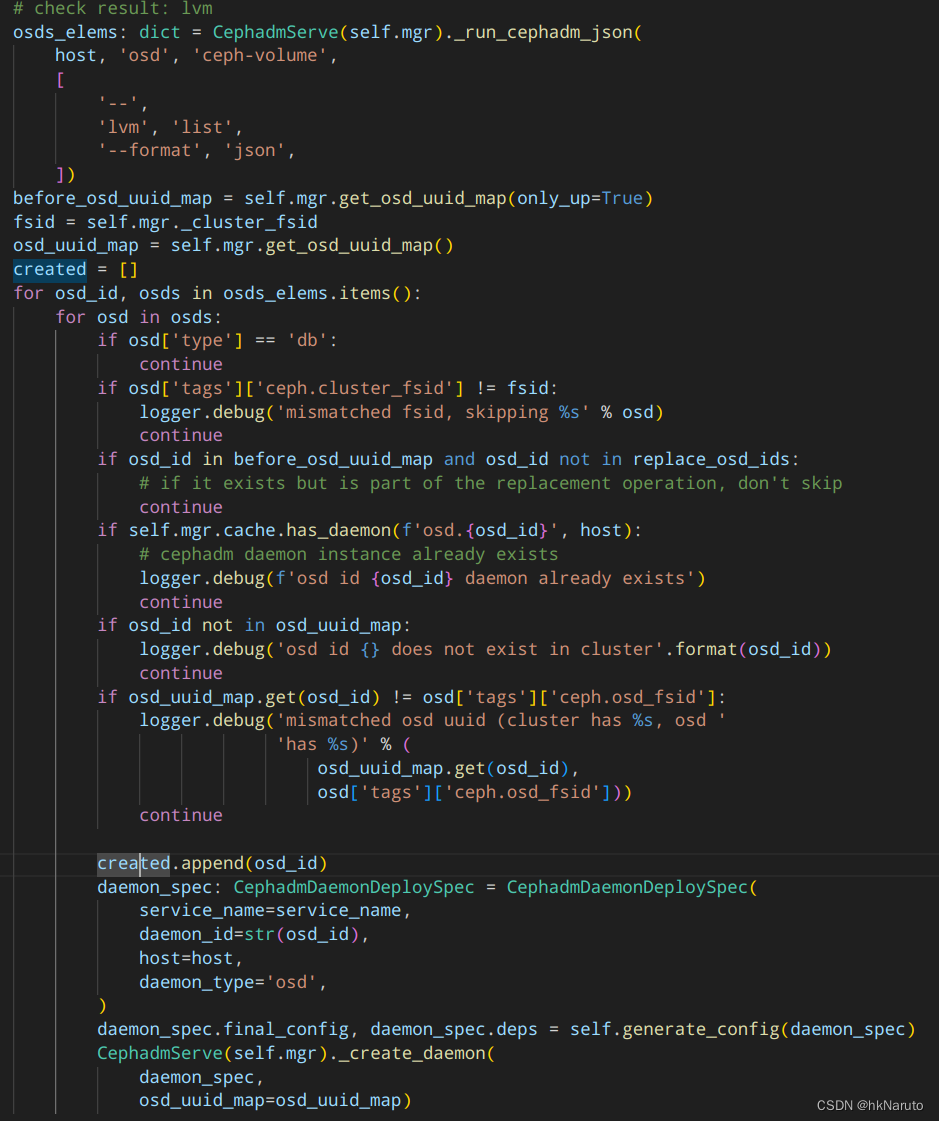
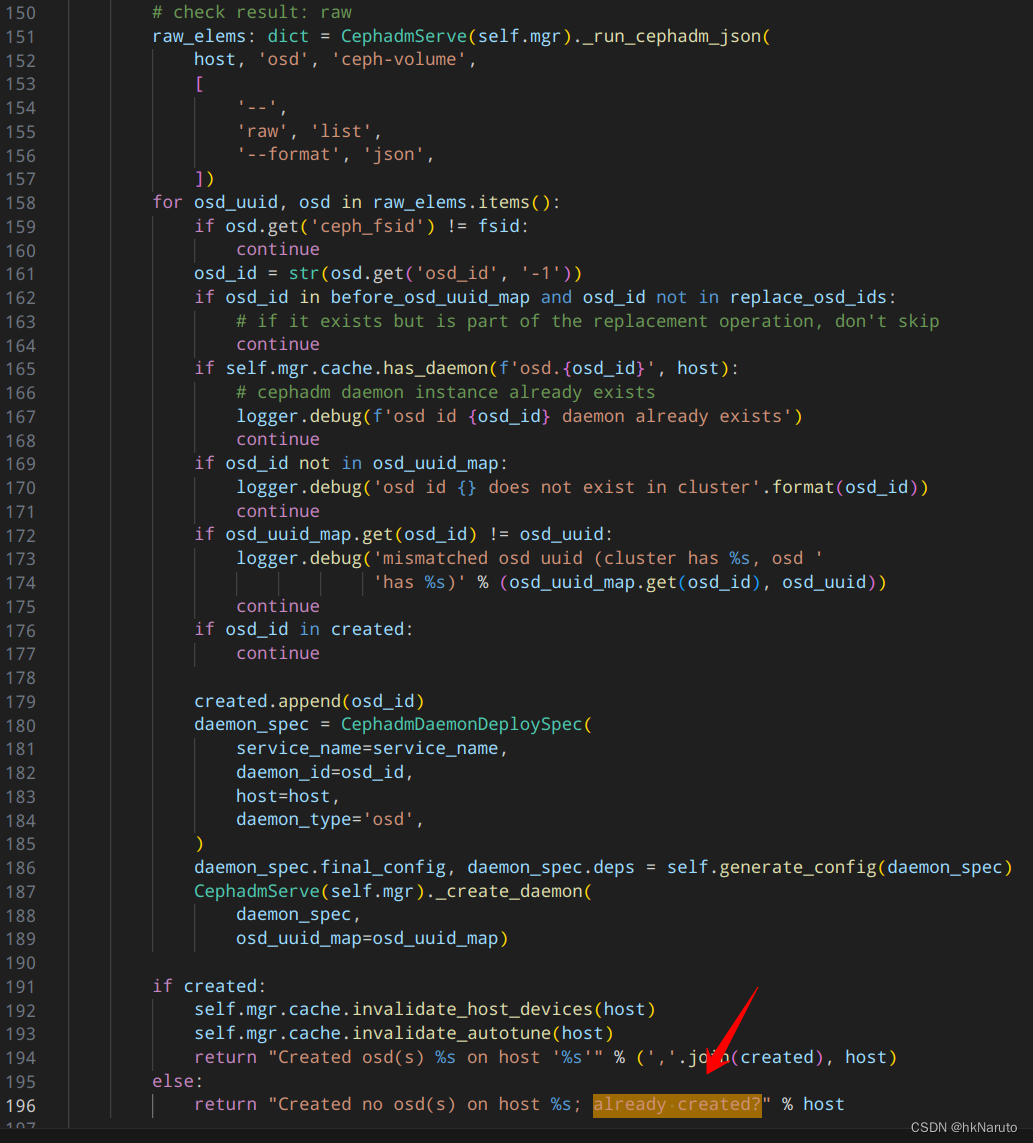
[ceph: root@node-1 /]# ceph-volume lvm list --format json
{
"0": [
{
"devices": [
"/dev/sdb"
],
"lv_name": "osd-block-9776080f-92f5-460f-a15a-e59e084733ef",
"lv_path": "/dev/ceph-23879db6-822b-428f-ad8a-03117b2c75cc/osd-block-9776080f-92f5-460f-a15a-e59e084733ef",
"lv_size": "53682896896",
"lv_tags": "ceph.block_device=/dev/ceph-23879db6-822b-428f-ad8a-03117b2c75cc/osd-block-9776080f-92f5-460f-a15a-e59e084733ef,ceph.block_uuid=vef8ur-nppY-XCol-tbme-nD0g-Kl2u-A2rnol,ceph.cephx_lockbox_secret=,ceph.cluster_fsid=4466c6c0-8828-11ee-b74e-08002726ce7d,ceph.cluster_name=ceph,ceph.crush_device_class=,ceph.encrypted=0,ceph.osd_fsid=9776080f-92f5-460f-a15a-e59e084733ef,ceph.osd_id=0,ceph.osdspec_affinity=None,ceph.type=block,ceph.vdo=0",
"lv_uuid": "vef8ur-nppY-XCol-tbme-nD0g-Kl2u-A2rnol",
"name": "osd-block-9776080f-92f5-460f-a15a-e59e084733ef",
"path": "/dev/ceph-23879db6-822b-428f-ad8a-03117b2c75cc/osd-block-9776080f-92f5-460f-a15a-e59e084733ef",
"tags": {
"ceph.block_device": "/dev/ceph-23879db6-822b-428f-ad8a-03117b2c75cc/osd-block-9776080f-92f5-460f-a15a-e59e084733ef",
"ceph.block_uuid": "vef8ur-nppY-XCol-tbme-nD0g-Kl2u-A2rnol",
"ceph.cephx_lockbox_secret": "",
"ceph.cluster_fsid": "4466c6c0-8828-11ee-b74e-08002726ce7d",
"ceph.cluster_name": "ceph",
"ceph.crush_device_class": "",
"ceph.encrypted": "0",
"ceph.osd_fsid": "9776080f-92f5-460f-a15a-e59e084733ef",
"ceph.osd_id": "0",
"ceph.osdspec_affinity": "None",
"ceph.type": "block",
"ceph.vdo": "0"
},
"type": "block",
"vg_name": "ceph-23879db6-822b-428f-ad8a-03117b2c75cc"
}
]
}
[ceph: root@node-1 /]# ceph-volume raw list --format json
{
"9776080f-92f5-460f-a15a-e59e084733ef": {
"ceph_fsid": "4466c6c0-8828-11ee-b74e-08002726ce7d",
"device": "/dev/mapper/ceph--23879db6--822b--428f--ad8a--03117b2c75cc-osd--block--9776080f--92f5--460f--a15a--e59e084733ef",
"osd_id": 0,
"osd_uuid": "9776080f-92f5-460f-a15a-e59e084733ef",
"type": "bluestore"
}
}
[ceph: root@node-1 /]# cat /etc/ceph/ceph.conf
# minimal ceph.conf for 4466c6c0-8828-11ee-b74e-08002726ce7d
[global]
fsid = 4466c6c0-8828-11ee-b74e-08002726ce7d
mon_host = [v2:10.47.76.94:3300/0,v1:10.47.76.94:6789/0]
分析lvm list
type=block 通过
tags.ceph.cluster_fsid 4466c6c0-8828-11ee-b74e-08002726ce7d == 4466c6c0-8828-11ee-b74e-08002726ce7d 通过
before_osd_uuid_map
最大的嫌疑!


清理数据再查
ceph osd out 0
ceph osd crush remove osd.0
ceph auth del osd.0
ceph osd rm 0


# umount /var/lib/ceph/osd/ceph-0
dmsetup remove_all

wipefs -af /dev/sdb
ceph-volume lvm zap /dev/sdb --destroy
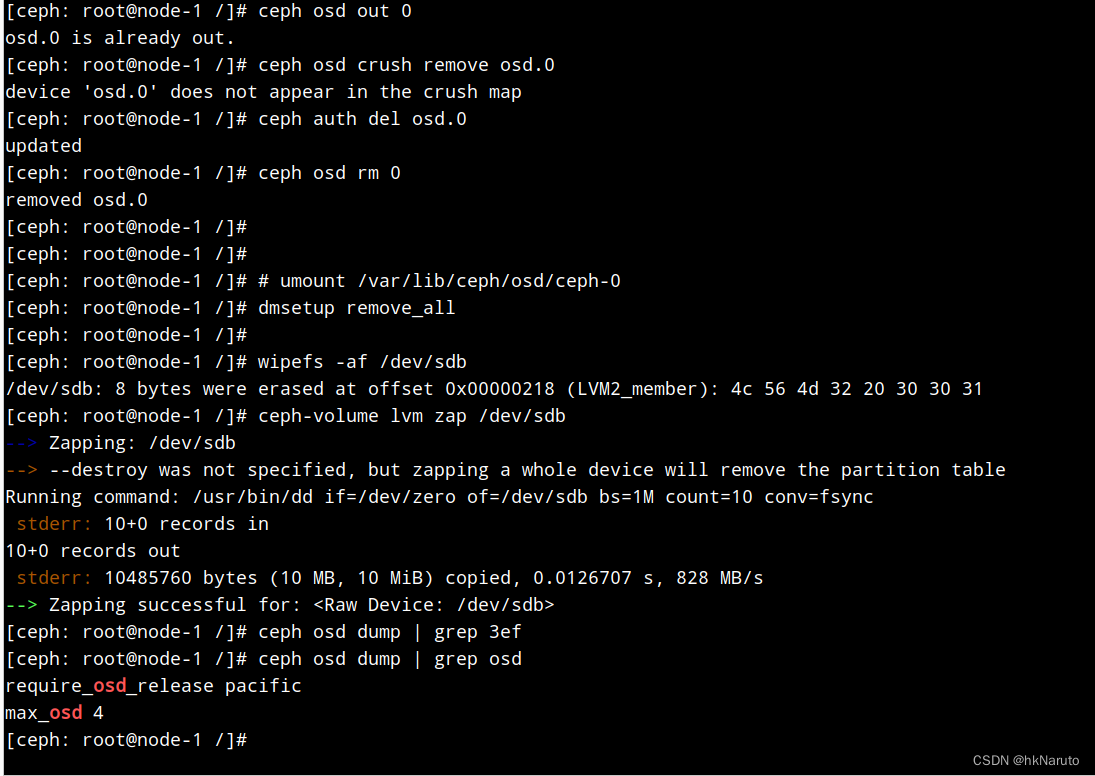
删除后,查不到对应uuid,说明不是这个问题。
没找到开启mgr日志方法,放弃!
重新bootstrap!!!
[root@node-1 ~]# cephadm bootstrap --mon-ip 10.47.76.94 --skip-pull
Creating directory /etc/ceph for ceph.conf
Verifying podman|docker is present...
Verifying lvm2 is present...
Verifying time synchronization is in place...
Unit chronyd.service is enabled and running
Repeating the final host check...
podman (/usr/bin/podman) version 3.4.4 is present
systemctl is present
lvcreate is present
Unit chronyd.service is enabled and running
Host looks OK
Cluster fsid: 70053a2a-8dcb-11ee-9649-08002726ce7d
Verifying IP 10.47.76.94 port 3300 ...
Verifying IP 10.47.76.94 port 6789 ...
Mon IP `10.47.76.94` is in CIDR network `10.47.76.0/24`
- internal network (--cluster-network) has not been provided, OSD replication will default to the public_network
Ceph version: ceph version 16.2.14 (238ba602515df21ea7ffc75c88db29f9e5ef12c9) pacific (stable)
Extracting ceph user uid/gid from container image...
Creating initial keys...
Creating initial monmap...
Creating mon...
Waiting for mon to start...
Waiting for mon...
mon is available
Assimilating anything we can from ceph.conf...
Generating new minimal ceph.conf...
Restarting the monitor...
Setting mon public_network to 10.47.76.0/24
Wrote config to /etc/ceph/ceph.conf
Wrote keyring to /etc/ceph/ceph.client.admin.keyring
Creating mgr...
Verifying port 9283 ...
Waiting for mgr to start...
Waiting for mgr...
mgr not available, waiting (1/15)...
mgr not available, waiting (2/15)...
mgr not available, waiting (3/15)...
mgr is available
Enabling cephadm module...
Waiting for the mgr to restart...
Waiting for mgr epoch 5...
mgr epoch 5 is available
Setting orchestrator backend to cephadm...
Generating ssh key...
Wrote public SSH key to /etc/ceph/ceph.pub
Adding key to root@localhost authorized_keys...
Adding host node-1...
Deploying mon service with default placement...
Deploying mgr service with default placement...
Deploying crash service with default placement...
Deploying prometheus service with default placement...
Deploying grafana service with default placement...
Deploying node-exporter service with default placement...
Deploying alertmanager service with default placement...
Enabling the dashboard module...
Waiting for the mgr to restart...
Waiting for mgr epoch 9...
mgr epoch 9 is available
Generating a dashboard self-signed certificate...
Creating initial admin user...
Fetching dashboard port number...
Ceph Dashboard is now available at:
URL: https://node-1:8443/
User: admin
Password: ygc2lav8sa
Enabling client.admin keyring and conf on hosts with "admin" label
You can access the Ceph CLI with:
sudo /usr/sbin/cephadm shell --fsid 70053a2a-8dcb-11ee-9649-08002726ce7d -c /etc/ceph/ceph.conf -k /etc/ceph/ceph.client.admin.keyring
Please consider enabling telemetry to help improve Ceph:
ceph telemetry on
For more information see:
https://docs.ceph.com/docs/pacific/mgr/telemetry/
Bootstrap complete.
[root@node-1 ~]# cephadm shell ceph -s
Inferring fsid 70053a2a-8dcb-11ee-9649-08002726ce7d
Using recent ceph image quay.io/ceph/ceph@sha256:c00e089064cc7afd4db454ac645cc4d760f2eae86eb73655124abde9bb9058fb
cluster:
id: 70053a2a-8dcb-11ee-9649-08002726ce7d
health: HEALTH_WARN
OSD count 0 < osd_pool_default_size 3
services:
mon: 1 daemons, quorum node-1 (age 98s)
mgr: node-1.hrckfr(active, since 67s)
osd: 0 osds: 0 up, 0 in
data:
pools: 0 pools, 0 pgs
objects: 0 objects, 0 B
usage: 0 B used, 0 B / 0 B avail
pgs:
[ceph: root@node-1 /]# ceph orch host ls
HOST ADDR LABELS STATUS
node-1 10.47.76.94 _admin
1 hosts in cluster
[ceph: root@node-1 /]# ceph orch host add node-2 10.47.76.95 --labels _admin
Error EINVAL: Failed to connect to node-2 (10.47.76.95).
Please make sure that the host is reachable and accepts connections using the cephadm SSH key
To add the cephadm SSH key to the host:
> ceph cephadm get-pub-key > ~/ceph.pub
> ssh-copy-id -f -i ~/ceph.pub root@10.47.76.95
To check that the host is reachable open a new shell with the --no-hosts flag:
> cephadm shell --no-hosts
Then run the following:
> ceph cephadm get-ssh-config > ssh_config
> ceph config-key get mgr/cephadm/ssh_identity_key > ~/cephadm_private_key
> chmod 0600 ~/cephadm_private_key
> ssh -F ssh_config -i ~/cephadm_private_key root@10.47.76.95
[ceph: root@node-1 /]# cd ~
[ceph: root@node-1 ~]# ceph cephadm get-ssh-config > ssh_config
[ceph: root@node-1 ~]# ceph config-key get mgr/cephadm/ssh_identity_key > ~/cephadm_private_key
[ceph: root@node-1 ~]# chmod 0600 ~/cephadm_private_key
[ceph: root@node-1 ~]# ssh -F ssh_config -i ~/cephadm_private_key root@10.47.76.95
Warning: Permanently added '10.47.76.95' (ECDSA) to the list of known hosts.
Authorized users only. All activities may be monitored and reported.
root@10.47.76.95's password:
Authorized users only. All activities may be monitored and reported.
Last failed login: Tue Nov 28 16:55:21 CST 2023 from 10.47.76.94 on ssh:notty
There were 2 failed login attempts since the last successful login.
Last login: Tue Nov 28 16:47:22 2023 from 10.47.76.67
Welcome to 5.10.0-60.18.0.50.oe2203.x86_64
System information as of time: Tue Nov 28 04:56:21 PM CST 2023
System load: 0.00
Processes: 110
Memory used: 2.4%
Swap used: 0%
Usage On: 15%
IP address: 10.47.76.95
Users online: 2
[root@node-2 ~]# logout
Connection to 10.47.76.95 closed.
[ceph: root@node-1 ~]# ssh -F ssh_config -i ~/cephadm_private_key root@10.47.76.95
Warning: Permanently added '10.47.76.95' (ECDSA) to the list of known hosts.
Authorized users only. All activities may be monitored and reported.
root@10.47.76.95's password:
[ceph: root@node-1 ~]# ceph cephadm get-pub-key > ~/ceph.pub
[ceph: root@node-1 ~]# ssh-copy-id -f -i ~/ceph.pub root@10.47.76.95
/usr/bin/ssh-copy-id: INFO: Source of key(s) to be installed: "/root/ceph.pub"
The authenticity of host '10.47.76.95 (10.47.76.95)' can't be established.
ECDSA key fingerprint is SHA256:yL4NzrhizHt0f/4uM9bqSTP3VsXU7mn+HFRJ7BglXeQ.
Are you sure you want to continue connecting (yes/no/[fingerprint])? yes
Authorized users only. All activities may be monitored and reported.
root@10.47.76.95's password:
Number of key(s) added: 1
Now try logging into the machine, with: "ssh 'root@10.47.76.95'"
and check to make sure that only the key(s) you wanted were added.
[ceph: root@node-1 ~]# ssh -F ssh_config -i ~/cephadm_private_key root@10.47.76.95
Warning: Permanently added '10.47.76.95' (ECDSA) to the list of known hosts.
Authorized users only. All activities may be monitored and reported.
Authorized users only. All activities may be monitored and reported.
Last login: Tue Nov 28 16:56:21 2023 from 10.47.76.94
Welcome to 5.10.0-60.18.0.50.oe2203.x86_64
System information as of time: Tue Nov 28 04:57:12 PM CST 2023
System load: 0.00
Processes: 113
Memory used: 2.4%
Swap used: 0%
Usage On: 15%
IP address: 10.47.76.95
Users online: 2
[root@node-2 ~]# logout
Connection to 10.47.76.95 closed.
[ceph: root@node-1 ~]# ssh-copy-id -f -i ~/ceph.pub root@10.47.76.96
/usr/bin/ssh-copy-id: INFO: Source of key(s) to be installed: "/root/ceph.pub"
The authenticity of host '10.47.76.96 (10.47.76.96)' can't be established.
ECDSA key fingerprint is SHA256:yL4NzrhizHt0f/4uM9bqSTP3VsXU7mn+HFRJ7BglXeQ.
Are you sure you want to continue connecting (yes/no/[fingerprint])? yes
Authorized users only. All activities may be monitored and reported.
root@10.47.76.96's password:
Number of key(s) added: 1
Now try logging into the machine, with: "ssh 'root@10.47.76.96'"
and check to make sure that only the key(s) you wanted were added.
[ceph: root@node-1 ~]# ceph orch host add node-3 10.47.76.96 --labels _admin
Added host 'node-3' with addr '10.47.76.96'
[ceph: root@node-1 /]# ceph -s
cluster:
id: 70053a2a-8dcb-11ee-9649-08002726ce7d
health: HEALTH_WARN
OSD count 0 < osd_pool_default_size 3
services:
mon: 1 daemons, quorum node-1 (age 14m)
mgr: node-1.hrckfr(active, since 13m)
osd: 0 osds: 0 up, 0 in
data:
pools: 0 pools, 0 pgs
objects: 0 objects, 0 B
usage: 0 B used, 0 B / 0 B avail
pgs:
[ceph: root@node-1 /]# ceph orch host ls
HOST ADDR LABELS STATUS
node-1 10.47.76.94 _admin
node-2 10.47.76.95 _admin
node-3 10.47.76.96 _admin
3 hosts in cluster
[ceph: root@node-1 /]# ceph orch daemon add mon node-2:10.47.76.95
Deployed mon.node-2 on host 'node-2'
[ceph: root@node-1 /]# ceph orch daemon add mon node-3:10.47.76.96
Deployed mon.node-3 on host 'node-3'
[ceph: root@node-1 /]# ceph -s
cluster:
id: 70053a2a-8dcb-11ee-9649-08002726ce7d
health: HEALTH_WARN
OSD count 0 < osd_pool_default_size 3
services:
mon: 3 daemons, quorum node-1,node-2,node-3 (age 10s)
mgr: node-1.hrckfr(active, since 15h)
osd: 0 osds: 0 up, 0 in
data:
pools: 0 pools, 0 pgs
objects: 0 objects, 0 B
usage: 0 B used, 0 B / 0 B avail
pgs:
正面分析为什么device ls没有数据
[ceph: root@node-1 /]# ceph orch device ls
[ceph: root@node-1 /]#
[ceph: root@node-1 /]# lsmcli ldl
Path | SCSI VPD 0x83 | Link Type | Serial Number | Health Status
--------------------------------------------------------------------------
/dev/sda | | PATA/SATA | VB6e15fee0-b6edd184 | Unknown
/dev/sdb | | PATA/SATA | VBfa988fe4-ea372ddc | Unknown
重启bootstrap 把日志写到文件
[root@node-1 ~]# systemctl start ntpd
[root@node-1 ~]# cephadm bootstrap --mon-ip 10.47.76.94 --skip-pull --log-to-file --allow-overwrite
[root@node-1 ~]# cephadm bootstrap --mon-ip 10.47.76.94 --skip-pull --log-to-file --allow-overwrite
Verifying podman|docker is present...
Verifying lvm2 is present...
Verifying time synchronization is in place...
No time sync service is running; checked for ['chrony.service', 'chronyd.service', 'systemd-timesyncd.service', 'ntpd.service', 'ntp.service', 'ntpsec.service', 'openntpd.service']
ERROR: Distro openeuler version 22.03 not supported
/usr/sbin/cephadm:6169行添加一行配置
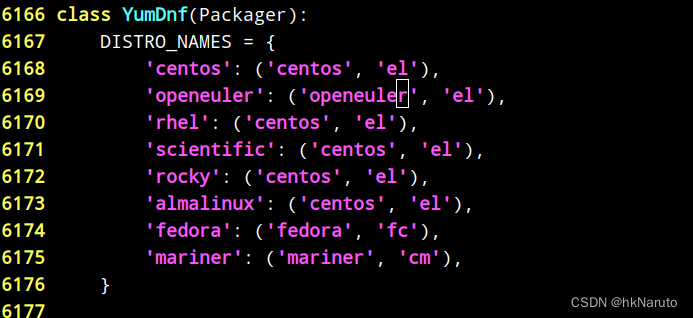
[root@node-1 ~]# cephadm bootstrap --mon-ip 10.47.76.94 --skip-pull --log-to-file --allow-overwrite
Verifying podman|docker is present...
Verifying lvm2 is present...
Verifying time synchronization is in place...
No time sync service is running; checked for ['chrony.service', 'chronyd.service', 'systemd-timesyncd.service', 'ntpd.service', 'ntp.service', 'ntpsec.service', 'openntpd.service']
Installing packages ['chrony']...
Enabling unit chronyd.service
Enabling unit ntpd.service
No time sync service is running; checked for ['chrony.service', 'chronyd.service', 'systemd-timesyncd.service', 'ntpd.service', 'ntp.service', 'ntpsec.service', 'openntpd.service']
Repeating the final host check...
podman (/usr/bin/podman) version 3.4.4 is present
systemctl is present
lvcreate is present
Unit ntpd.service is enabled and running
Host looks OK
Cluster fsid: 13ddd7de-8e57-11ee-b57e-08002726ce7d
Verifying IP 10.47.76.94 port 3300 ...
Cannot bind to IP 10.47.76.94 port 3300: [Errno 98] Address already in use
ERROR: Cannot bind to IP 10.47.76.94 port 3300: [Errno 98] Address already in use
重新部署
这玩意,不能直接覆盖配置?!,又得部署一个新的
[root@node-1 ~]# podman ps | grep -v CONTAINER | awk '{print $1}' | xargs podman rm -f
3f2b9dd44f75a8280b9c31125249b2d0c4d7072042001a98b86c39512eb46a6e
15892f7dbd867e45a3b053f2564afcb199209283a1aec949092b2acaa86a7d9f
[root@node-1 ~]# rm /etc/ceph/ -rf
[root@node-1 ~]# rm /var/lib/ceph -rf
[root@node-1 ~]# rm /var/log/ceph/ -rf
[root@node-1 ~]# systemctl restart podman
[root@node-1 ~]# podman ps
CONTAINER ID IMAGE COMMAND CREATED STATUS PORTS NAMES
[root@node-1 ~]#
node 2 3 依次执行
podman ps | grep -v regi | awk '{print $1}' | xargs -i podman rm -f {}

rm /etc/ceph/ -rf
rm /var/lib/ceph -rf
rm /var/log/ceph/ -rf

systemctl restart podman
[root@node-1 ~]# cephadm bootstrap --mon-ip 10.47.76.94 --skip-pull --log-to-file
Creating directory /etc/ceph for ceph.conf
Verifying podman|docker is present...
Verifying lvm2 is present...
Verifying time synchronization is in place...
Unit ntpd.service is enabled and running
Repeating the final host check...
podman (/usr/bin/podman) version 3.4.4 is present
systemctl is present
lvcreate is present
Unit ntpd.service is enabled and running
Host looks OK
Cluster fsid: f7cf9d4c-8e57-11ee-8a45-08002726ce7d
Verifying IP 10.47.76.94 port 3300 ...
Verifying IP 10.47.76.94 port 6789 ...
Mon IP `10.47.76.94` is in CIDR network `10.47.76.0/24`
- internal network (--cluster-network) has not been provided, OSD replication will default to the public_network
Ceph version: ceph version 16.2.14 (238ba602515df21ea7ffc75c88db29f9e5ef12c9) pacific (stable)
Extracting ceph user uid/gid from container image...
Creating initial keys...
Creating initial monmap...
Creating mon...
Waiting for mon to start...
Waiting for mon...
mon is available
Assimilating anything we can from ceph.conf...
Generating new minimal ceph.conf...
Restarting the monitor...
Setting mon public_network to 10.47.76.0/24
Wrote config to /etc/ceph/ceph.conf
Wrote keyring to /etc/ceph/ceph.client.admin.keyring
Creating mgr...
Verifying port 9283 ...
Waiting for mgr to start...
Waiting for mgr...
mgr not available, waiting (1/15)...
mgr not available, waiting (2/15)...
mgr is available
Enabling cephadm module...
Waiting for the mgr to restart...
Waiting for mgr epoch 4...
mgr epoch 4 is available
Setting orchestrator backend to cephadm...
Generating ssh key...
Wrote public SSH key to /etc/ceph/ceph.pub
Adding key to root@localhost authorized_keys...
Adding host node-1...
Deploying mon service with default placement...
Deploying mgr service with default placement...
Deploying crash service with default placement...
Deploying prometheus service with default placement...
Deploying grafana service with default placement...
Deploying node-exporter service with default placement...
Deploying alertmanager service with default placement...
Enabling the dashboard module...
Waiting for the mgr to restart...
Waiting for mgr epoch 8...
mgr epoch 8 is available
Generating a dashboard self-signed certificate...
Creating initial admin user...
Fetching dashboard port number...
Ceph Dashboard is now available at:
URL: https://node-1:8443/
User: admin
Password: 84kcf02dyn
Enabling client.admin keyring and conf on hosts with "admin" label
You can access the Ceph CLI with:
sudo /usr/sbin/cephadm shell --fsid f7cf9d4c-8e57-11ee-8a45-08002726ce7d -c /etc/ceph/ceph.conf -k /etc/ceph/ceph.client.admin.keyring
Please consider enabling telemetry to help improve Ceph:
ceph telemetry on
For more information see:
https://docs.ceph.com/docs/pacific/mgr/telemetry/
Bootstrap complete.
[root@node-1 ~]# cephadm shell
Inferring fsid f7cf9d4c-8e57-11ee-8a45-08002726ce7d
Using recent ceph image quay.io/ceph/ceph@sha256:c00e089064cc7afd4db454ac645cc4d760f2eae86eb73655124abde9bb9058fb
[ceph: root@node-1 /]# ls ~
[ceph: root@node-1 /]# ceph cephadm get-pub-key > ~/ceph.pub
[ceph: root@node-1 /]# ssh-copy-id -f -i ~/ceph.pub root@10.47.76.95
/usr/bin/ssh-copy-id: INFO: Source of key(s) to be installed: "/root/ceph.pub"
The authenticity of host '10.47.76.95 (10.47.76.95)' can't be established.
ECDSA key fingerprint is SHA256:yL4NzrhizHt0f/4uM9bqSTP3VsXU7mn+HFRJ7BglXeQ.
Are you sure you want to continue connecting (yes/no/[fingerprint])? yes
Authorized users only. All activities may be monitored and reported.
root@10.47.76.95's password:
Number of key(s) added: 1
Now try logging into the machine, with: "ssh 'root@10.47.76.95'"
and check to make sure that only the key(s) you wanted were added.
[ceph: root@node-1 /]# ceph cephadm get-ssh-config > ssh_config
[ceph: root@node-1 /]# ceph config-key get mgr/cephadm/ssh_identity_key > ~/cephadm_private_key
[ceph: root@node-1 /]# chmod 0600 ~/cephadm_private_key
[ceph: root@node-1 /]# ceph orch host add node-2 10.47.76.95 --labels _admin
Added host 'node-2' with addr '10.47.76.95'
[ceph: root@node-1 /]# ssh-copy-id -f -i ~/ceph.pub root@10.47.76.96
/usr/bin/ssh-copy-id: INFO: Source of key(s) to be installed: "/root/ceph.pub"
The authenticity of host '10.47.76.96 (10.47.76.96)' can't be established.
ECDSA key fingerprint is SHA256:yL4NzrhizHt0f/4uM9bqSTP3VsXU7mn+HFRJ7BglXeQ.
Are you sure you want to continue connecting (yes/no/[fingerprint])? yes
Authorized users only. All activities may be monitored and reported.
root@10.47.76.96's password:
Number of key(s) added: 1
Now try logging into the machine, with: "ssh 'root@10.47.76.96'"
and check to make sure that only the key(s) you wanted were added.
[ceph: root@node-1 /]# ceph orch host add node-3 10.47.76.96 --labels _admin
Added host 'node-3' with addr '10.47.76.96'
日志文件都出来了,方便后续分析
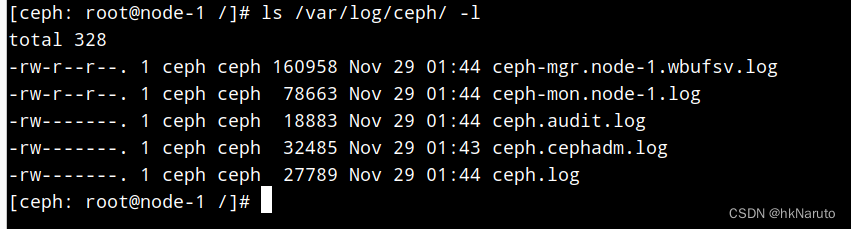
[ceph: root@node-1 /]# ceph orch daemon add mon node-2:10.47.76.95
Deployed mon.node-2 on host 'node-2'
[ceph: root@node-1 /]# ceph orch daemon add mon node-3:10.47.76.96
Deployed mon.node-3 on host 'node-3'
[ceph: root@node-1 /]# ceph -s
cluster:
id: f7cf9d4c-8e57-11ee-8a45-08002726ce7d
health: HEALTH_WARN
OSD count 0 < osd_pool_default_size 3
services:
mon: 3 daemons, quorum node-1,node-2,node-3 (age 7s)
mgr: node-1.wbufsv(active, since 7m)
osd: 0 osds: 0 up, 0 in
data:
pools: 0 pools, 0 pgs
objects: 0 objects, 0 B
usage: 0 B used, 0 B / 0 B avail
pgs:
[ceph: root@node-1 /]# ceph orch host ls
HOST ADDR LABELS STATUS
node-1 10.47.76.94 _admin
node-2 10.47.76.95 _admin
node-3 10.47.76.96 _admin
3 hosts in cluster
[ceph: root@node-1 /]# ceph orch device ls
[ceph: root@node-1 /]#
tail -f /var/log/ceph/*.log,执行ceph orch device ls 无任何有价值日志。
ceph-volume inventory可以看到有一块可用磁盘
[ceph: root@node-1 /]# lsblk
NAME MAJ:MIN RM SIZE RO TYPE MOUNTPOINT
sda 8:0 0 50G 0 disk
|-sda1 8:1 0 1G 0 part
`-sda2 8:2 0 49G 0 part
|-openeuler-root 253:0 0 44G 0 lvm /var/lib/ceph/crash
`-openeuler-swap 253:1 0 5G 0 lvm [SWAP]
sdb 8:16 0 50G 0 disk
sr0 11:0 1 1024M 0 rom
[ceph: root@node-1 /]# ceph-volume inventory
Device Path Size Device nodes rotates available Model name
/dev/sdb 50.00 GB sdb True True VBOX HARDDISK
/dev/sda 50.00 GB sda True False VBOX HARDDISK
[ceph: root@node-1 /]# ceph-volume lvm list
No valid Ceph lvm devices found
[ceph: root@node-1 /]# ceph-volume raw list
{}
ceph orch ps少了一个节点?
[ceph: root@node-1 /]# ceph orch ps
NAME HOST PORTS STATUS REFRESHED AGE MEM USE MEM LIM VERSION IMAGE ID
mon.node-2 node-2 starting - - - 2048M <unknown> <unknown>
mon.node-3 node-3 starting - - - 2048M <unknown> <unknown>
把node-1加上
[ceph: root@node-1 /]# ceph orch daemon add mon node-1:10.47.76.94
Deployed mon.node-1 on host 'node-1'
[ceph: root@node-1 /]# ceph orch ps
NAME HOST PORTS STATUS REFRESHED AGE MEM USE MEM LIM VERSION IMAGE ID
mon.node-1 node-1 starting - - - 2048M <unknown> <unknown>
mon.node-2 node-2 starting - - - 2048M <unknown> <unknown>
mon.node-3 node-3 starting - - - 2048M <unknown> <unknown>
[ceph: root@node-1 /]# ceph orch ls
NAME PORTS RUNNING REFRESHED AGE PLACEMENT
alertmanager ?:9093,9094 0/1 - 55m count:1
crash 0/3 - 55m *
grafana ?:3000 0/1 - 55m count:1
mgr 0/2 - 55m count:2
mon 0/5 - 55m count:5
node-exporter ?:9100 0/3 - 55m *
prometheus ?:9095 0/1 - 55m count:1
mon状态不对

[ceph: root@node-1 /]# ceph orch host ls
HOST ADDR LABELS STATUS
node-1 10.47.76.94 _admin
node-2 10.47.76.95 _admin
node-3 10.47.76.96 _admin
3 hosts in cluster
[ceph: root@node-1 /]# ceph orch apply mon --placement="3 node-1 node-2 node-3"
Scheduled mon update...
[ceph: root@node-1 /]# ceph orch apply mgr --placement="3 node-1 node-2 node-3"
Scheduled mgr update...
[ceph: root@node-1 /]# ceph orch ls
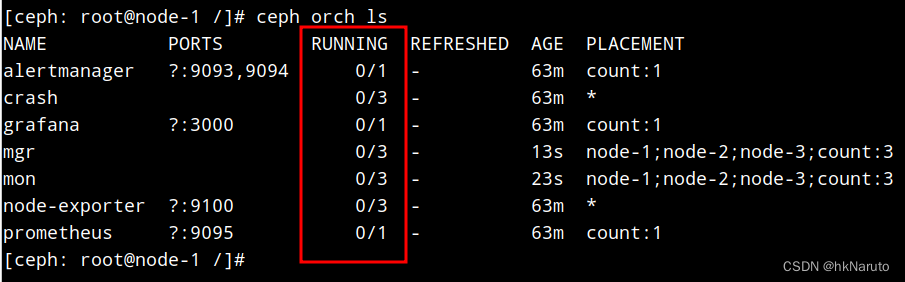
ceph-mgr.node-1.wbufsv.log日志,难道是这个导致的?bootstrap --skip-pull也不行?
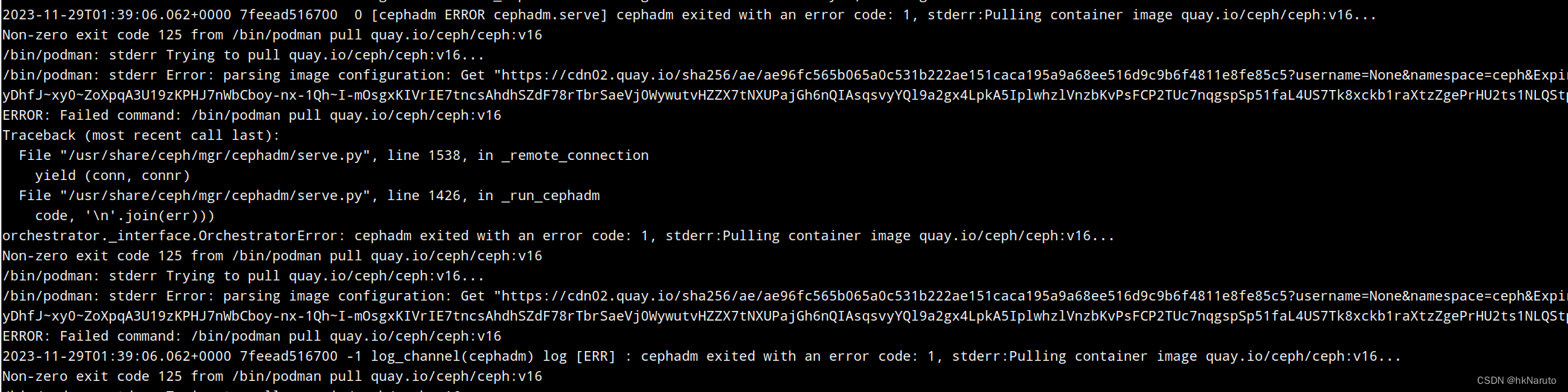
再次删除集群,bootstrap
清理
podman ps | grep -v CONTAINER | awk '{print $1}' | xargs podman rm -f
rm /etc/ceph/ -rf
rm /var/lib/ceph -rf
rm /var/log/ceph/ -rf

systemctl restart podman
lsblk
制作一个离线registry,再来一次
registry:2
[root@node-1 ~]# podman load -i podman-registry2.tar
Getting image source signatures
Copying blob ab4798a34c77 done
Copying blob 0b261c932361 done
Copying blob b4fcd5c55862 done
Copying blob cc2447e1835a done
Copying blob d95d36f1fde7 done
Copying config ff1857193a done
Writing manifest to image destination
Storing signatures
Loaded image(s): docker.io/library/registry:2
[root@node-1 ~]# mkdir /var/lib/registry
[root@node-1 ~]# podman run --privileged -d --name registry -p 5000:5000 -v /var/lib/registry:/var/lib/registry --restart=always registry:2
8e88bf1b7c94ecab82e5b5748f317b36a2f8e72fe3a87742147594afe28db85b
编辑/etc/containers/registries.conf
[registries.insecure]
registries = ["10.47.76.94:5000"]

systemctl restart podman
podman info
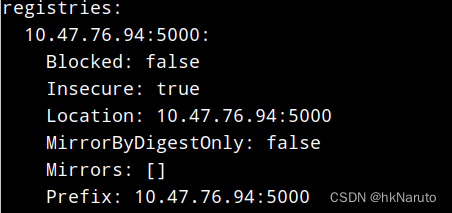
[root@node-1 ~]# podman push 10.47.76.94:5000/quay.io/ceph/ceph:v16
Getting image source signatures
Copying blob c9b8d8af634e done
Copying blob 602fe9f6cc5a done
Copying config ae96fc565b done
Writing manifest to image destination
Storing signatures
其他两个节点,配置insecure-registry
[root@node-1 ~]# scp /etc/containers/registries.conf node-2:/etc/containers/registries.conf
Authorized users only. All activities may be monitored and reported.
registries.conf 100% 147 140.2KB/s 00:00
[root@node-1 ~]# scp /etc/containers/registries.conf node-3:/etc/containers/registries.conf
Authorized users only. All activities may be monitored and reported.
registries.conf 100% 147 227.9KB/s 00:00
[root@node-1 ~]# ssh node-2 systemctl restart podman
Authorized users only. All activities may be monitored and reported.
[root@node-1 ~]# ssh node-3 systemctl restart podman
Authorized users only. All activities may be monitored and reported.
第N次bootstrap
[root@node-1 ~]# cephadm --image 10.47.76.94:5000/quay.io/ceph/ceph:v16 bootstrap --mon-ip 10.47.76.94 --log-to-file
Verifying podman|docker is present...
Verifying lvm2 is present...
Verifying time synchronization is in place...
Unit ntpd.service is enabled and running
Repeating the final host check...
podman (/usr/bin/podman) version 3.4.4 is present
systemctl is present
lvcreate is present
Unit ntpd.service is enabled and running
Host looks OK
Cluster fsid: 9144ed0c-8e7a-11ee-9686-08002726ce7d
Verifying IP 10.47.76.94 port 3300 ...
Verifying IP 10.47.76.94 port 6789 ...
Mon IP `10.47.76.94` is in CIDR network `10.47.76.0/24`
- internal network (--cluster-network) has not been provided, OSD replication will default to the public_network
Pulling container image 10.47.76.94:5000/quay.io/ceph/ceph:v16...
Ceph version: ceph version 16.2.14 (238ba602515df21ea7ffc75c88db29f9e5ef12c9) pacific (stable)
Extracting ceph user uid/gid from container image...
Creating initial keys...
Creating initial monmap...
Creating mon...
Waiting for mon to start...
Waiting for mon...
mon is available
Assimilating anything we can from ceph.conf...
Generating new minimal ceph.conf...
Restarting the monitor...
Setting mon public_network to 10.47.76.0/24
Wrote config to /etc/ceph/ceph.conf
Wrote keyring to /etc/ceph/ceph.client.admin.keyring
Creating mgr...
Verifying port 9283 ...
Waiting for mgr to start...
Waiting for mgr...
mgr not available, waiting (1/15)...
mgr not available, waiting (2/15)...
mgr not available, waiting (3/15)...
mgr is available
Enabling cephadm module...
Waiting for the mgr to restart...
Waiting for mgr epoch 5...
mgr epoch 5 is available
Setting orchestrator backend to cephadm...
Generating ssh key...
Wrote public SSH key to /etc/ceph/ceph.pub
Adding key to root@localhost authorized_keys...
Adding host node-1...
Deploying mon service with default placement...
Deploying mgr service with default placement...
Deploying crash service with default placement...
Deploying prometheus service with default placement...
Deploying grafana service with default placement...
Deploying node-exporter service with default placement...
Deploying alertmanager service with default placement...
Enabling the dashboard module...
Waiting for the mgr to restart...
Waiting for mgr epoch 9...
mgr epoch 9 is available
Generating a dashboard self-signed certificate...
Creating initial admin user...
Fetching dashboard port number...
Ceph Dashboard is now available at:
URL: https://node-1:8443/
User: admin
Password: yrgst2rhkd
Enabling client.admin keyring and conf on hosts with "admin" label
You can access the Ceph CLI with:
sudo /usr/sbin/cephadm shell --fsid 9144ed0c-8e7a-11ee-9686-08002726ce7d -c /etc/ceph/ceph.conf -k /etc/ceph/ceph.client.admin.keyring
Please consider enabling telemetry to help improve Ceph:
ceph telemetry on
For more information see:
https://docs.ceph.com/docs/pacific/mgr/telemetry/
Bootstrap complete.
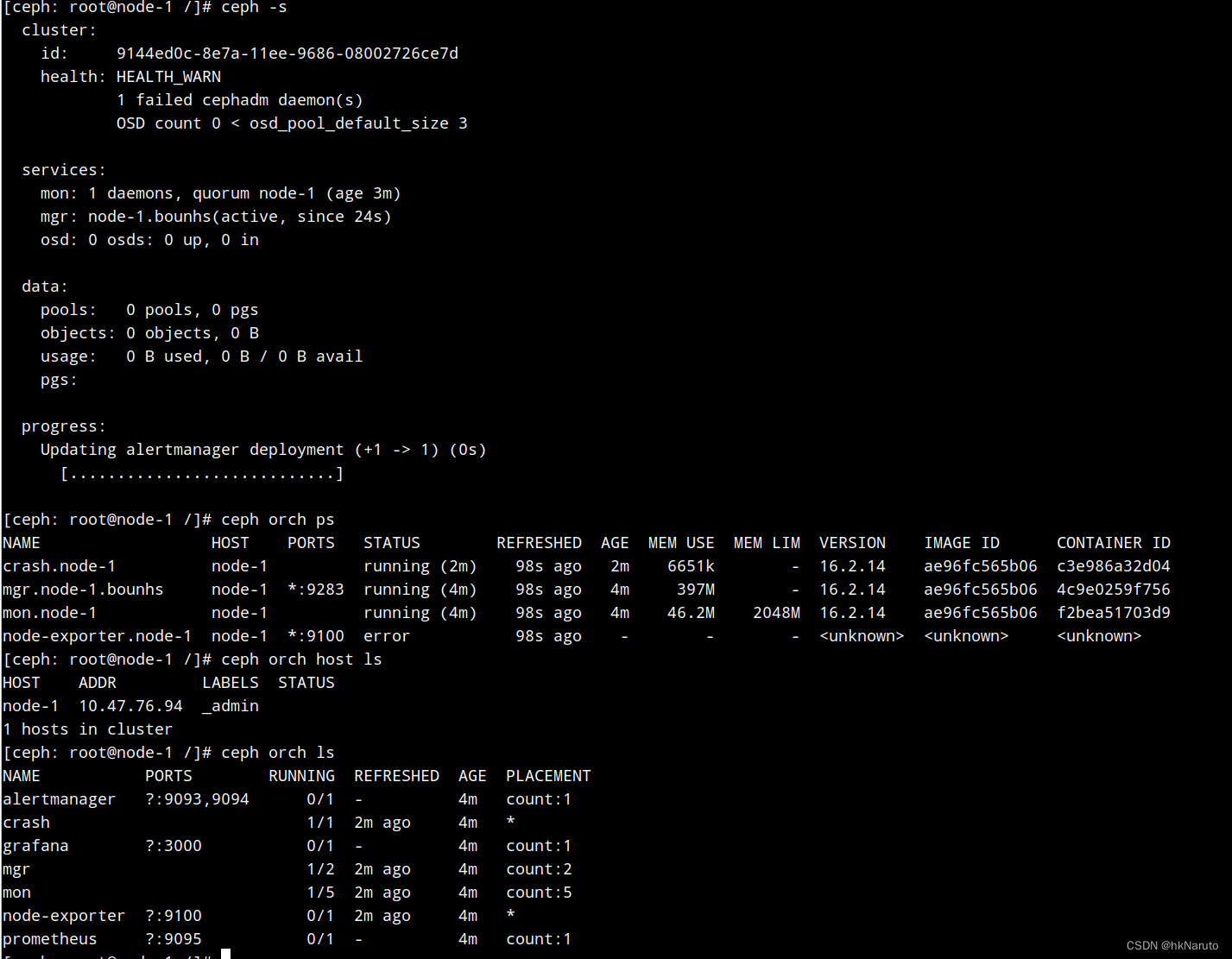
是不是一开始的网络环境不通,导致之前遇到的一系列问题?坑爹的内网
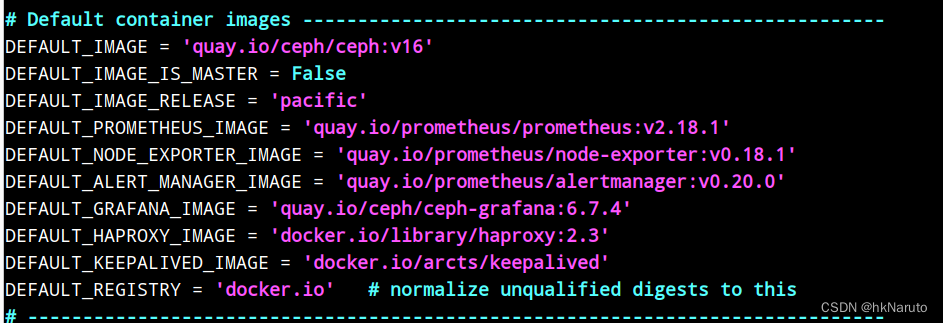
vim /usr/sbin/cephadm,把里面的镜像都导入到私有仓库
所有镜像已经推入仓库
[root@node-1 podman-images]# podman images | grep 10.47
10.47.76.94:5000/quay.io/ceph/ceph v16 ae96fc565b06 2 weeks ago 1.21 GB
10.47.76.94:5000/docker.io/library/registry 2 ff1857193a0b 5 weeks ago 26 MB
10.47.76.94:5000/docker.io/library/haproxy 2.3 7ecd3fda00f4 16 months ago 103 MB
10.47.76.94:5000/quay.io/ceph/ceph-grafana 6.7.4 557c83e11646 2 years ago 496 MB
10.47.76.94:5000/quay.io/prometheus/prometheus v2.18.1 de242295e225 3 years ago 141 MB
10.47.76.94:5000/quay.io/prometheus/alertmanager v0.20.0 0881eb8f169f 3 years ago 53.5 MB
10.47.76.94:5000/quay.io/prometheus/node-exporter v0.18.1 e5a616e4b9cf 4 years ago 24.3 MB
10.47.76.94:5000/docker.io/arcts/keepalived latest 073e0c3cd1b9 4 years ago 16.2 MB

这个版本号,对不上哦。。。

分析发现,宿主机上的cephadm与容器里面的cephadm不一致!以容器内的为准,这什么设计。。。
容器内的版本
# Default container images -----------------------------------------------------
DEFAULT_IMAGE = 'quay.io/ceph/ceph:v16'
DEFAULT_IMAGE_IS_MASTER = False
DEFAULT_IMAGE_RELEASE = 'pacific'
DEFAULT_PROMETHEUS_IMAGE = 'quay.io/prometheus/prometheus:v2.33.4'
DEFAULT_NODE_EXPORTER_IMAGE = 'quay.io/prometheus/node-exporter:v1.3.1'
DEFAULT_ALERT_MANAGER_IMAGE = 'quay.io/prometheus/alertmanager:v0.23.0'
DEFAULT_GRAFANA_IMAGE = 'quay.io/ceph/ceph-grafana:8.3.5'
DEFAULT_HAPROXY_IMAGE = 'docker.io/library/haproxy:2.3'
DEFAULT_KEEPALIVED_IMAGE = 'docker.io/arcts/keepalived'
DEFAULT_SNMP_GATEWAY_IMAGE = 'docker.io/maxwo/snmp-notifier:v1.2.1'
DEFAULT_REGISTRY = 'docker.io'   # normalize unqualified digests to this
# ------------------------------------------------------------------------------
再来一次
podman ps | grep -v regi | awk '{print $1}' | xargs -i podman rm -f {}

rm /etc/ceph/ -rf
rm /var/lib/ceph -rf
rm /var/log/ceph/ -rf

systemctl restart podman
指定registry bootstrap
账号密码随笔写,没有配置
[root@node-1 images]# cephadm --image 10.47.76.94:5000/quay.io/ceph/ceph:v16 bootstrap --registry-url=10.47.76.94:5000 --registry-username=x --registry-password=x --mon-ip 10.47.76.94 --log-to-file
Creating directory /etc/ceph for ceph.conf
Verifying podman|docker is present...
Verifying lvm2 is present...
Verifying time synchronization is in place...
Unit ntpd.service is enabled and running
Repeating the final host check...
podman (/usr/bin/podman) version 3.4.4 is present
systemctl is present
lvcreate is present
Unit ntpd.service is enabled and running
Host looks OK
Cluster fsid: 7ae38ab2-8e86-11ee-af53-08002726ce7d
Verifying IP 10.47.76.94 port 3300 ...
Verifying IP 10.47.76.94 port 6789 ...
Mon IP `10.47.76.94` is in CIDR network `10.47.76.0/24`
- internal network (--cluster-network) has not been provided, OSD replication will default to the public_network
Logging into custom registry.
Pulling container image 10.47.76.94:5000/quay.io/ceph/ceph:v16...
Ceph version: ceph version 16.2.14 (238ba602515df21ea7ffc75c88db29f9e5ef12c9) pacific (stable)
Extracting ceph user uid/gid from container image...
Creating initial keys...
Creating initial monmap...
Creating mon...
Waiting for mon to start...
Waiting for mon...
mon is available
Assimilating anything we can from ceph.conf...
Generating new minimal ceph.conf...
Restarting the monitor...
Setting mon public_network to 10.47.76.0/24
Wrote config to /etc/ceph/ceph.conf
Wrote keyring to /etc/ceph/ceph.client.admin.keyring
Creating mgr...
Verifying port 9283 ...
Waiting for mgr to start...
Waiting for mgr...
mgr not available, waiting (1/15)...
mgr not available, waiting (2/15)...
mgr not available, waiting (3/15)...
mgr is available
Enabling cephadm module...
Waiting for the mgr to restart...
Waiting for mgr epoch 5...
mgr epoch 5 is available
Setting orchestrator backend to cephadm...
Generating ssh key...
Wrote public SSH key to /etc/ceph/ceph.pub
Adding key to root@localhost authorized_keys...
Adding host node-1...
Deploying mon service with default placement...
Deploying mgr service with default placement...
Deploying crash service with default placement...
Deploying prometheus service with default placement...
Deploying grafana service with default placement...
Deploying node-exporter service with default placement...
Deploying alertmanager service with default placement...
Enabling the dashboard module...
Waiting for the mgr to restart...
Waiting for mgr epoch 9...
mgr epoch 9 is available
Generating a dashboard self-signed certificate...
Creating initial admin user...
Fetching dashboard port number...
Ceph Dashboard is now available at:
URL: https://node-1:8443/
User: admin
Password: ffrqhdcxii
Enabling client.admin keyring and conf on hosts with "admin" label
You can access the Ceph CLI with:
sudo /usr/sbin/cephadm shell --fsid 7ae38ab2-8e86-11ee-af53-08002726ce7d -c /etc/ceph/ceph.conf -k /etc/ceph/ceph.client.admin.keyring
Please consider enabling telemetry to help improve Ceph:
ceph telemetry on
For more information see:
https://docs.ceph.com/docs/pacific/mgr/telemetry/
Bootstrap complete.
参数没有效果!

login测试成功,但是pull默认不会走私有仓库

[root@node-1 ~]# cephadm registry-login --registry-url 10.47.76.94:5000 --registry-username x --registry-password x
Logging into custom registry.
[root@node-1 ~]# cephadm --image 10.47.76.94:5000/quay.io/ceph/ceph:v16 bootstrap --registry-url=10.47.76.94:5000 --registry-username=x --registry-password=x --mon-ip 10.47.76.94 --log-to-file
Creating directory /etc/ceph for ceph.conf
Verifying podman|docker is present...
Verifying lvm2 is present...
Verifying time synchronization is in place...
Unit ntpd.service is enabled and running
Repeating the final host check...
podman (/usr/bin/podman) version 3.4.4 is present
systemctl is present
lvcreate is present
Unit ntpd.service is enabled and running
Host looks OK
Cluster fsid: 0169d94a-8e89-11ee-bd89-08002726ce7d
Verifying IP 10.47.76.94 port 3300 ...
Verifying IP 10.47.76.94 port 6789 ...
Mon IP `10.47.76.94` is in CIDR network `10.47.76.0/24`
- internal network (--cluster-network) has not been provided, OSD replication will default to the public_network
Logging into custom registry.
Pulling container image 10.47.76.94:5000/quay.io/ceph/ceph:v16...
Ceph version: ceph version 16.2.14 (238ba602515df21ea7ffc75c88db29f9e5ef12c9) pacific (stable)
Extracting ceph user uid/gid from container image...
Creating initial keys...
Creating initial monmap...
Creating mon...
Waiting for mon to start...
Waiting for mon...
mon is available
Assimilating anything we can from ceph.conf...
Generating new minimal ceph.conf...
Restarting the monitor...
Setting mon public_network to 10.47.76.0/24
Wrote config to /etc/ceph/ceph.conf
Wrote keyring to /etc/ceph/ceph.client.admin.keyring
Creating mgr...
Verifying port 9283 ...
Waiting for mgr to start...
Waiting for mgr...
mgr not available, waiting (1/15)...
mgr not available, waiting (2/15)...
mgr not available, waiting (3/15)...
mgr is available
Enabling cephadm module...
Waiting for the mgr to restart...
Waiting for mgr epoch 5...
mgr epoch 5 is available
Setting orchestrator backend to cephadm...
Generating ssh key...
Wrote public SSH key to /etc/ceph/ceph.pub
Adding key to root@localhost authorized_keys...
Adding host node-1...
Deploying mon service with default placement...
Deploying mgr service with default placement...
Deploying crash service with default placement...
Deploying prometheus service with default placement...
Deploying grafana service with default placement...
Deploying node-exporter service with default placement...
Deploying alertmanager service with default placement...
Enabling the dashboard module...
Waiting for the mgr to restart...
Waiting for mgr epoch 9...
mgr epoch 9 is available
Generating a dashboard self-signed certificate...
Creating initial admin user...
Fetching dashboard port number...
Ceph Dashboard is now available at:
URL: https://node-1:8443/
User: admin
Password: fziwdpatuk
Enabling client.admin keyring and conf on hosts with "admin" label
You can access the Ceph CLI with:
sudo /usr/sbin/cephadm shell --fsid 0169d94a-8e89-11ee-bd89-08002726ce7d -c /etc/ceph/ceph.conf -k /etc/ceph/ceph.client.admin.keyring
Please consider enabling telemetry to help improve Ceph:
ceph telemetry on
For more information see:
https://docs.ceph.com/docs/pacific/mgr/telemetry/
Bootstrap complete.
没用!

跟踪代码cephadm,没有发现有registry-url参数传递,这玩意只管ceph这一个镜像?

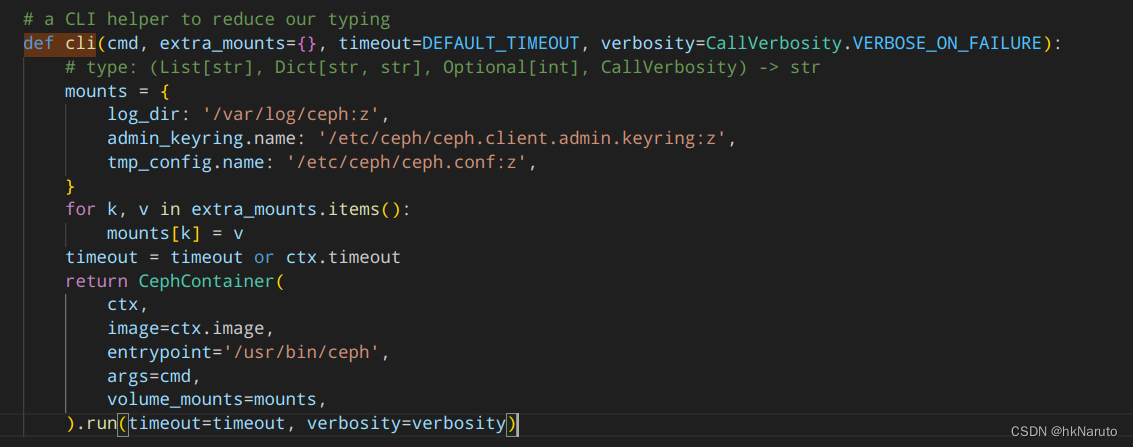
手动导入镜像
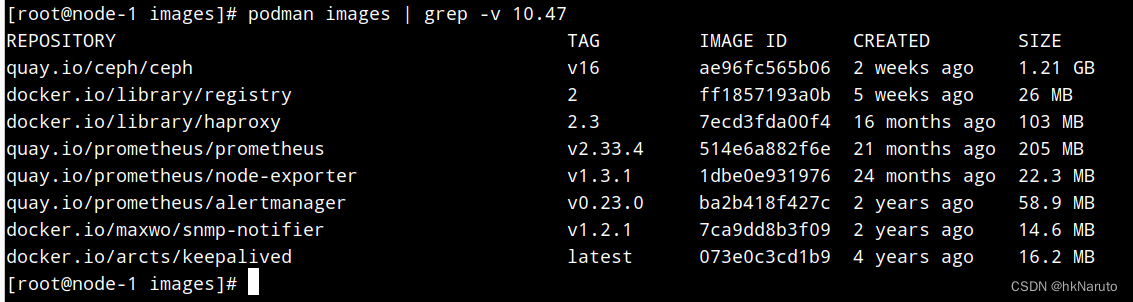
自建registry就只解决了日志不断在pull ceph镜像这一个问题。。。

目前正常
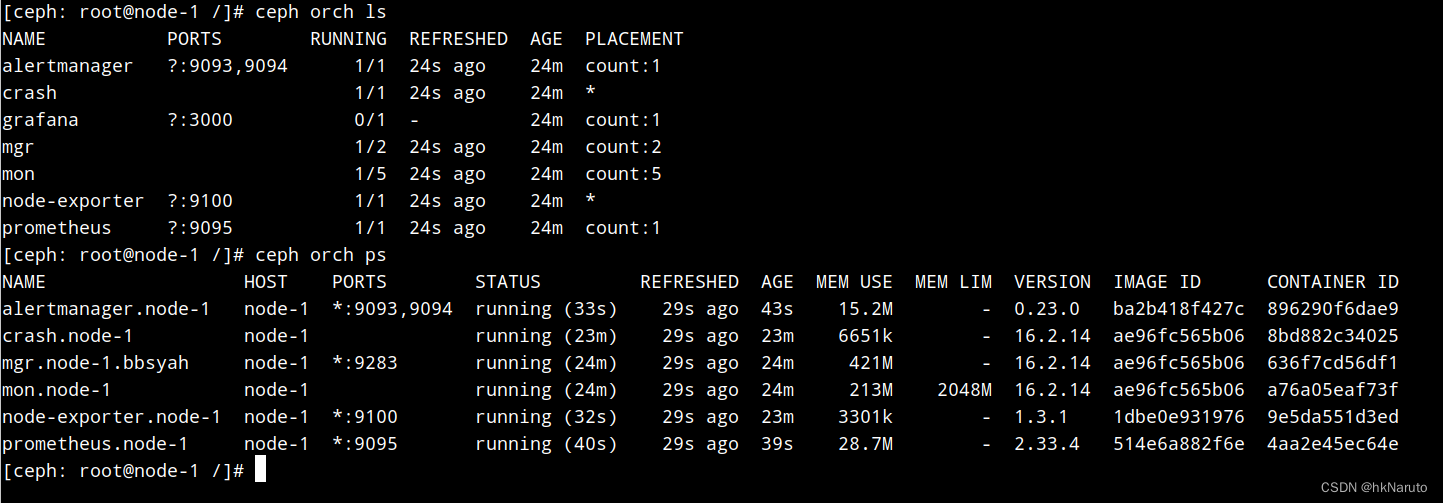
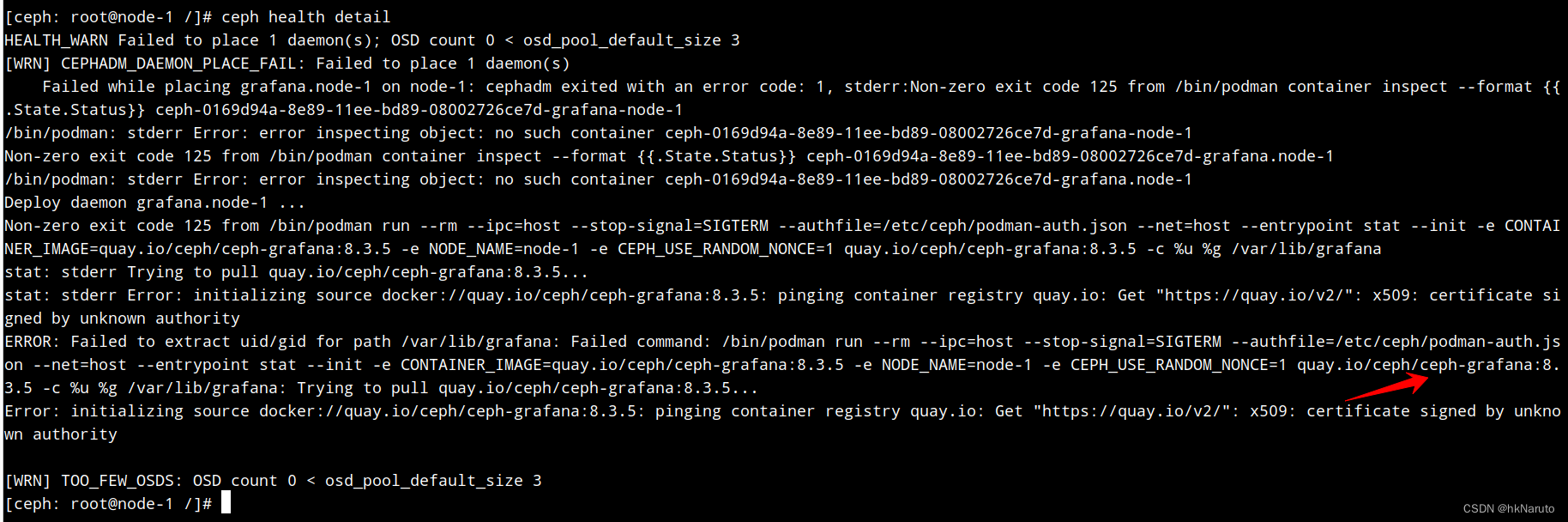
其他镜像的内网配置方案
ceph config set mgr mgr/cephadm/container_image_prometheus 10.47.76.94:5000/quay.io/prometheus/prometheus:v2.33.4
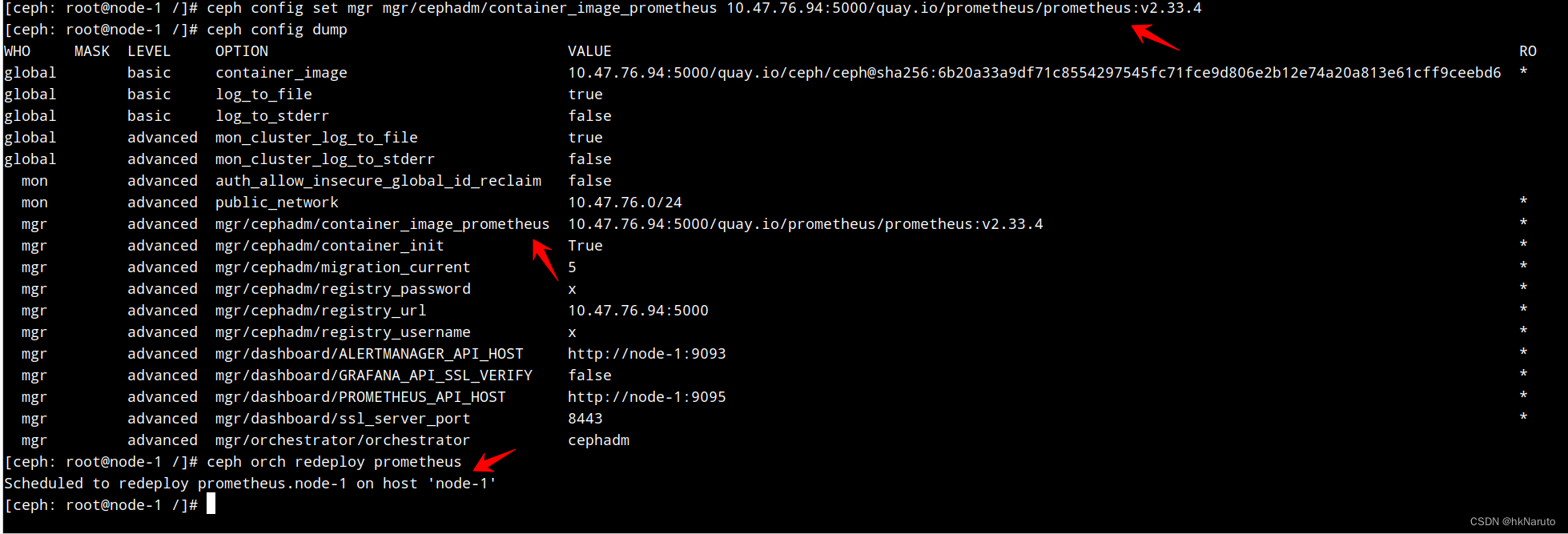
效果

部署日志
[ceph: root@node-1 /]# ceph config set mgr mgr/cephadm/container_image_prometheus 10.47.76.94:5000/quay.io/prometheus/prometheus:v2.33.4
[ceph: root@node-1 /]# ceph config set mgr mgr/cephadm/container_image_grafana 10.47.76.94:5000/quay.io/ceph/ceph-grafana:8.3.5
[ceph: root@node-1 /]# ceph config set mgr mgr/cephadm/container_image_alertmanager 10.47.76.94:5000/quay.io/prometheus/alertmanager:v0.23.0
[ceph: root@node-1 /]# ceph config set mgr mgr/cephadm/container_image_node_exporter 10.47.76.94:5000/quay.io/prometheus/node-exporter:v1.3.1
[ceph: root@node-1 /]#
[ceph: root@node-1 /]# ceph orch redeploy prometheus
Scheduled to redeploy prometheus.node-1 on host 'node-1'
[ceph: root@node-1 /]# ceph orch redeploy grafana
Scheduled to redeploy grafana.node-1 on host 'node-1'
[ceph: root@node-1 /]# ceph orch redeploy alertmanager
Scheduled to redeploy alertmanager.node-1 on host 'node-1'
[ceph: root@node-1 /]# ceph orch redeploy node_exporter
Error EINVAL: Invalid service name "node_exporter". View currently running services using "ceph orch ls"

名称错误!重新执行
[ceph: root@node-1 /]# ceph orch redeploy node-exporter
Scheduled to redeploy node-exporter.node-1 on host 'node-1'
完整指令
ceph config set mgr mgr/cephadm/container_image_prometheus 10.47.76.94:5000/quay.io/prometheus/prometheus:v2.33.4
ceph config set mgr mgr/cephadm/container_image_grafana 10.47.76.94:5000/quay.io/ceph/ceph-grafana:8.3.5
ceph config set mgr mgr/cephadm/container_image_alertmanager 10.47.76.94:5000/quay.io/prometheus/alertmanager:v0.23.0
ceph config set mgr mgr/cephadm/container_image_node_exporter 10.47.76.94:5000/quay.io/prometheus/node-exporter:v1.3.1


ceph orch redeploy prometheus
ceph orch redeploy grafana
ceph orch redeploy alertmanager
ceph orch redeploy node-exporter
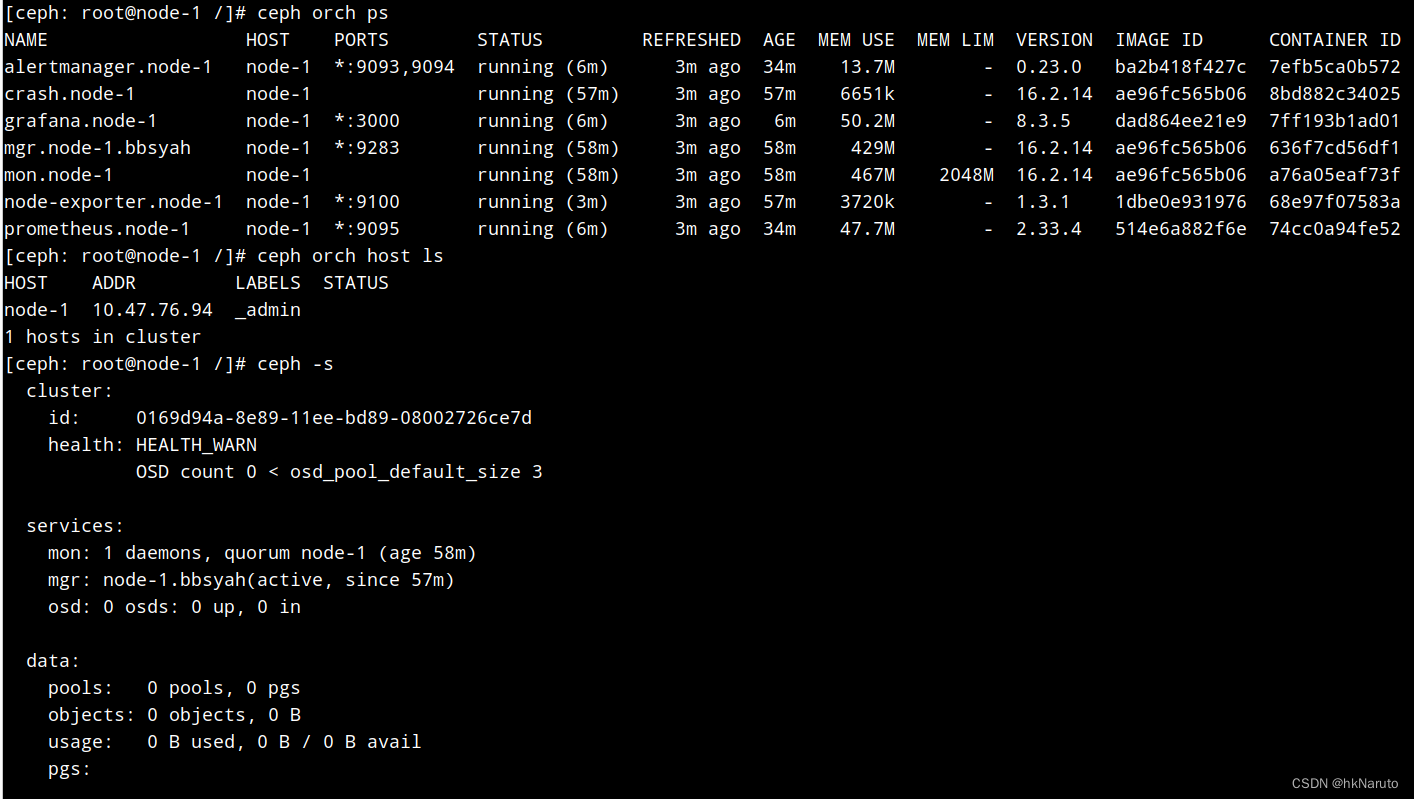
成果

添加host
[ceph: root@node-1 /]# ceph cephadm get-pub-key > ~/ceph.pub
[ceph: root@node-1 /]# ssh-copy-id -f -i ~/ceph.pub root@10.47.76.95
/usr/bin/ssh-copy-id: INFO: Source of key(s) to be installed: "/root/ceph.pub"
The authenticity of host '10.47.76.95 (10.47.76.95)' can't be established.
ECDSA key fingerprint is SHA256:yL4NzrhizHt0f/4uM9bqSTP3VsXU7mn+HFRJ7BglXeQ.
Are you sure you want to continue connecting (yes/no/[fingerprint])? yes
Authorized users only. All activities may be monitored and reported.
root@10.47.76.95's password:
Number of key(s) added: 1
Now try logging into the machine, with: "ssh 'root@10.47.76.95'"
and check to make sure that only the key(s) you wanted were added.
[ceph: root@node-1 /]# ceph cephadm get-ssh-config > ssh_config
[ceph: root@node-1 /]# ceph config-key get mgr/cephadm/ssh_identity_key > ~/cephadm_private_key
[ceph: root@node-1 /]# chmod 0600 ~/cephadm_private_key
[ceph: root@node-1 /]# ceph orch host add node-2 10.47.76.95 --labels _admin
Added host 'node-2' with addr '10.47.76.95'
[ceph: root@node-1 /]# ssh-copy-id -f -i ~/ceph.pub root@10.47.76.96
/usr/bin/ssh-copy-id: INFO: Source of key(s) to be installed: "/root/ceph.pub"
The authenticity of host '10.47.76.96 (10.47.76.96)' can't be established.
ECDSA key fingerprint is SHA256:yL4NzrhizHt0f/4uM9bqSTP3VsXU7mn+HFRJ7BglXeQ.
Are you sure you want to continue connecting (yes/no/[fingerprint])? yes
Authorized users only. All activities may be monitored and reported.
root@10.47.76.96's password:
Number of key(s) added: 1
Now try logging into the machine, with: "ssh 'root@10.47.76.96'"
and check to make sure that only the key(s) you wanted were added.
[ceph: root@node-1 /]# ceph orch host add node-3 10.47.76.96 --labels _admin
Added host 'node-3' with addr '10.47.76.96'
自动部署了3个mon实例
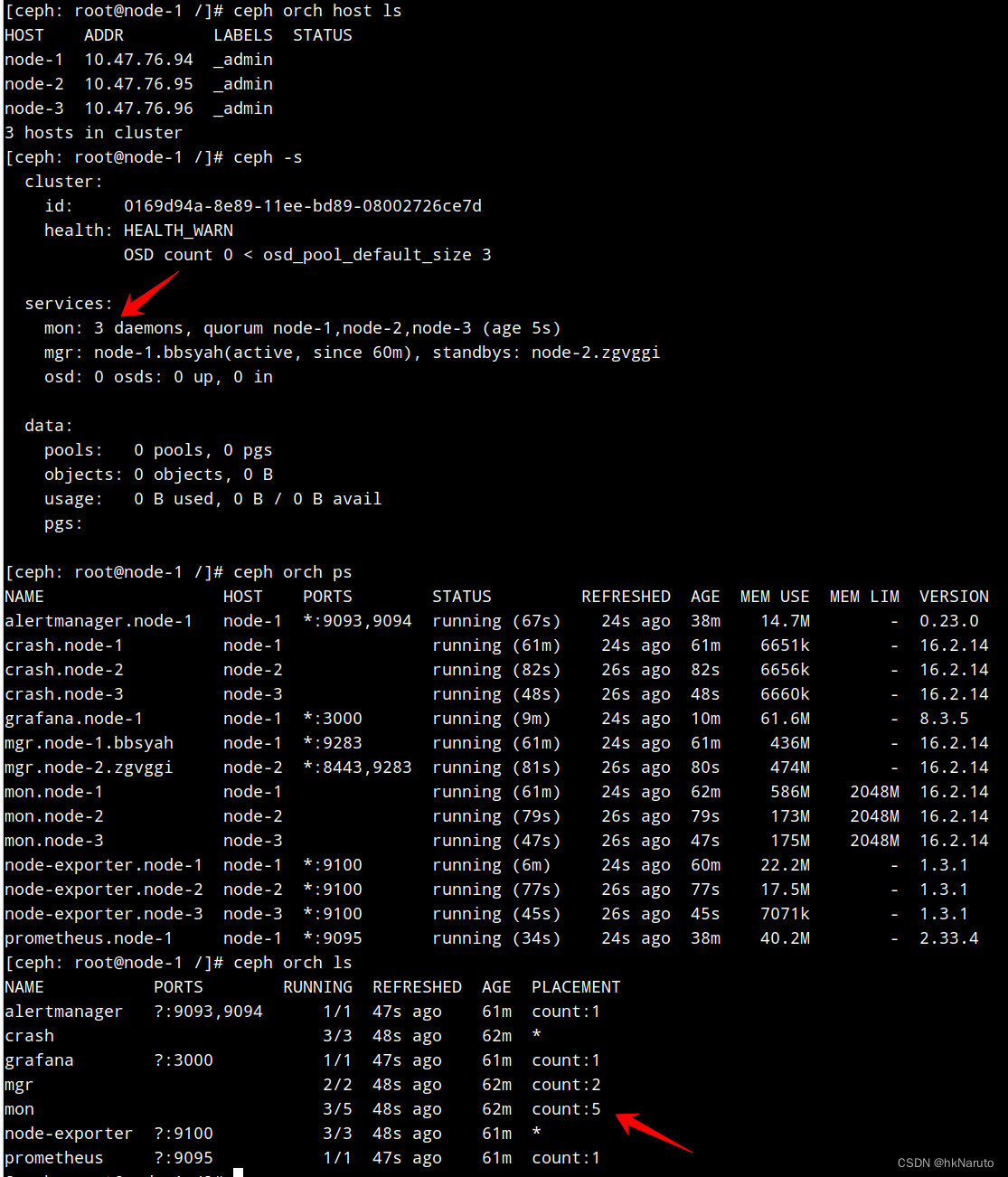
修改mon数量=3
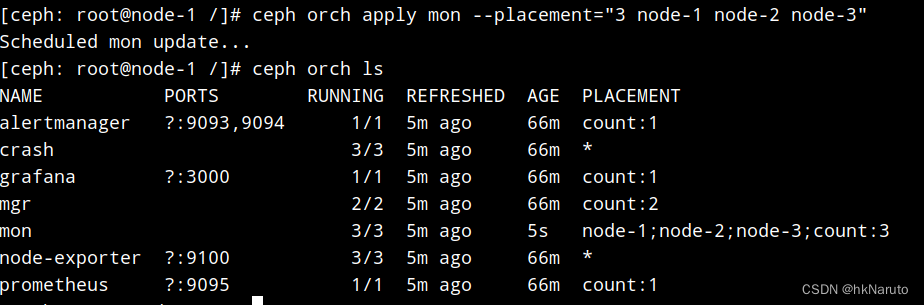
node 2 3 情况


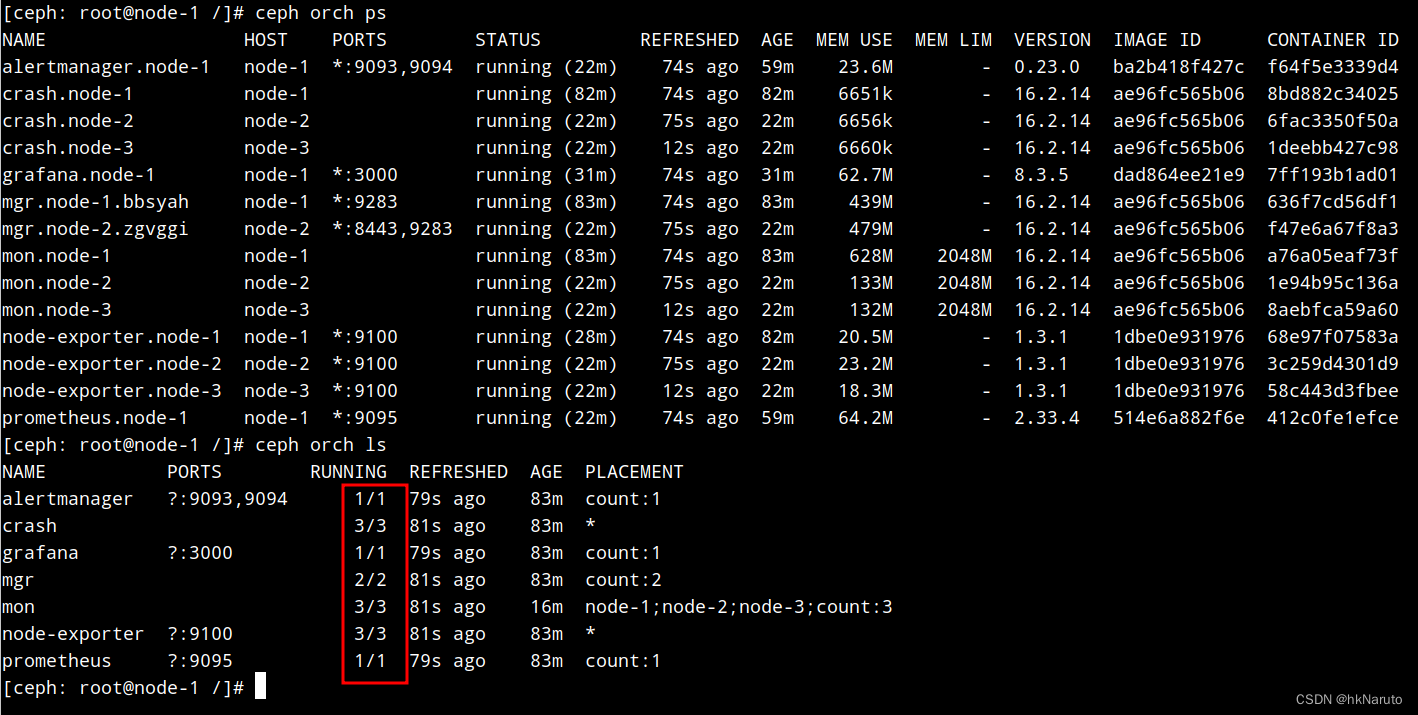
终于搞定了ceph orch device ls 返回数据为空问题
原因:组件安装不完整!

正常状态
参考
3.12. 引导新存储集群 Red Hat Ceph Storage 5 | Red Hat Customer Portal
Deploying a new Ceph cluster — Ceph Documentation
https://www.cnblogs.com/leoyang63/articles/13445023.html
ceph 删除和添加osd_ceph删除osd_人生匆匆的博客-CSDN博客
将前面删除的osd磁盘,重新初始化并重新加入到ceph集群当中_ceph orch_好记忆不如烂笔头abc的博客-CSDN博客

鲲鹏昇腾开发者社区是面向全社会开放的“联接全球计算开发者,聚合华为+生态”的社区,内容涵盖鲲鹏、昇腾资源,帮助开发者快速获取所需的知识、经验、软件、工具、算力,支撑开发者易学、好用、成功,成为核心开发者。
更多推荐

 23
23 0
0- 0


 已为社区贡献19条内容

所有评论(0)