
大木博士模拟器(使用树莓派4B进行宝可梦图像分类)
这篇文章介绍了如何使用树莓派4B和YOLOv8模型实现一个简易的宝可梦图鉴系统。作者详细记录了从树莓派系统配置到模型训练转换的全过程。内容包括树莓派系统初始化、SSH/VNC连接设置、软件换源配置,以及创建conda环境进行YOLOv8模型训练,最后将PyTorch模型转换为ONNX格式。虽然硬件限制导致无法实现完整功能,但文章为基于树莓派的AI视觉项目提供了实用参考。
最近在B站看到了使用K210复现宝可梦图鉴的视频,视频指路:宝可梦图鉴
在观察了他的复现过程后,我有了尝试的冲动,教程指路:K210复现宝可梦图鉴
我手中只有一个树莓派4B,虽然没有了摄像头,但是仅仅是实现逻辑功能就让我非常兴奋!
所以这个帖子将包含以下内容:
- 树莓派4B系统构建
- yolov8b-cls模型训练
- pt模型权重文件转onnx模型权重文件
硬件准备:树莓派(4B); 主机(推荐3060及以上); 32/64G内存卡,不推荐太大的内存卡,会影响系统启动速度; 读卡器;
软件准备:putty(ssh连接工具);VNC-viewer(远程桌面连接);FinalShell(远程文件管理);CMake(用于转换模型权重的环境依赖);
本项目已开源至下述仓库:
https://github.com/kingdomlys/pokemon
树莓派4B初始化
树莓派的教程全网都不算太多,我参考的也是很老的教程,但是实际上树莓派的官网一直在更新,如今最新的树莓派系统镜像写入程序已经非常的简易!
- 下载树莓派镜像写入软件
下载链接指路:树莓派软件下载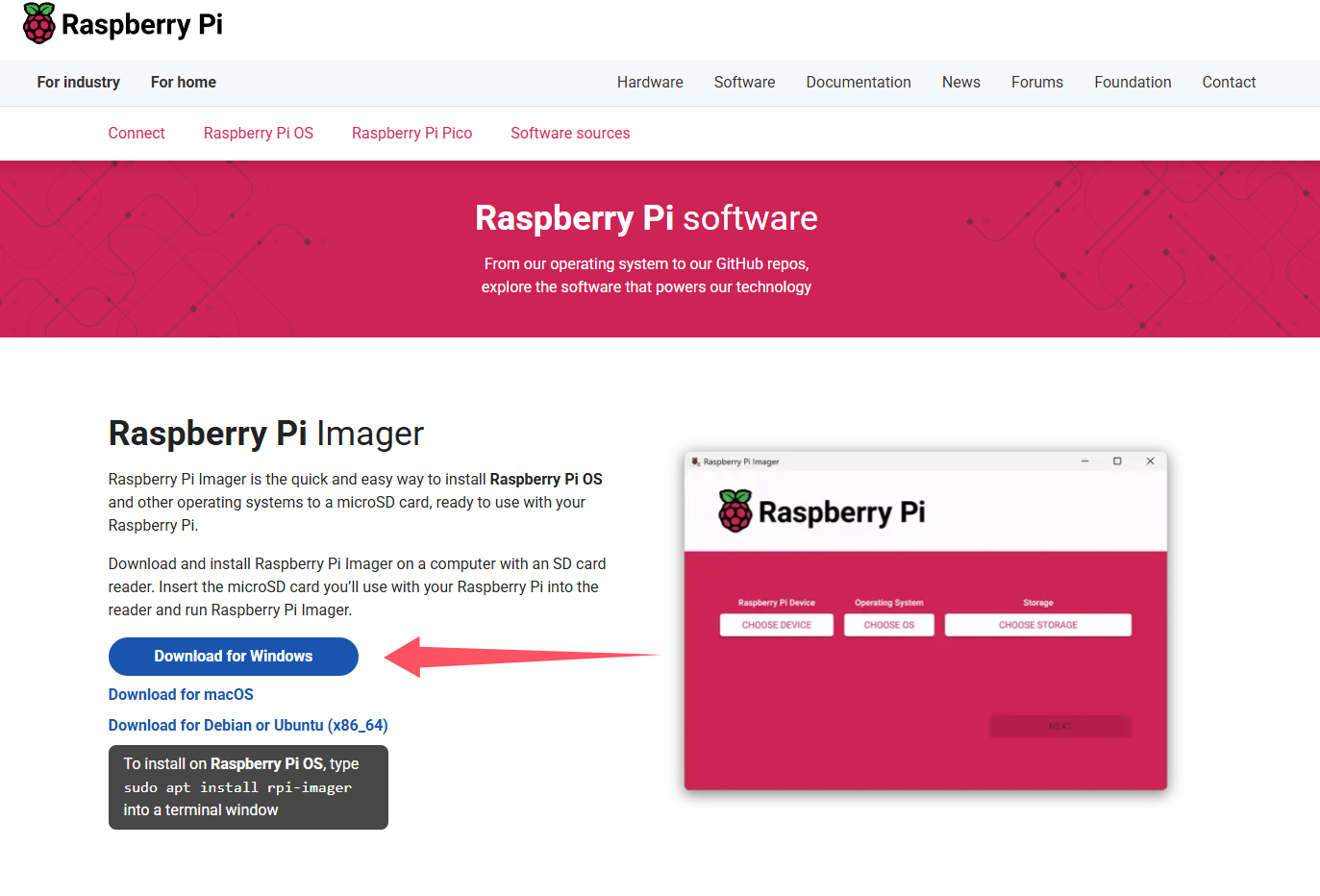
- 写入镜像
将内存卡放入读卡器插入主机,类似于制作win的启动盘,但是可以存在可以自定义的内容
通用部分的内容只有WLAN一定需要填写,方便树莓派启动后自动连接wifi
服务部分的SSH也一定要打开,这样在树莓派不连接屏幕的情况下也能够开启VNC服务,之后就可以在主机中操作树莓派的图形化界面!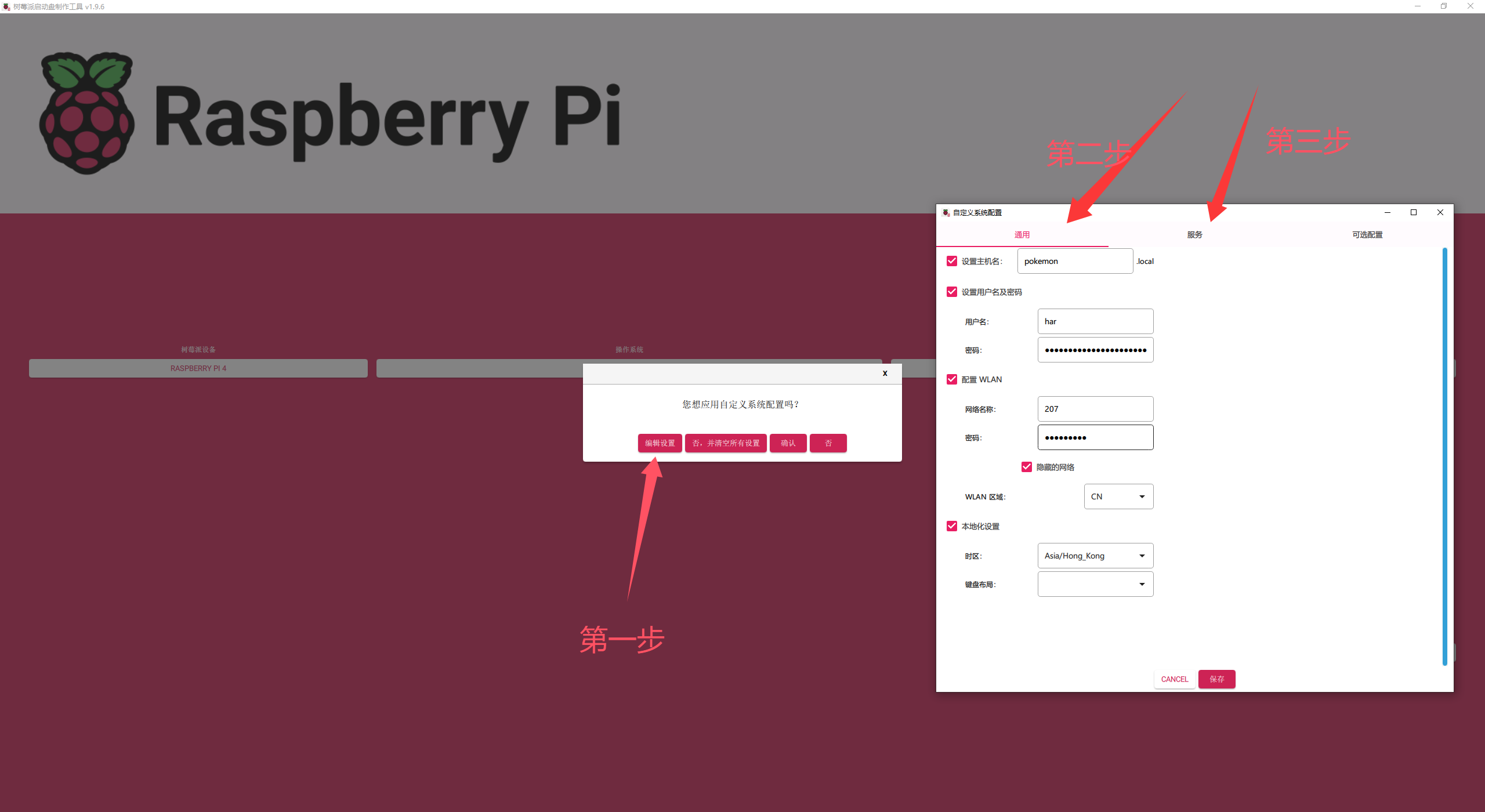
自定义的内容填写完成后点击保存,等待软件将镜像写入到内存卡中即可,写入之前软件会提示您它会将内存卡中的文件全部清除,这也是必要的。烧录的这段时间可能很长,如果发生读卡器与主机断连的情况,建议插拔换个插口以及重新写入!
系统写入成功后,将内存卡取出插入树莓派,树莓派4B的内存卡插槽位置在树莓派的反面~ - 查看树莓派的ip
查看树莓派ip的方法有很多,最简单的方法就是就如wifi的后台查看树莓派的ip,如果你在第二部的自定义配置中设置了主机名, 那么在路由器的后台界面就能够看到该主机名。
路由器的后台网址通常可以在cmd中使用ipconfig命令看到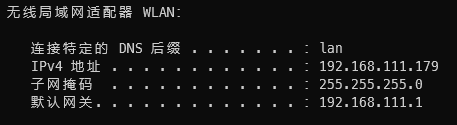
无线网络适配器的默认网关一般就是路由器的后台管理界面,密码默认admin或者是wifi的密码 - 树莓派系统配置
由于树莓派的系统中默认安装的是nano而不是vim所以需要熟悉一下nano的操作:
编辑文件的命令与vim相同:nano *.txt
文件修改完成后需要 ctrl+O --> enter --> ctrl+X 进行文件保存
对树莓派的apt-get进行换源:
sudo nano /etc/apt/sources.list
#把原本的官方源用‘#’进行注释,而后添加下述镜像源
deb http://mirrors.tuna.tsinghua.edu.cn/raspbian/raspbian/ stretch main contrib non-free rpi
deb-src http://mirrors.tuna.tsinghua.edu.cn/raspbian/raspbian/ stretch main contrib non-free rpi
对pip进行换源
新版本的树莓派系统已经默认安装python3,所以不需要额外的分别处理pip与pip3的换源,仅需要:
pip config set global.index-url https://pypi.tuna.tsinghua.edu.cn/simple
如果不灵那还是建议采用up主:同济子豪兄的方法去改写pip.conf
sudo mkdir ~/.pip
cd .pip
sudo nano pip.conf

#输入以下内容
[global]
timeout = 10
index-url =  http://mirrors.aliyun.com/pypi/simple/
extra-index-url= http://pypi.douban.com/simple/
[install]
trusted-host=
    mirrors.aliyun.com
    pypi.douban.com
打开VNC
sudo raspi-config
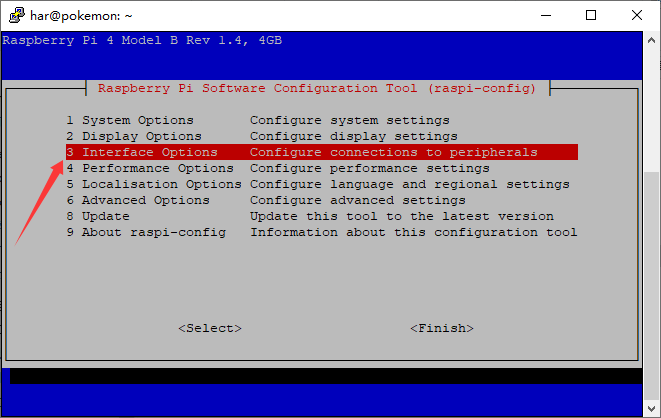
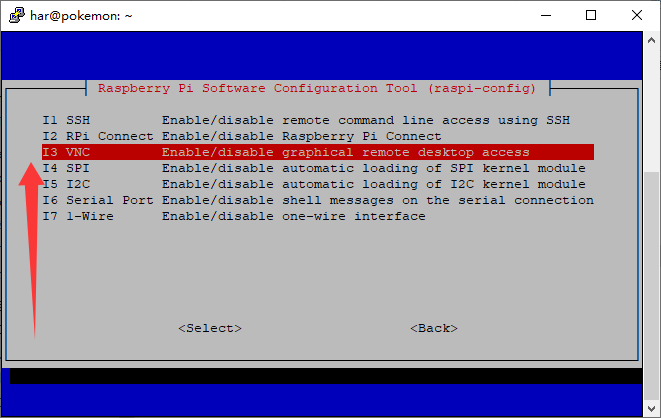
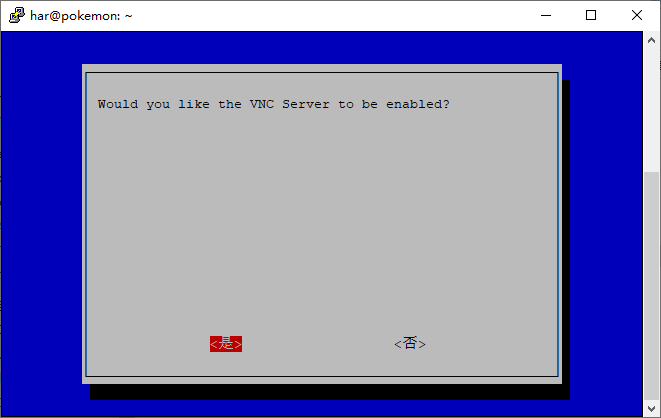
OK,这样就可以使用VNC愉快的连接了,前提是主机和树莓派在同一个局域网中!
模型训练
首先自然是配置环境,在主机中创建yolo能够运行的环境:
name: pokemon
channels:
  - https://mirrors.tuna.tsinghua.edu.cn/anaconda/cloud/pytorch/
  - defaults
dependencies:
  - bzip2=1.0.8=h2bbff1b_6
  - ca-certificates=2025.9.9=haa95532_0
  - expat=2.7.1=h8ddb27b_0
  - libffi=3.4.4=hd77b12b_1
  - libzlib=1.3.1=h02ab6af_0
  - openssl=3.0.18=h543e019_0
  - python=3.12.0=h1d929f7_0
  - setuptools=80.9.0=py312haa95532_0
  - sqlite=3.50.2=hda9a48d_1
  - tk=8.6.15=hf199647_0
  - tzdata=2025b=h04d1e81_0
  - ucrt=10.0.22621.0=haa95532_0
  - vc=14.3=h2df5915_10
  - vc14_runtime=14.44.35208=h4927774_10
  - vs2015_runtime=14.44.35208=ha6b5a95_10
  - wheel=0.45.1=py312haa95532_0
  - xz=5.6.4=h4754444_1
  - zlib=1.3.1=h02ab6af_0
  - pip:
      - certifi==2025.10.5
      - charset-normalizer==3.4.4
      - colorama==0.4.6
      - coloredlogs==15.0.1
      - comtypes==1.4.13
      - contourpy==1.3.3
      - cycler==0.12.1
      - filelock==3.20.0
      - flatbuffers==25.9.23
      - fonttools==4.60.1
      - fsspec==2025.9.0
      - humanfriendly==10.0
      - idna==3.11
      - jinja2==3.1.6
      - kiwisolver==1.4.9
      - markupsafe==3.0.3
      - matplotlib==3.10.7
      - ml-dtypes==0.5.3
      - mpmath==1.3.0
      - networkx==3.5
      - numpy==2.2.6
      - onnx==1.19.1
      - onnxruntime==1.23.2
      - onnxruntime-gpu==1.23.2
      - onnxslim==0.1.72
      - opencv-python==4.12.0.88
      - packaging==25.0
      - pillow==12.0.0
      - pip==25.3
      - polars==1.34.0
      - polars-runtime-32==1.34.0
      - protobuf==6.33.0
      - psutil==7.1.2
      - pyparsing==3.2.5
      - pypiwin32==223
      - pyreadline3==3.5.4
      - python-dateutil==2.9.0.post0
      - pyttsx3==2.99
      - pywin32==311
      - pyyaml==6.0.3
      - requests==2.32.5
      - scipy==1.16.2
      - six==1.17.0
      - sympy==1.14.0
      - torch==2.5.1+cu121
      - torchaudio==2.5.1+cu121
      - torchvision==0.20.1+cu121
      - typing-extensions==4.15.0
      - ultralytics==8.3.221
      - ultralytics-thop==2.0.17
      - urllib3==2.5.0
prefix: C:\Users\har\anaconda\ins\envs\pokemon
上述内容复制成yaml导入到conda中创建环境
环境创建完成后就可以训练(更像是微调预训练的yolov8n-cls轻量化模型)
    model = YOLO('pretrain/yolov8n-cls.pt')

    # 训练参数配置
    training_args = {
        'data': 'Dataset_pokemon_split',  # 数据集路径
        'epochs': 100,                     # 训练轮数
        'batch': 32,                       # 批次大小(根据内存调整)
        'imgsz': 224,                      # 图像大小
        'device': device,                  # 设备
        'workers': 4,                      # 数据加载线程数
        'optimizer': 'Adam',               # 优化器
        'lr0': 0.001,                      # 初始学习率
        'patience': 20,                    # 早停耐心值
        'save': True,                      # 保存模型
        'save_period': 10,                 # 每10轮保存一次
        'project': 'runs/classify',        # 项目目录
        'name': 'pokemon_yolov8n',         # 实验名称
        'exist_ok': True,                  # 允许覆盖
        'pretrained': True,                # 使用预训练权重
        'verbose': True,                   # 详细输出
    }

    # 开始训练
    results = model.train(**training_args)
    metrics = model.val()
    onnx_path = model.export(format='onnx', imgsz=224, simplify=True)
训练过程示意: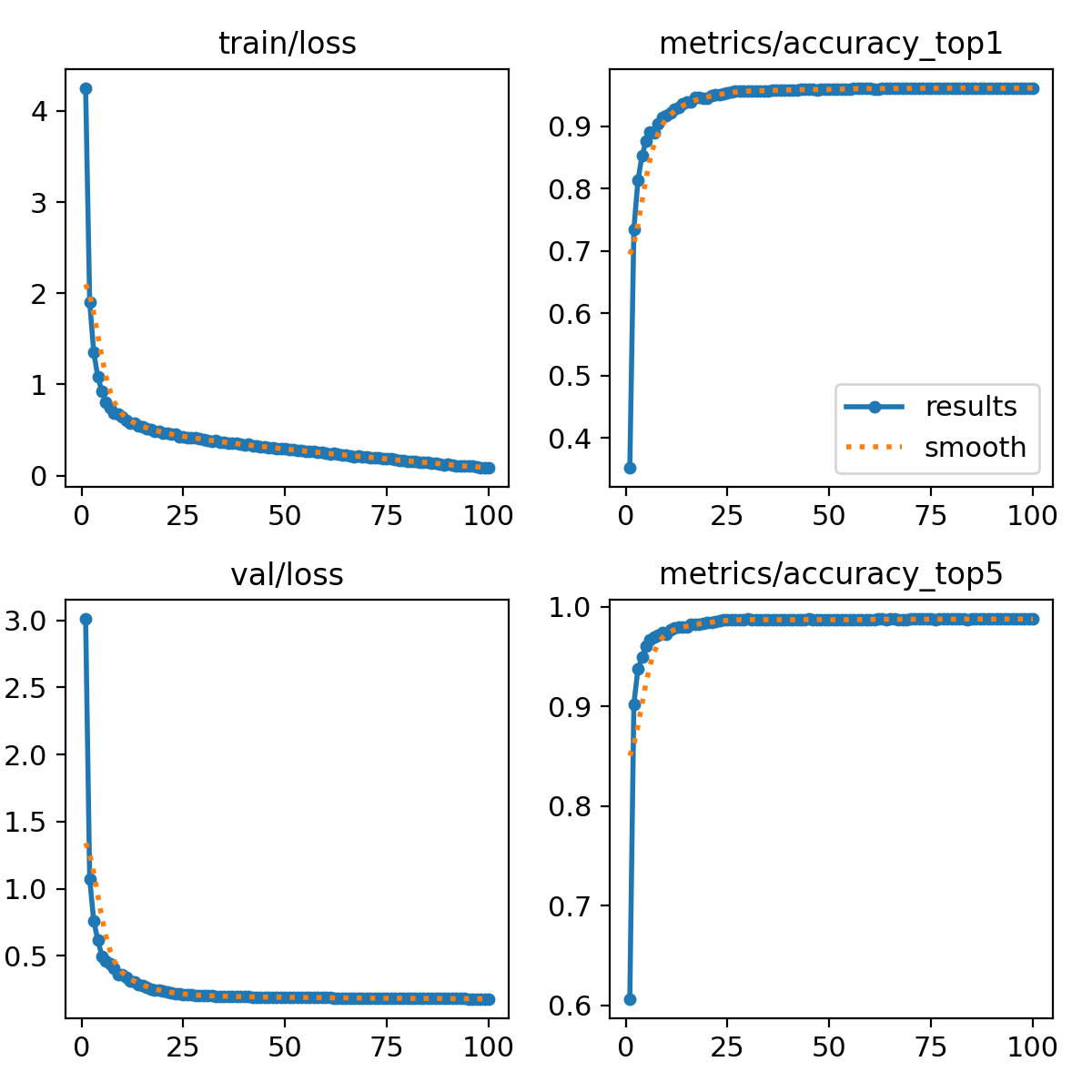
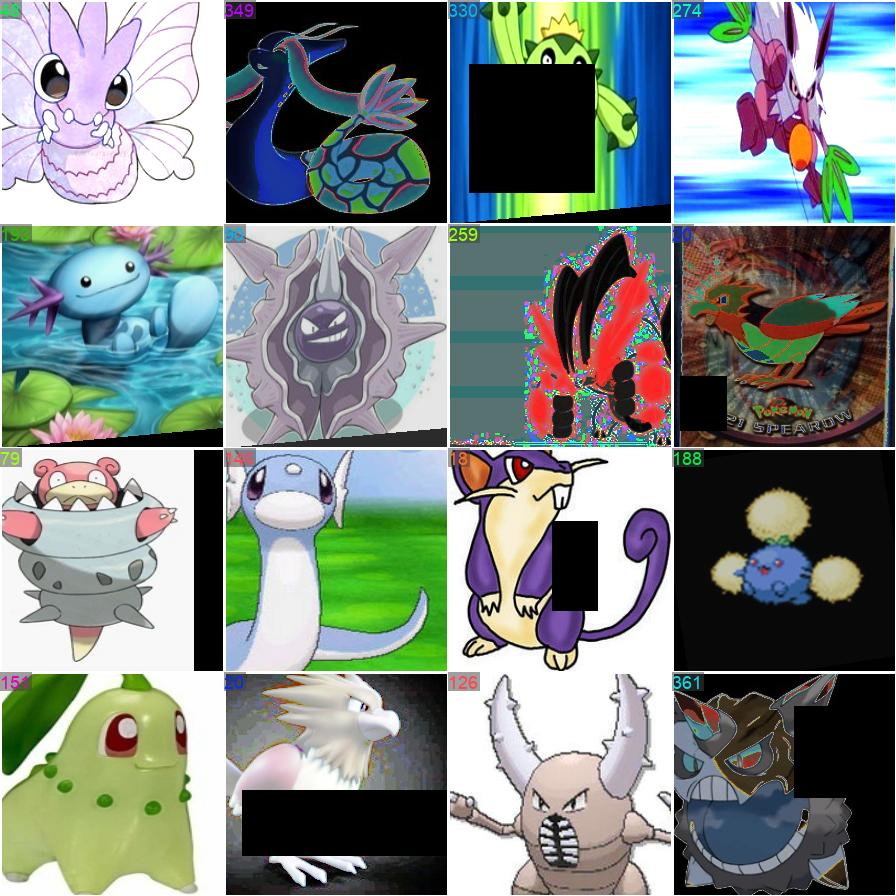
混淆矩阵: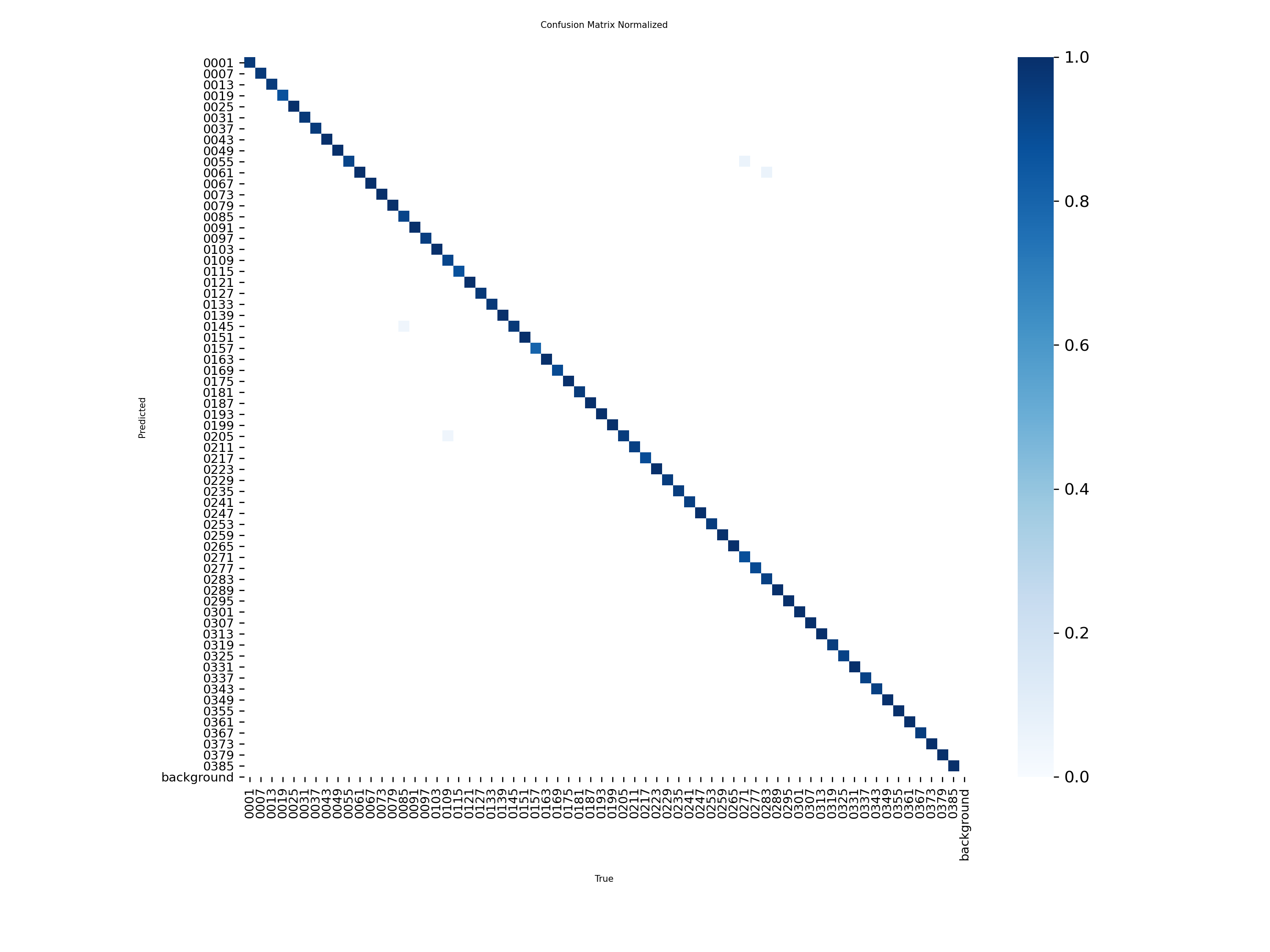
模型训练完成后得到易于在树莓派端部署的onnx模型权重。
树莓派部署
树莓派端同样需要创建虚拟环境用以更好的管理项目:
python -m venv myenv
(myenv) har@pokemon:~ $ pip list
Package            Version
------------------ ---------
certifi            2025.10.5
charset-normalizer 3.4.4
click              8.1.8
coloredlogs        15.0.1
flatbuffers        25.9.23
gTTS               2.5.4
humanfriendly      10.0
idna               3.11
mpmath             1.3.0
numpy              2.2.6
onnxruntime        1.23.2
opencv-python      4.12.0.88
packaging          25.0
pip                25.1.1
protobuf           6.33.0
pyttsx3            2.99
requests           2.32.5
sympy              1.14.0
urllib3            2.5.0
上述即为树莓派端环境
将之前模型训练得到onnx模型权重复制到树莓派中,在树莓派中进行模型加载:
"""
树莓派4B 宝可梦图鉴部署脚本
使用ONNX Runtime进行推理,性能优化版
支持Google TTS中文语音播报功能
deploy_raspberry_pi.py
"""
import cv2
import numpy as np
import onnxruntime as ort
import time
from pathlib import Path
import json
import os
import tempfile
import subprocess

# Google TTS 语音支持(可选)
try:
    from gtts import gTTS
    TTS_AVAILABLE = True
except ImportError:
    TTS_AVAILABLE = False
    print("⚠️  gtts 未安装,语音播报功能不可用")
    print("   安装命令: pip install gtts")

class PokemonPokedex:
    """宝可梦图鉴识别器"""

    def __init__(self, model_path, names_file=None, conf_threshold=0.5, enable_tts=True):
        """
        初始化图鉴

        Args:
            model_path: ONNX模型路径
            names_file: 类别名称文件(JSON格式)
            conf_threshold: 置信度阈值
            enable_tts: 是否启用语音播报
        """
        print("🎮 初始化宝可梦图鉴...")

        # 初始化 Google TTS
        self.tts_enabled = enable_tts and TTS_AVAILABLE
        self.temp_dir = tempfile.gettempdir()

        if self.tts_enabled:
            try:
                # 测试网络连接和 gtts
                print("🔊 初始化 Google TTS...")

                # 检查音频播放工具
                self.audio_player = self._detect_audio_player()
                if not self.audio_player:
                    print("⚠️  未找到音频播放工具 (mpg123/ffplay)")
                    print("   安装: sudo apt-get install mpg123")
                    self.tts_enabled = False
                else:
                    print(f"✅ 语音播报已启用 (使用 {self.audio_player})")

            except Exception as e:
                print(f"⚠️  TTS初始化失败: {e}")
                self.tts_enabled = False
        else:
            if enable_tts and not TTS_AVAILABLE:
                print("💡 提示: 安装 gtts 以启用中文语音播报")
                print("   pip install gtts")
                print("   sudo apt-get install mpg123")

        # 加载ONNX模型
        print(f"📦 加载模型: {model_path}")
        self.session = ort.InferenceSession(
            model_path,
            providers=['CPUExecutionProvider']  # 树莓派使用CPU
        )

        # 获取输入输出信息
        self.input_name = self.session.get_inputs()[0].name
        self.output_name = self.session.get_outputs()[0].name
        self.input_shape = self.session.get_inputs()[0].shape

        print(f"   输入名称: {self.input_name}")
        print(f"   输入形状: {self.input_shape}")
        print(f"   输出名称: {self.output_name}")

        # 加载类别名称和详细信息
        if names_file and Path(names_file).exists():
            with open(names_file, 'r', encoding='utf-8') as f:
                raw_names = json.load(f)

            # 保存原始详细信息(用于显示)
            self.pokemon_details = raw_names

            # 标准化名称映射(用于快速查找)
            self.names = self._normalize_names(raw_names)
            if self.names:
                print(f"   加载 {len(self.pokemon_details)} 个宝可梦类别(含详细信息)")
            else:
                print("   警告: 类别名称文件为空或格式不兼容,使用默认编号")
        else:
            self.names = None
            self.pokemon_details = {}
            print("   警告: 未提供类别名称文件")

        self.conf_threshold = conf_threshold
        self.img_size = 224  # YOLOv8-cls默认输入大小

        print("✅ 图鉴初始化完成!\n")

    def _detect_audio_player(self):
        """检测可用的音频播放工具"""
        # 优先使用 mpg123
        try:
            result = subprocess.run(['mpg123', '--version'],
                                  capture_output=True, timeout=2)
            if result.returncode == 0:
                return 'mpg123'
        except:
            pass

        # 备用 ffplay
        try:
            result = subprocess.run(['ffplay', '-version'],
                                  capture_output=True, timeout=2)
            if result.returncode == 0:
                return 'ffplay'
        except:
            pass

        return None

    def preprocess(self, image):
        """
        图像预处理

        Args:
            image: OpenCV读取的图像(BGR格式)

        Returns:
            预处理后的张量
        """
        # 调整大小
        img = cv2.resize(image, (self.img_size, self.img_size))

        # BGR转RGB
        img = cv2.cvtColor(img, cv2.COLOR_BGR2RGB)

        # 归一化到[0, 1]
        img = img.astype(np.float32) / 255.0

        # 转换为CHW格式
        img = np.transpose(img, (2, 0, 1))

        # 添加batch维度
        img = np.expand_dims(img, axis=0)

        return img

    def postprocess(self, output):
        """
        后处理输出

        Args:
            output: 模型输出

        Returns:
            预测结果字典
        """
        # Flatten logits before softmax so class index selection works
        logits = np.asarray(output[0])
        probs = self._softmax(np.squeeze(logits))

        # Top-1
        top1_idx = np.argmax(probs)
        top1_conf = probs[top1_idx]

        # Top-5
        top5_idx = np.argsort(probs)[::-1][:5]
        top5_conf = probs[top5_idx]

        # 类别索引从0开始,但数据集编号从0001开始,需要+1对齐
        # 例如:模型输出0 -> 0001妙蛙种子,模型输出385 -> 0386
        top1_label_aligned = int(top1_idx) + 1
        top5_labels_aligned = [int(i) + 1 for i in top5_idx]

        result = {
            'top1_label': top1_label_aligned,
            'top1_conf': float(top1_conf)*100,
            'top5_labels': top5_labels_aligned,
            'top5_conf': [float(c)*100 for c in top5_conf]
        }

        # 添加名称
        if self.names:
            result['top1_name'] = self._resolve_name(top1_label_aligned)
            result['top5_names'] = [self._resolve_name(i) for i in top5_labels_aligned]

        return result

    def _normalize_names(self, raw_names):
        """标准化名称映射,兼容列表、数字字符串等格式"""
        if raw_names is None:
            return {}

        normalized = {}

        if isinstance(raw_names, list):
            for idx, name in enumerate(raw_names):
                if not name:
                    continue
                # 如果是字符串直接用,如果是字典则提取 name 字段
                display_name = name.get('name', f'Pokemon_{idx}') if isinstance(name, dict) else name
                normalized[str(idx)] = display_name
                normalized[f"{idx:04d}"] = display_name
        elif isinstance(raw_names, dict):
            for key, value in raw_names.items():
                if not value:
                    continue
                str_key = str(key)

                # 如果 value 是字典(包含详细信息),提取 name 字段
                if isinstance(value, dict):
                    display_name = value.get('name', f'Pokemon_{key}')
                else:
                    display_name = value

                if str_key.isdigit():
                    idx = int(str_key)
                    normalized[str(idx)] = display_name
                    normalized[f"{idx:04d}"] = display_name
                normalized[str_key] = display_name

        return normalized

    def _resolve_name(self, class_idx):
        """根据类别索引返回名称,找不到则返回 Unknown_x"""
        if not self.names:
            return f"Unknown_{class_idx}"

        key_plain = str(class_idx)
        key_zero = f"{class_idx:04d}"
        return self.names.get(key_plain) or self.names.get(key_zero) or f"Unknown_{class_idx}"

    def _get_pokemon_details(self, class_idx):
        """根据类别索引获取宝可梦的详细信息"""
        if not self.pokemon_details:
            return None

        key_zero = f"{class_idx:04d}"
        return self.pokemon_details.get(key_zero, None)

    def _format_pokemon_info(self, details):
        """格式化宝可梦详细信息为一段话"""
        if not details or not isinstance(details, dict):
            return ""

        info_parts = []

        # 基本信息
        name_cn = details.get('name_cn', '')
        name_en = details.get('name_en', '')
        category = details.get('category', '')

        if name_cn and category:
            info_parts.append(f"{name_cn}, {category}")

        # 属性
        types = details.get('types', [])
        if types:
            types_str = "、".join(types)
            info_parts.append(f"属性为{types_str}系")

        # 特性
        abilities = details.get('abilities', [])
        if abilities:
            abilities_str = "、".join(abilities)
            info_parts.append(f"拥有{abilities_str}等特性")

        # 体型
        height = details.get('height', '')
        weight = details.get('weight', '')
        if height and weight:
            info_parts.append(f"身高{height},体重{weight}")

        # 种族值
        stats = details.get('stats', {})
        if stats and isinstance(stats, dict):
            total = stats.get('total', '')
            if total:
                hp = stats.get('hp', '')
                attack = stats.get('attack', '')
                defense = stats.get('defense', '')
                info_parts.append(f"种族值总和{total}(HP:{hp} 攻击:{attack} 防御:{defense})")

        # 拼接成一段话
        if info_parts:
            return ",".join(info_parts) + "。"
        return ""

    def _speak(self, text):
        """
        使用 Google TTS 播报文本

        Args:
            text: 要播报的中文文本
        """
        if not self.tts_enabled:
            return

        try:
            print(f"🔊 播报中...")

            # 生成临时音频文件
            audio_file = os.path.join(self.temp_dir, 'pokemon_tts_temp.mp3')

            # 使用 Google TTS 生成音频
            tts = gTTS(text=text, lang='zh-cn', slow=False)
            tts.save(audio_file)

            # 播放音频
            if self.audio_player == 'mpg123':
                subprocess.run(['mpg123', '-q', audio_file],
                             timeout=30,
                             stderr=subprocess.DEVNULL)
            elif self.audio_player == 'ffplay':
                subprocess.run(['ffplay', '-nodisp', '-autoexit', audio_file],
                             timeout=30,
                             stdout=subprocess.DEVNULL,
                             stderr=subprocess.DEVNULL)

            # 清理临时文件
            if os.path.exists(audio_file):
                try:
                    os.remove(audio_file)
                except:
                    pass  # 忽略删除失败

        except Exception as e:
            print(f"⚠️  语音播报失败: {e}")
            # 如果是网络问题,提示用户
            if "Connection" in str(e) or "Network" in str(e):
                print("   提示: 请检查网络连接(Google TTS 需要网络)")

    def _softmax(self, x):
        """Softmax函数"""
        exp_x = np.exp(x - np.max(x))
        return exp_x / exp_x.sum()

    def predict(self, image, verbose=True):
        """
        预测图像

        Args:
            image: 输入图像或图像路径
            verbose: 是否打印结果

        Returns:
            预测结果字典
        """
        # 读取图像
        if isinstance(image, (str, Path)):
            image = cv2.imread(str(image))
            if image is None:
                raise ValueError(f"无法读取图像: {image}")

        # 预处理
        input_tensor = self.preprocess(image)

        # 推理
        start_time = time.time()
        output = self.session.run(
            [self.output_name],
            {self.input_name: input_tensor}
        )
        inference_time = (time.time() - start_time) * 1000  # 毫秒

        # 后处理
        result = self.postprocess(output)
        result['inference_time'] = inference_time

        # 打印结果
        if verbose:
            self._print_result(result)

        return result

    def _print_result(self, result):
        """打印预测结果"""
        print("\n" + "="*60)
        if 'top1_name' in result:
            print(f"🎯 识别到宝可梦: {result['top1_name']}")
        else:
            print(f"🎯 预测类别: {result['top1_label']}")

        print(f"   置信度: {result['top1_conf']:.4f}")
        print(f"   推理时间: {result['inference_time']:.2f} ms")

        if result['top1_conf'] < self.conf_threshold:
            print(f"   ⚠️  置信度低于阈值 {self.conf_threshold}")

        # 显示详细信息
        top1_label = result.get('top1_label', 0)
        details = self._get_pokemon_details(top1_label)
        info_text = ""

        if details:
            info_text = self._format_pokemon_info(details)
            if info_text:
                print(f"\n📖 宝可梦图鉴:")
                print(f"   {info_text}")

        # 语音播报
        if self.tts_enabled and info_text:
            # 播报宝可梦名称和详细信息
            pokemon_name = details.get('name_cn', '')
            if pokemon_name:
                tts_text = f"识别到{pokemon_name}。{info_text}"
            else:
                tts_text = info_text

            self._speak(tts_text)

        print(f"\n📊 Top-5 预测:")
        for i, (label, conf) in enumerate(
            zip(result['top5_labels'], result['top5_conf']), 1
        ):
            if 'top5_names' in result:
                name = result['top5_names'][i-1]
                print(f"   {i}. {name:20s} - {conf:.4f}")
            else:
                print(f"   {i}. Label {label:3d} - {conf:.4f}")
        print("="*60)

    def benchmark(self, image, n_runs=100):
        """
        性能基准测试

        Args:
            image: 测试图像
            n_runs: 运行次数
        """
        print(f"\n🔧 运行性能测试 ({n_runs} 次推理)...")

        # 读取和预处理
        if isinstance(image, (str, Path)):
            image = cv2.imread(str(image))
        input_tensor = self.preprocess(image)

        # 预热
        for _ in range(10):
            self.session.run([self.output_name], {self.input_name: input_tensor})

        # 测试
        times = []
        for _ in range(n_runs):
            start = time.time()
            self.session.run([self.output_name], {self.input_name: input_tensor})
            times.append((time.time() - start) * 1000)

        # 统计
        times = np.array(times)
        print(f"\n性能统计:")
        print(f"  平均推理时间: {times.mean():.2f} ms")
        print(f"  最小推理时间: {times.min():.2f} ms")
        print(f"  最大推理时间: {times.max():.2f} ms")
        print(f"  标准差: {times.std():.2f} ms")
        print(f"  平均FPS: {1000/times.mean():.2f}")

def create_names_file_from_pytorch(pt_model_path, output_path="pokemon_names.json"):
    """
    从PyTorch模型提取类别名称并保存为JSON

    Args:
        pt_model_path: .pt模型路径
        output_path: 输出JSON文件路径
    """
    try:
        from ultralytics import YOLO
        print(f"📝 从 {pt_model_path} 提取类别名称...")

        model = YOLO(pt_model_path)
        names = model.names

        with open(output_path, 'w', encoding='utf-8') as f:
            json.dump(names, f, ensure_ascii=False, indent=2)

        print(f"✅ 类别名称已保存到: {output_path}")
        print(f"   共 {len(names)} 个类别")

    except ImportError:
        print("❌ 需要安装ultralytics库才能提取类别名称")
        print("   在有ultralytics的环境中运行此函数")

def main():
    """主函数 - 演示用法"""

    # ===== 配置 =====
    MODEL_PATH = "runs/classify/pokemon_yolov8n/weights/best.onnx"
    NAMES_FILE = "pokemon_names.json"
    TEST_IMAGE = "Dataset_pokemon/0001/0001Bulbasaur1.jpg"

    # ===== 创建类别名称文件(仅需运行一次) =====
    if not Path(NAMES_FILE).exists():
        print("⚠️  类别名称文件不存在,尝试从.pt模型提取...")
        pt_model = "runs/classify/pokemon_yolov8n/weights/best.pt"
        if Path(pt_model).exists():
            create_names_file_from_pytorch(pt_model, NAMES_FILE)

    # ===== 初始化图鉴 =====
    pokedex = PokemonPokedex(
        model_path=MODEL_PATH,
        names_file=NAMES_FILE,
        conf_threshold=0.5
    )

    # ===== 测试单张图片 =====
    if Path(TEST_IMAGE).exists():
        print(f"\n📸 测试图片: {TEST_IMAGE}")
        result = pokedex.predict(TEST_IMAGE)
    else:
        print(f"⚠️  测试图片不存在: {TEST_IMAGE}")

    # ===== 性能测试 =====
    if Path(TEST_IMAGE).exists():
        pokedex.benchmark(TEST_IMAGE, n_runs=100)

    print("\n🎉 演示完成!")

if __name__ == "__main__":
    main()
关于文本转语音:自行配置的pyttsx3包以及espeak包,后者非常难听的机械音,前者一直报错,迫不得已部署了clash,使用的google tts,啊,相当好用。
BTW,部署clashs时,需要订阅链接生成config.yaml,如果直接使用
wget -O config.yaml [订阅链接]
使用上述命令貌似生成的yaml文件内是一大串字符,建议将主机的yml文件改个名字与后缀丢到树莓派中就行
"""
树莓派大木博士模拟器

支持多种验证方式:
1. 单张图片识别
2. 批量图片识别
3. 目录遍历识别
4. 交互式命令行
deploy_interactive.py
"""
import cv2
import numpy as np
from pathlib import Path
import time
import argparse
from deploy_raspberry_pi import PokemonPokedex

class InteractivePokedex:
    """交互式宝可梦图鉴"""

    def __init__(self, model_path, names_file, conf_threshold=0.5):
        """初始化交互式图鉴"""
        print("="*60)
        print("🎮 宝可梦图鉴 - 交互式识别系统")
        print("="*60)

        # 初始化识别器
        self.pokedex = PokemonPokedex(model_path, names_file, conf_threshold)
        self.history = []  # 识别历史

    def predict_single(self, image_path, show_image=False):
        """
        识别单张图片

        Args:
            image_path: 图片路径
            show_image: 是否显示图片(需要图形界面)
        """
        image_path = Path(image_path)

        if not image_path.exists():
            print(f"❌ 文件不存在: {image_path}")
            return None

        print(f"\n{'='*60}")
        print(f"📸 正在识别: {image_path.name}")
        print(f"{'='*60}")

        # 预测
        result = self.pokedex.predict(str(image_path), verbose=True)

        # 保存历史
        self.history.append({
            'file': str(image_path),
            'result': result
        })

        # 显示图片(如果支持)
        if show_image:
            try:
                img = cv2.imread(str(image_path))
                if img is not None:
                    # 添加预测结果到图片
                    img_display = self._add_text_to_image(img, result)
                    cv2.imshow('Pokemon Detection', img_display)
                    print("\n💡 按任意键继续...")
                    cv2.waitKey(0)
                    cv2.destroyAllWindows()
            except Exception as e:
                print(f"⚠️  无法显示图片(可能是无图形界面): {e}")

        return result

    def predict_batch(self, image_paths, max_display=10):
        """
        批量识别

        Args:
            image_paths: 图片路径列表
            max_display: 最多显示的结果数
        """
        print(f"\n{'='*60}")
        print(f"📦 批量识别模式 - 共 {len(image_paths)} 张图片")
        print(f"{'='*60}\n")

        results = []
        start_time = time.time()

        for i, img_path in enumerate(image_paths, 1):
            print(f"\n[{i}/{len(image_paths)}] ", end="")

            try:
                result = self.pokedex.predict(str(img_path), verbose=False)
                results.append({
                    'file': Path(img_path).name,
                    'path': str(img_path),
                    'result': result
                })

                # 简要输出
                pokemon_name = result.get('top1_name', f"ID:{result['top1_label']}")
                conf = result['top1_conf']
                print(f"{Path(img_path).name:40s} -> {pokemon_name:20s} ({conf:.4f})")

            except Exception as e:
                print(f"❌ 处理失败: {img_path} - {e}")

        total_time = time.time() - start_time

        # 统计摘要
        self._print_batch_summary(results, total_time)

        return results

    def predict_directory(self, directory, pattern="*.jpg", recursive=False):
        """
        识别目录下所有图片

        Args:
            directory: 目录路径
            pattern: 文件匹配模式
            recursive: 是否递归子目录
        """
        directory = Path(directory)

        if not directory.exists():
            print(f"❌ 目录不存在: {directory}")
            return None

        # 搜索图片 - 支持多种常见格式
        image_extensions = ['*.jpg', '*.jpeg', '*.png', '*.JPG', '*.JPEG', '*.PNG', '*.bmp', '*.BMP']
        image_paths = []

        for ext in image_extensions:
            if recursive:
                image_paths.extend(list(directory.rglob(ext)))
            else:
                image_paths.extend(list(directory.glob(ext)))

        # 去重(防止大小写重复)
        image_paths = list(set(image_paths))

        if len(image_paths) == 0:
            print(f"❌ 未找到图片文件: {directory}")
            print(f"💡 提示: 支持的格式: jpg, jpeg, png, bmp")
            return None

        print(f"\n📁 目录: {directory}")
        print(f"🔍 模式: {pattern}")
        print(f"📊 找到 {len(image_paths)} 张图片")

        return self.predict_batch(image_paths)

    def interactive_mode(self):
        """交互式命令行模式"""
        print("\n" + "="*60)
        print("🎮 进入交互式模式")
        print("="*60)
        print("\n命令说明:")
        print("  <图片路径>        - 识别单张图片")
        print("  <目录路径>        - 识别目录下所有图片 (自动检测)")
        print("  dir <目录>        - 识别目录下所有图片")
        print("  batch <文件1> <文件2> ... - 批量识别多张图片")
        print("  history           - 查看识别历史")
        print("  stats             - 显示统计信息")
        print("  clear             - 清除历史")
        print("  help              - 显示帮助")
        print("  quit/exit         - 退出程序")
        print("="*60 + "\n")

        while True:
            try:
                # 获取用户输入
                user_input = input("\n🎯 请输入命令 > ").strip()

                if not user_input:
                    continue

                # 解析命令
                parts = user_input.split()
                command = parts[0].lower()

                # 处理命令
                if command in ['quit', 'exit', 'q']:
                    print("\n👋 感谢使用宝可梦图鉴! Bye~")
                    break

                elif command == 'help':
                    self._print_help()

                elif command == 'history':
                    self._print_history()

                elif command == 'stats':
                    self._print_stats()

                elif command == 'clear':
                    self.history.clear()
                    print("✅ 历史记录已清除")

                elif command == 'dir':
                    if len(parts) < 2:
                        print("❌ 用法: dir <目录路径>")
                    else:
                        self.predict_directory(parts[1])

                elif command == 'batch':
                    if len(parts) < 2:
                        print("❌ 用法: batch <图片1> <图片2> ...")
                    else:
                        self.predict_batch(parts[1:])

                else:
                    # 智能判断:目录 or 文件
                    input_path = Path(user_input.strip())

                    if input_path.exists():
                        if input_path.is_dir():
                            # 自动识别为目录
                            print(f"💡 检测到目录,自动切换到目录识别模式")
                            self.predict_directory(user_input)
                        elif input_path.is_file():
                            # 单张图片
                            self.predict_single(user_input, show_image=True)
                        else:
                            print(f"❌ 不支持的路径类型: {user_input}")
                    else:
                        print(f"❌ 路径不存在: {user_input}")
                        print("💡 提示: 请检查路径是否正确,或使用 'help' 查看命令帮助")

            except KeyboardInterrupt:
                print("\n\n⚠️  接收到中断信号")
                confirm = input("确定要退出吗? (y/n) > ").strip().lower()
                if confirm in ['y', 'yes']:
                    break

            except Exception as e:
                print(f"❌ 错误: {e}")
                import traceback
                traceback.print_exc()

    def _add_text_to_image(self, img, result):
        """在图片上添加识别结果"""
        h, w = img.shape[:2]

        # 创建副本
        img_display = img.copy()

        # 调整图片大小以便显示
        max_size = 800
        if w > max_size or h > max_size:
            scale = min(max_size/w, max_size/h)
            new_w, new_h = int(w*scale), int(h*scale)
            img_display = cv2.resize(img_display, (new_w, new_h))
            h, w = new_h, new_w

        # 添加黑色背景
        overlay = img_display.copy()
        cv2.rectangle(overlay, (0, 0), (w, 100), (0, 0, 0), -1)
        cv2.addWeighted(overlay, 0.7, img_display, 0.3, 0, img_display)

        # 添加文字
        pokemon_name = result.get('top1_name', f"ID:{result['top1_label']}")
        conf = result['top1_conf']

        cv2.putText(img_display, f"Pokemon: {pokemon_name}",
                   (10, 35), cv2.FONT_HERSHEY_SIMPLEX, 1.0, (0, 255, 0), 2)
        cv2.putText(img_display, f"Confidence: {conf:.2%}",
                   (10, 70), cv2.FONT_HERSHEY_SIMPLEX, 0.8, (255, 255, 255), 2)

        return img_display

    def _print_batch_summary(self, results, total_time):
        """打印批量识别摘要"""
        print(f"\n{'='*60}")
        print(f"✅ 批量识别完成!")
        print(f"{'='*60}")
        print(f"总计: {len(results)} 张图片")
        print(f"总耗时: {total_time:.2f} 秒")
        print(f"平均速度: {total_time/len(results)*1000:.2f} ms/张")

        # 统计置信度分布
        if results:
            confidences = [r['result']['top1_conf'] for r in results]
            print(f"\n置信度统计:")
            print(f"  最高: {max(confidences):.4f}")
            print(f"  最低: {min(confidences):.4f}")
            print(f"  平均: {np.mean(confidences):.4f}")

            # 高置信度预测
            high_conf = [r for r in results if r['result']['top1_conf'] > 0.9]
            print(f"  高置信度(>0.9): {len(high_conf)}/{len(results)}")

    def _print_history(self):
        """打印识别历史"""
        if not self.history:
            print("📭 暂无识别历史")
            return

        print(f"\n{'='*60}")
        print(f"📜 识别历史 (共 {len(self.history)} 条)")
        print(f"{'='*60}")

        for i, record in enumerate(self.history[-10:], 1):  # 只显示最近10条
            result = record['result']
            pokemon_name = result.get('top1_name', f"ID:{result['top1_label']}")
            conf = result['top1_conf']
            filename = Path(record['file']).name

            print(f"{i:2d}. {filename:40s} -> {pokemon_name:20s} ({conf:.4f})")

        if len(self.history) > 10:
            print(f"\n... 还有 {len(self.history)-10} 条历史记录")

    def _print_stats(self):
        """打印统计信息"""
        if not self.history:
            print("📭 暂无统计数据")
            return

        print(f"\n{'='*60}")
        print(f"📊 统计信息")
        print(f"{'='*60}")

        print(f"总识别次数: {len(self.history)}")

        # 统计最常识别的宝可梦
        from collections import Counter
        predictions = [r['result'].get('top1_name', 'Unknown') for r in self.history]
        most_common = Counter(predictions).most_common(5)

        print(f"\n最常识别的宝可梦:")
        for i, (pokemon, count) in enumerate(most_common, 1):
            print(f"  {i}. {pokemon:20s} - {count} 次")

        # 平均置信度
        confidences = [r['result']['top1_conf'] for r in self.history]
        print(f"\n平均置信度: {np.mean(confidences):.4f}")

    def _print_help(self):
        """打印帮助信息"""
        print("\n" + "="*60)
        print("📖 命令帮助")
        print("="*60)
        print("\n基本命令:")
        print("  <图片路径>        识别单张图片")
        print("                    示例: test.jpg")
        print("                    示例: /home/pi/pokemon/pikachu.png")
        print("")
        print("  <目录路径>        识别目录下所有图片 (自动检测)")
        print("                    示例: /home/pi/test_images")
        print("                    示例: ./test_random/")
        print("")
        print("  dir <目录>        识别目录下所有图片")
        print("                    示例: dir /home/pi/test_images")
        print("")
        print("  batch <文件列表>  批量识别多张图片")
        print("                    示例: batch img1.jpg img2.jpg img3.jpg")
        print("")
        print("查询命令:")
        print("  history           查看识别历史")
        print("  stats             显示统计信息")
        print("  clear             清除历史记录")
        print("")
        print("系统命令:")
        print("  help              显示此帮助信息")
        print("  quit/exit         退出程序")
        print("="*60)

def main():
    """主函数"""
    parser = argparse.ArgumentParser(
        description="宝可梦图鉴 - 树莓派交互式识别系统",
        formatter_class=argparse.RawDescriptionHelpFormatter,
        epilog="""
使用示例:
  # 交互式模式
  python deploy_interactive.py

  # 识别单张图片
  python deploy_interactive.py -i test.jpg

  # 识别目录
  python deploy_interactive.py -d /home/pi/test_images

  # 批量识别
  python deploy_interactive.py -b img1.jpg img2.jpg img3.jpg
        """
    )

    parser.add_argument('-m', '--model', type=str,
                       default='~/pokemon/best.onnx',
                       help='ONNX模型路径')

    parser.add_argument('-n', '--names', type=str,
                       default='pokemon_names.json',
                       help='类别名称文件路径')

    parser.add_argument('-t', '--threshold', type=float,
                       default=0.5,
                       help='置信度阈值 (默认: 0.5)')

    parser.add_argument('-i', '--image', type=str,
                       help='单张图片路径')

    parser.add_argument('-d', '--directory', type=str,
                       help='图片目录路径')

    parser.add_argument('-b', '--batch', nargs='+',
                       help='批量图片路径列表')

    parser.add_argument('--show', action='store_true',
                       help='显示图片(需要图形界面)')

    args = parser.parse_args()

    # 检查模型文件
    if not Path(args.model).exists():
        print(f"❌ 模型文件不存在: {args.model}")
        print("\n提示:")
        print("  1. 请先训练模型并导出ONNX格式")
        print("  2. 或使用 -m 参数指定正确的模型路径")
        return

    # 初始化
    try:
        app = InteractivePokedex(
            model_path=args.model,
            names_file=args.names if Path(args.names).exists() else None,
            conf_threshold=args.threshold
        )
    except Exception as e:
        print(f"❌ 初始化失败: {e}")
        import traceback
        traceback.print_exc()
        return

    # 根据参数执行不同模式
    if args.image:
        # 单图模式
        app.predict_single(args.image, show_image=args.show)

    elif args.directory:
        # 目录模式
        app.predict_directory(args.directory)

    elif args.batch:
        # 批量模式
        app.predict_batch(args.batch)

    else:
        # 交互式模式
        app.interactive_mode()

if __name__ == "__main__":
    main()
成功演示
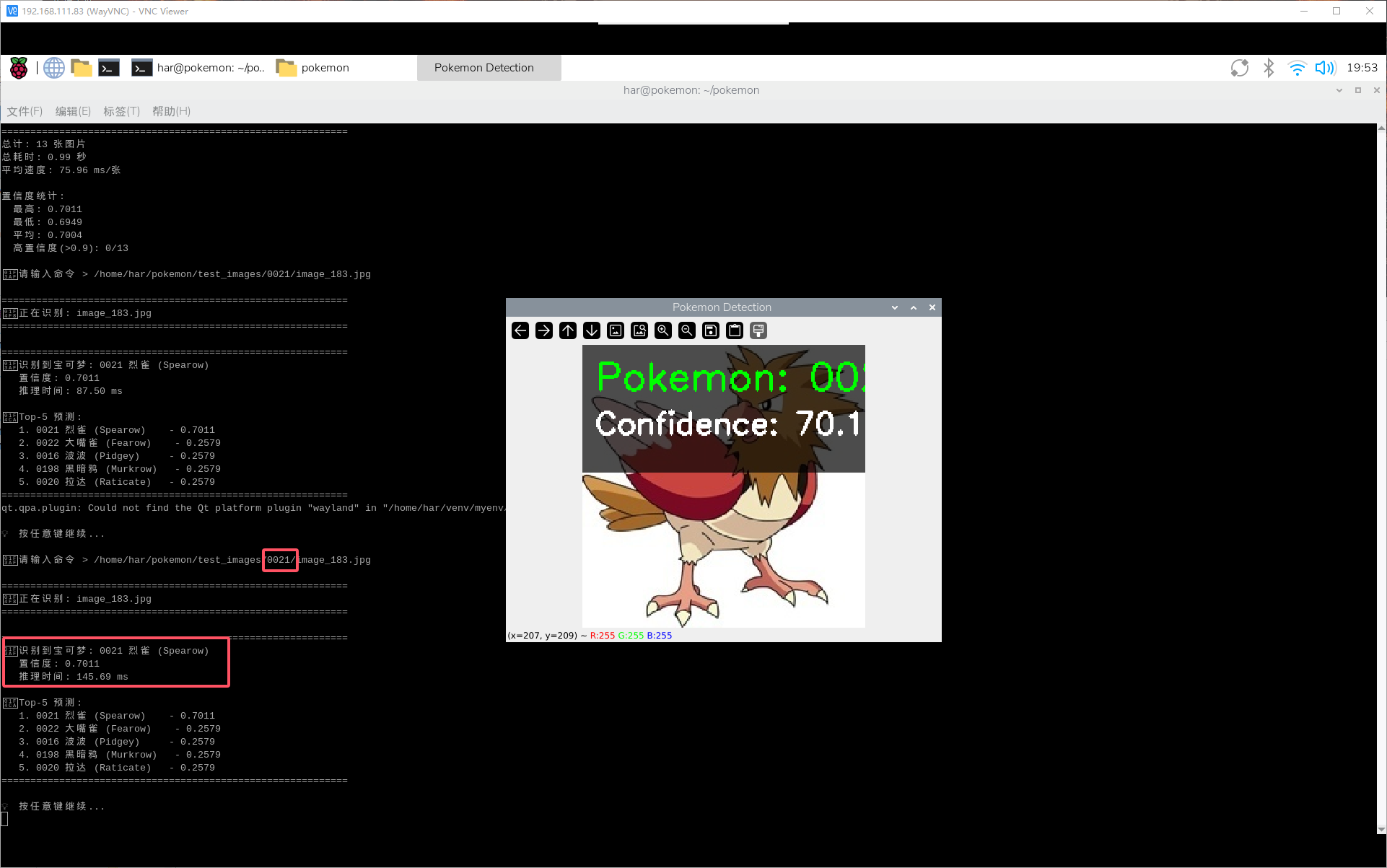
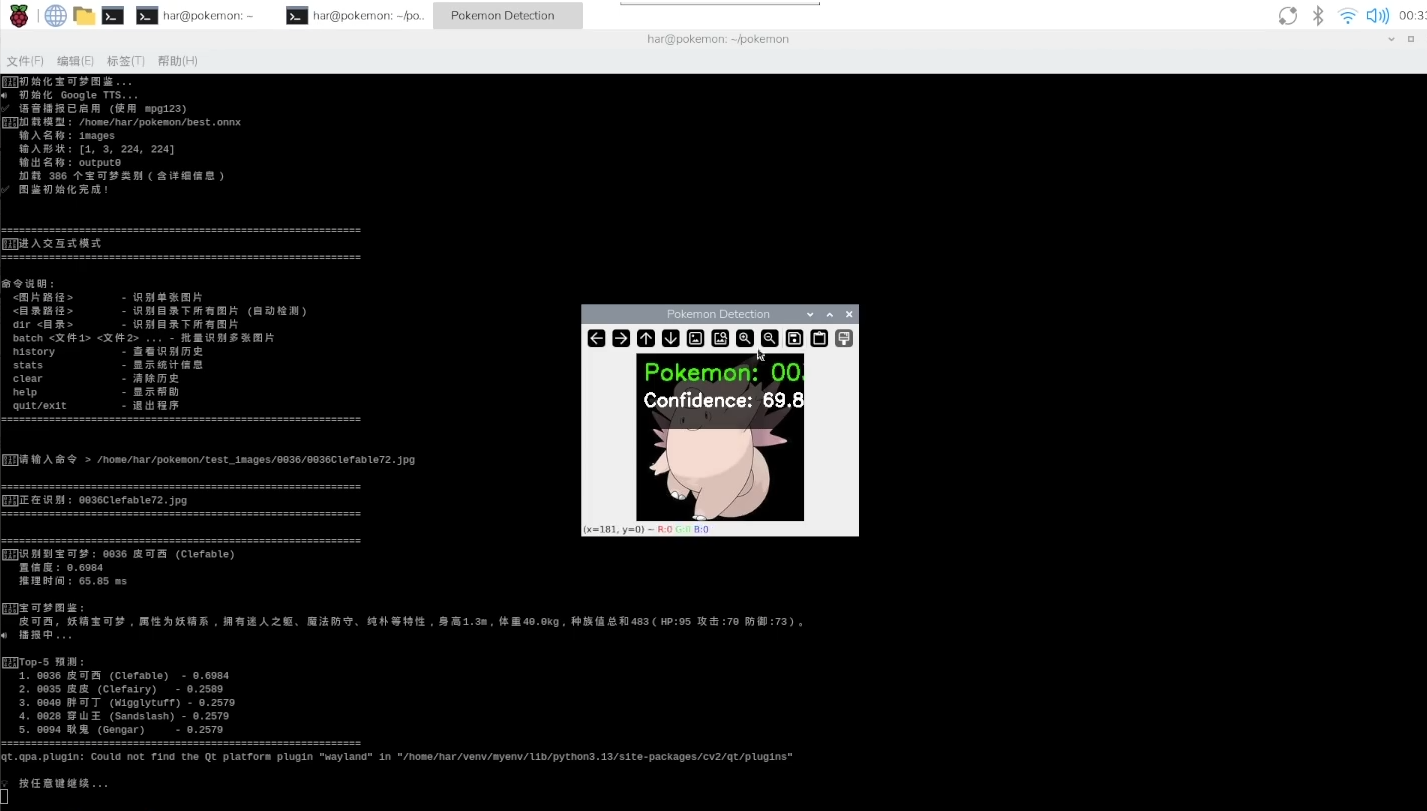
相关教程指路:
【1】同济子豪兄
【2】K210复现宝可梦图鉴
【3】pyttsx3安装
【4】树莓派安装clash
【5】树莓派4B介绍
【6】yolov8预训练权重下载及配置
【7】同济子豪兄github相关教程

鲲鹏昇腾开发者社区是面向全社会开放的“联接全球计算开发者,聚合华为+生态”的社区,内容涵盖鲲鹏、昇腾资源,帮助开发者快速获取所需的知识、经验、软件、工具、算力,支撑开发者易学、好用、成功,成为核心开发者。
更多推荐

 14
14 0
0- 0


 已为社区贡献1条内容

所有评论(0)