
S5000C下沐创B850 100G网卡性能测试
1、背景介绍
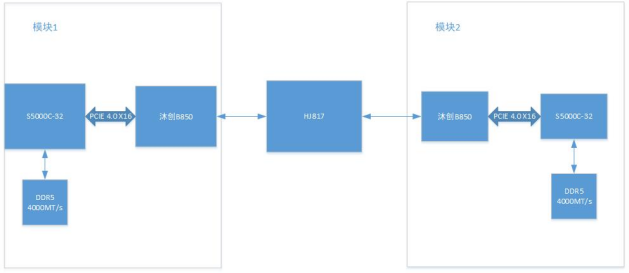
目前为了替换鲲鹏100G平台,采用飞腾S5000C-32核搭配沐创B850 100G网卡实现100G的数据传输,S5000C中使用DIE1的PCIE 4.0 x16与B850相连。S5000C适配DDR5 主频4000MT/s。两个模块之间通过盛科的100G交换芯片HJ817进行互联。示意图如下:
2、iperf性能测试
首先需要对系统接收缓存区,中断均衡性进行配置
/etc/sysctl.conf配置如下:
#
# /etc/sysctl.conf - Configuration file for setting system variables
# See /etc/sysctl.d/ for additional system variables.
# See sysctl.conf (5) for information.
#

#kernel.domainname = example.com

# Uncomment the following to stop low-level messages on console
#kernel.printk = 3 4 1 3

##############################################################3
# Functions previously found in netbase
#

# Uncomment the next two lines to enable Spoof protection (reverse-path filter)
# Turn on Source Address Verification in all interfaces to
# prevent some spoofing attacks
#net.ipv4.conf.default.rp_filter=1
#net.ipv4.conf.all.rp_filter=1

# Uncomment the next line to enable TCP/IP SYN cookies
# See http://lwn.net/Articles/277146/
# Note: This may impact IPv6 TCP sessions too
#net.ipv4.tcp_syncookies=1

# Uncomment the next line to enable packet forwarding for IPv4
#net.ipv4.ip_forward=1

# Uncomment the next line to enable packet forwarding for IPv6
#  Enabling this option disables Stateless Address Autoconfiguration
#  based on Router Advertisements for this host
#net.ipv6.conf.all.forwarding=1


###################################################################
# Additional settings - these settings can improve the network
# security of the host and prevent against some network attacks
# including spoofing attacks and man in the middle attacks through
# redirection. Some network environments, however, require that these
# settings are disabled so review and enable them as needed.
#
# Do not accept ICMP redirects (prevent MITM attacks)
#net.ipv4.conf.all.accept_redirects = 0
#net.ipv6.conf.all.accept_redirects = 0
# _or_
# Accept ICMP redirects only for gateways listed in our default
# gateway list (enabled by default)
# net.ipv4.conf.all.secure_redirects = 1
#
# Do not send ICMP redirects (we are not a router)
#net.ipv4.conf.all.send_redirects = 0
#
# Do not accept IP source route packets (we are not a router)
#net.ipv4.conf.all.accept_source_route = 0
#net.ipv6.conf.all.accept_source_route = 0
#
# Log Martian Packets
#net.ipv4.conf.all.log_martians = 1
#
net.core.rmem_max=67108864
net.core.rmem_default=67108864
net.ipv4.udp_rmem_min=67108864
net.ipv4.tcp_mem=218910000000        291910000000   437820000000
net.ipv4.tcp_rmem=67108864
net.ipv4.tcp_wmem=67108864
net.core.netdev_max_backlog=3000
#net.ipv4.tcp_fack=1
#net.ipv4.tcp_tw_reuse=0
#net.ipv4.conf.all.send_redirects=1
#net.ipv4.conf.default.accept_redirects=1
#net.ipv4.conf.default.rp_filter=1
#net.ipv4.conf.default.send_redirects=1


kernel.core_pattern = /tmp/core-%p-%e-%t
关闭irqbalance服务
systemctl disable irqbalance.service
systemctl stop irqbalance.service
需要对B850网卡进行配置,配置强制100G,接收队列为16个,中断亲核性设定16-31(因为采用的是die1的pcie,对应后面16个核)配置如下:
ethtool -s enP1p1s0f0 autoneg off speed 100000 duplex full

ethtool -s enP1p1s0f1 autoneg off speed 100000 duplex full

ethtool --set-fec enP1p1s0f0 encoding RS

ethtool --set-fec enP1p1s0f1 encoding RS


ethtool -L enP1p1s0f0 combined 16
ethtool -L enP1p1s0f1 combined 16

ethtool -G enP1p1s0f0 rx 4096
ethtool -G enP1p1s0f1 rx 4096

/opt/mcepf-1.0.0.0/scripts/set_irq_affinity 16-31 enP1p1s0f0
/opt/mcepf-1.0.0.0/scripts/set_irq_affinity 16-31 enP1p1s0f1
测试命令如下:
taskset -c 16-23 iperf -s -p 7000

taskset -c 16-23 iperf -c 192.170.1.110 -p 7000 -t 60 -i 1 -P 5 | grep SUM
sleep 1
taskset -c 16-23 iperf -c 192.180.1.110 -p 7000 -t 60 -i 1 -P 5 | grep SUM

taskset -c 16-23 iperf -s -p 7001

taskset -c 16-23 iperf -c 192.170.1.30 -p 7001 -t 60 -i 1 -P 5 | grep SUM
sleep 1
taskset -c 16-23 iperf -c 192.180.1.30 -p 7001 -t 60 -i 1 -P 5 | grep SUM
不过测试时发现五线程接收,有模块CPU性能达到100%,导致性能不达标
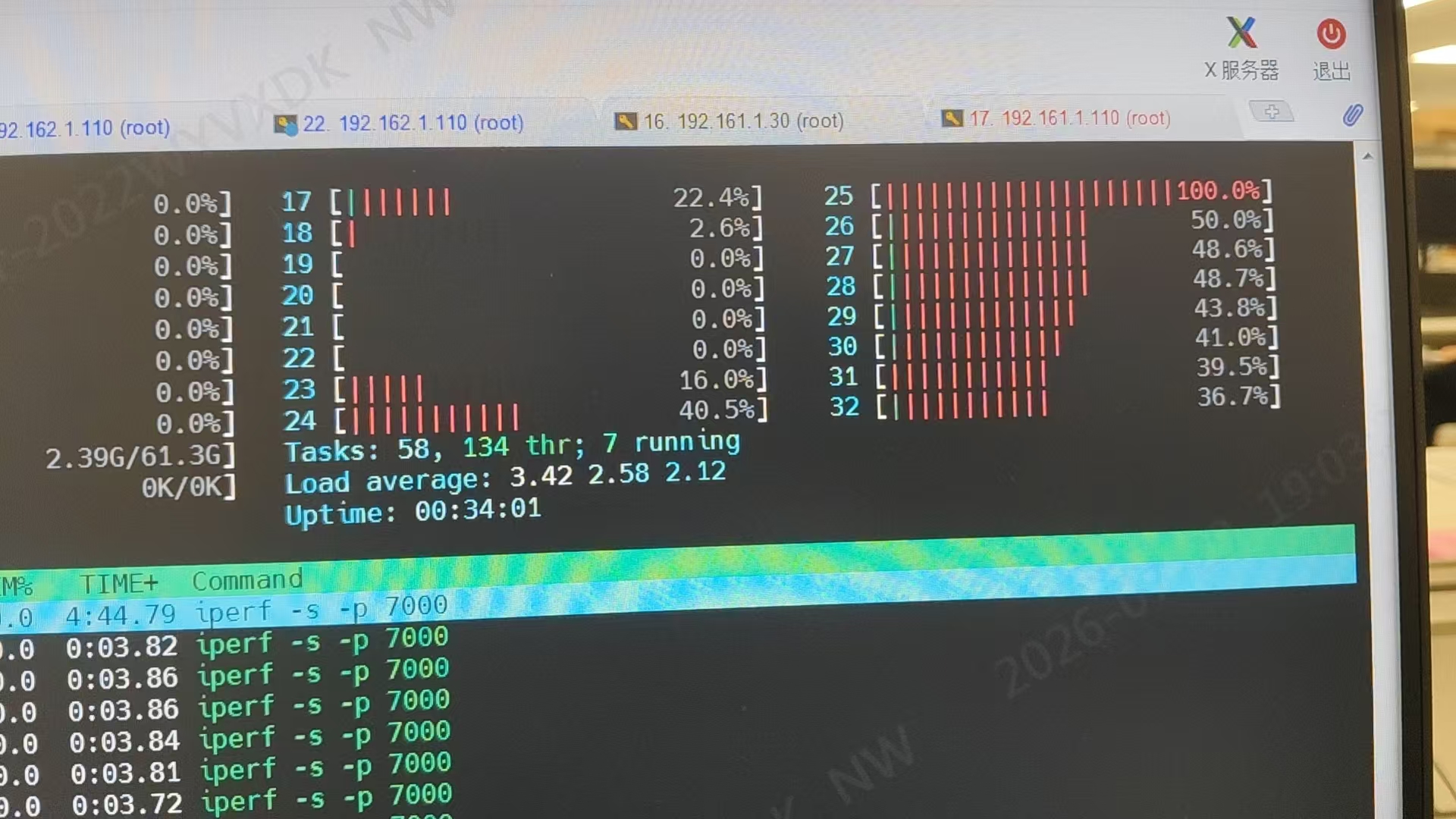
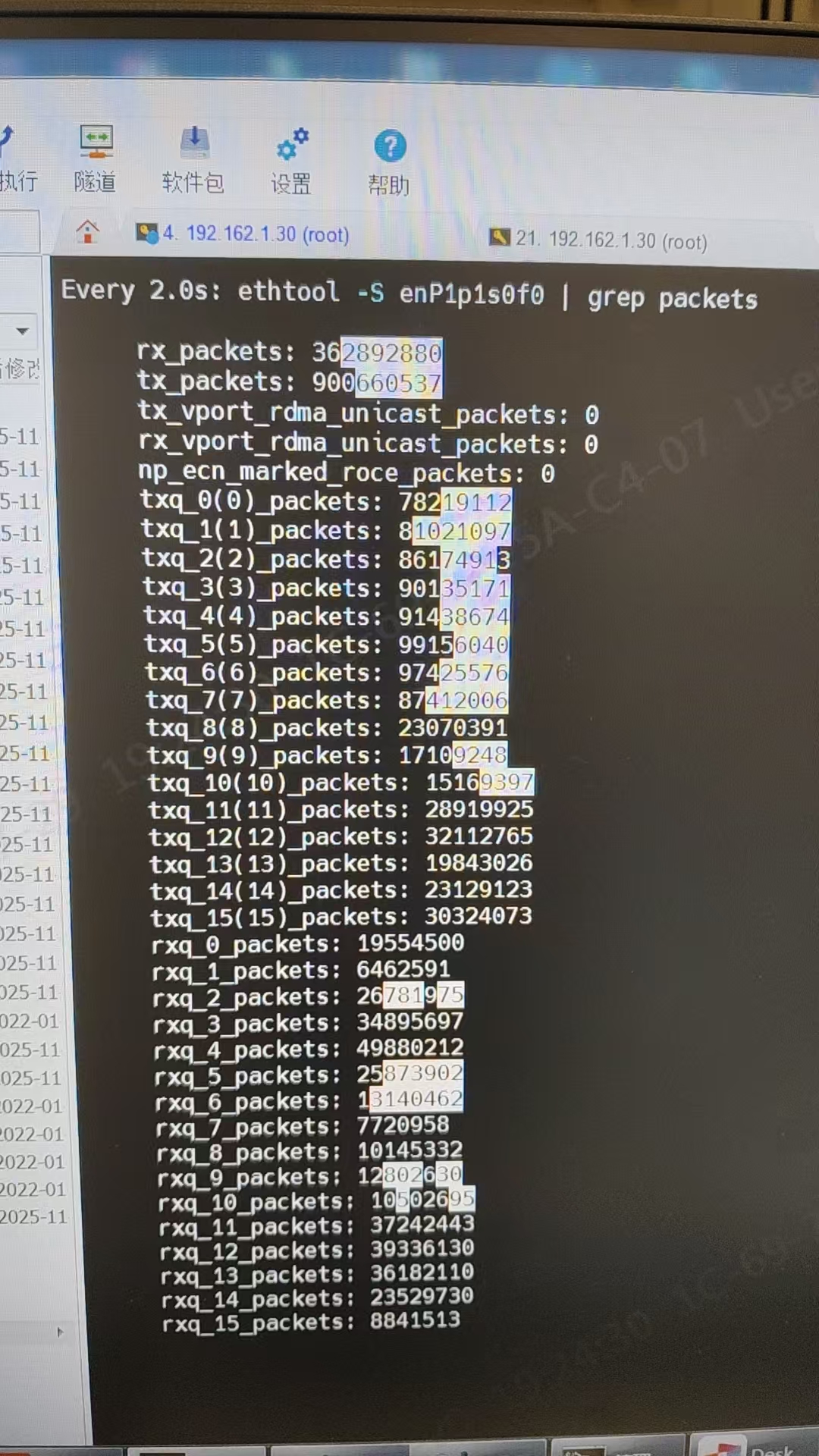
后续查看网卡接收队列,发现底层只有两个队列在收数据,导致CPU占用高
watch -d 'ethtool -S enP1p1s0f0 | grep packets'

watch -d 'ethtool -S enP1p1s0f1 | grep packets'
正常情况:
异常情况:
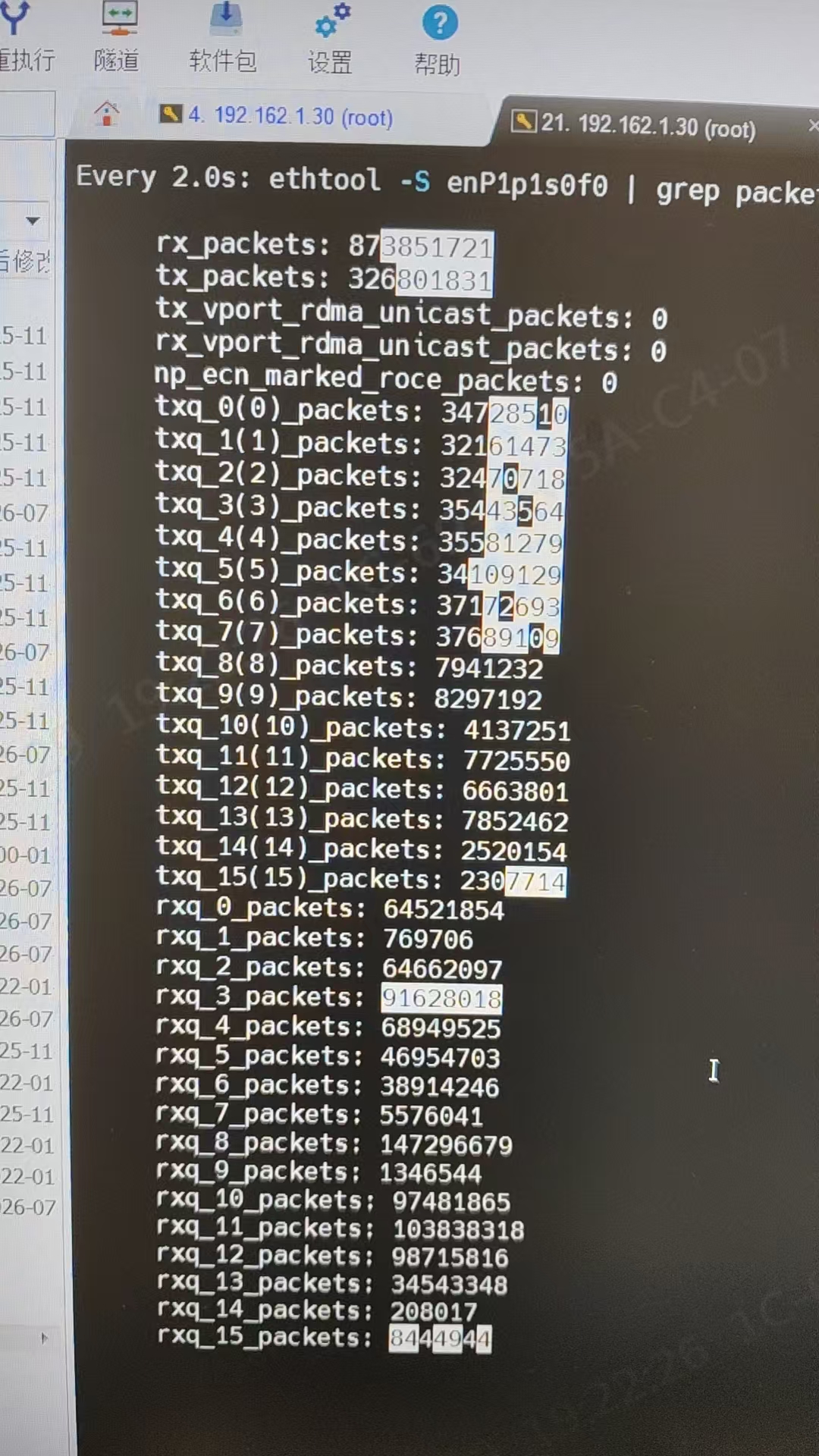
网卡厂家反馈为这种可能是多个流,正好算hash 到了同一个队列, 这样队列用的cpu就会比较多,需要调整hashkey
ethtool -X enP1p1s0f0 hkey 6a:5a:56:da:25:5b:0e:c2:41:67:25:3d:43:a3:8f:b0:d0:ca:2b:cb:ae:7b:30:b4:77:cb:2d:b0:ea:17:ef:cb:7e:6c:4e:7f:95:aa:67:4a:6a:5a:56:da:25:5b:0e:c2:41:67:25:5a

ethtool -X enP1p1s0f1 hkey 6a:5a:56:da:25:5b:0e:c2:41:67:25:3d:43:a3:8f:b0:d0:ca:2b:cb:ae:7b:30:b4:77:cb:2d:b0:ea:17:ef:cb:7e:6c:4e:7f:95:aa:67:4a:6a:5a:56:da:25:5b:0e:c2:42:67:25:5a
调整完后接收队列正常,性能测试结果如下:
[系统未激活][root@localhost ~]# taskset -c 16-23 iperf -c 192.170.1.110 -p 7000 -t 60 -i 1 -P 5 | grep SUM
[SUM]  0.0- 1.0 sec  11.2 GBytes  96.1 Gbits/sec
[SUM]  1.0- 2.0 sec  11.4 GBytes  98.2 Gbits/sec
[SUM]  2.0- 3.0 sec  11.3 GBytes  96.6 Gbits/sec
[SUM]  3.0- 4.0 sec  11.0 GBytes  94.9 Gbits/sec
[SUM]  4.0- 5.0 sec  11.0 GBytes  94.6 Gbits/sec
[SUM]  5.0- 6.0 sec  11.4 GBytes  98.1 Gbits/sec
[SUM]  6.0- 7.0 sec  11.2 GBytes  96.4 Gbits/sec
[SUM]  7.0- 8.0 sec  11.1 GBytes  95.7 Gbits/sec
[SUM]  8.0- 9.0 sec  11.3 GBytes  96.9 Gbits/sec
[SUM]  9.0-10.0 sec  11.1 GBytes  95.5 Gbits/sec
[SUM] 10.0-11.0 sec  11.3 GBytes  96.9 Gbits/sec
[SUM] 11.0-12.0 sec  11.1 GBytes  95.5 Gbits/sec
[SUM] 12.0-13.0 sec  11.2 GBytes  96.1 Gbits/sec
[SUM] 13.0-14.0 sec  11.2 GBytes  96.6 Gbits/sec
[SUM] 14.0-15.0 sec  11.1 GBytes  94.9 Gbits/sec
[SUM] 15.0-16.0 sec  11.2 GBytes  96.3 Gbits/sec
[SUM] 16.0-17.0 sec  11.0 GBytes  94.5 Gbits/sec
[SUM] 17.0-18.0 sec  11.3 GBytes  96.8 Gbits/sec
[SUM] 18.0-19.0 sec  11.3 GBytes  97.1 Gbits/sec
[SUM] 19.0-20.0 sec  11.2 GBytes  96.4 Gbits/sec
[SUM] 20.0-21.0 sec  11.0 GBytes  94.4 Gbits/sec
[SUM] 21.0-22.0 sec  11.2 GBytes  96.6 Gbits/sec
[SUM] 22.0-23.0 sec  11.3 GBytes  97.3 Gbits/sec
[SUM] 23.0-24.0 sec  11.2 GBytes  95.9 Gbits/sec
[SUM] 24.0-25.0 sec  11.1 GBytes  95.5 Gbits/sec
[SUM] 25.0-26.0 sec  11.3 GBytes  96.8 Gbits/sec
[SUM] 26.0-27.0 sec  11.2 GBytes  96.3 Gbits/sec
[SUM] 27.0-28.0 sec  10.9 GBytes  94.0 Gbits/sec
[SUM] 28.0-29.0 sec  11.1 GBytes  95.4 Gbits/sec
[SUM] 29.0-30.0 sec  10.8 GBytes  92.6 Gbits/sec
[SUM] 30.0-31.0 sec  10.9 GBytes  93.9 Gbits/sec
[SUM] 31.0-32.0 sec  10.9 GBytes  93.4 Gbits/sec
[SUM] 32.0-33.0 sec  11.1 GBytes  95.3 Gbits/sec
[SUM] 33.0-34.0 sec  11.1 GBytes  95.4 Gbits/sec
[SUM] 34.0-35.0 sec  11.0 GBytes  94.2 Gbits/sec
[SUM] 35.0-36.0 sec  11.2 GBytes  96.1 Gbits/sec
[SUM] 36.0-37.0 sec  11.0 GBytes  94.5 Gbits/sec
[SUM] 37.0-38.0 sec  11.2 GBytes  96.2 Gbits/sec
[SUM] 38.0-39.0 sec  11.3 GBytes  97.3 Gbits/sec
[SUM] 39.0-40.0 sec  11.2 GBytes  96.6 Gbits/sec
[SUM] 40.0-41.0 sec  11.0 GBytes  94.9 Gbits/sec
[SUM] 41.0-42.0 sec  11.2 GBytes  96.5 Gbits/sec
[SUM] 42.0-43.0 sec  11.1 GBytes  95.8 Gbits/sec
[SUM] 43.0-44.0 sec  10.9 GBytes  93.6 Gbits/sec
[SUM] 44.0-45.0 sec  11.2 GBytes  96.2 Gbits/sec
[SUM] 45.0-46.0 sec  11.3 GBytes  96.7 Gbits/sec
[SUM] 46.0-47.0 sec  11.1 GBytes  95.1 Gbits/sec
[SUM] 47.0-48.0 sec  10.8 GBytes  92.9 Gbits/sec
[SUM] 48.0-49.0 sec  11.2 GBytes  95.9 Gbits/sec
[SUM] 49.0-50.0 sec  11.2 GBytes  96.1 Gbits/sec
[SUM] 50.0-51.0 sec  11.4 GBytes  97.9 Gbits/sec
[SUM] 51.0-52.0 sec  11.1 GBytes  95.6 Gbits/sec
[SUM] 52.0-53.0 sec  11.2 GBytes  95.9 Gbits/sec
[SUM] 53.0-54.0 sec  11.3 GBytes  96.9 Gbits/sec
[SUM] 54.0-55.0 sec  10.8 GBytes  92.8 Gbits/sec

[系统未激活][root@localhost ~]# taskset -c 16-23 iperf -c 192.180.1.30 -p 7001 -t 60 -i 1 -P 5 | grep SUM
[SUM]  0.0- 1.0 sec  10.2 GBytes  87.9 Gbits/sec
[SUM]  1.0- 2.0 sec  11.0 GBytes  94.2 Gbits/sec
[SUM]  2.0- 3.0 sec  10.8 GBytes  92.4 Gbits/sec
[SUM]  3.0- 4.0 sec  11.0 GBytes  94.1 Gbits/sec
[SUM]  4.0- 5.0 sec  10.8 GBytes  93.2 Gbits/sec
[SUM]  5.0- 6.0 sec  10.7 GBytes  92.3 Gbits/sec
[SUM]  6.0- 7.0 sec  11.0 GBytes  94.4 Gbits/sec
[SUM]  7.0- 8.0 sec  11.2 GBytes  96.4 Gbits/sec
[SUM]  8.0- 9.0 sec  11.2 GBytes  95.9 Gbits/sec
[SUM]  9.0-10.0 sec  11.3 GBytes  96.7 Gbits/sec
[SUM] 10.0-11.0 sec  10.8 GBytes  93.2 Gbits/sec
[SUM] 11.0-12.0 sec  10.8 GBytes  93.2 Gbits/sec
[SUM] 12.0-13.0 sec  11.0 GBytes  94.8 Gbits/sec
[SUM] 13.0-14.0 sec  11.2 GBytes  96.1 Gbits/sec
[SUM] 14.0-15.0 sec  11.1 GBytes  95.4 Gbits/sec
[SUM] 15.0-16.0 sec  11.3 GBytes  97.1 Gbits/sec
[SUM] 16.0-17.0 sec  11.4 GBytes  98.3 Gbits/sec
[SUM] 17.0-18.0 sec  11.1 GBytes  95.2 Gbits/sec
[SUM] 18.0-19.0 sec  11.2 GBytes  96.3 Gbits/sec
[SUM] 19.0-20.0 sec  11.1 GBytes  95.1 Gbits/sec
[SUM] 20.0-21.0 sec  11.0 GBytes  94.4 Gbits/sec
[SUM] 21.0-22.0 sec  11.0 GBytes  94.8 Gbits/sec
[SUM] 22.0-23.0 sec  11.0 GBytes  94.3 Gbits/sec
[SUM] 23.0-24.0 sec  10.9 GBytes  93.7 Gbits/sec
[SUM] 24.0-25.0 sec  10.7 GBytes  92.0 Gbits/sec
[SUM] 25.0-26.0 sec  11.0 GBytes  94.4 Gbits/sec
[SUM] 26.0-27.0 sec  10.9 GBytes  93.7 Gbits/sec
[SUM] 27.0-28.0 sec  10.8 GBytes  93.1 Gbits/sec
[SUM] 28.0-29.0 sec  11.1 GBytes  95.4 Gbits/sec
[SUM] 29.0-30.0 sec  11.0 GBytes  94.8 Gbits/sec
[SUM] 30.0-31.0 sec  10.6 GBytes  90.8 Gbits/sec
[SUM] 31.0-32.0 sec  10.8 GBytes  92.7 Gbits/sec
[SUM] 32.0-33.0 sec  11.2 GBytes  95.8 Gbits/sec
[SUM] 33.0-34.0 sec  11.3 GBytes  97.0 Gbits/sec
[SUM] 34.0-35.0 sec  11.2 GBytes  96.3 Gbits/sec
[SUM] 35.0-36.0 sec  11.0 GBytes  94.2 Gbits/sec
[SUM] 36.0-37.0 sec  10.7 GBytes  91.6 Gbits/sec
[SUM] 37.0-38.0 sec  10.6 GBytes  91.3 Gbits/sec
[SUM] 38.0-39.0 sec  11.0 GBytes  94.9 Gbits/sec
[SUM] 39.0-40.0 sec  10.5 GBytes  90.6 Gbits/sec
[SUM] 40.0-41.0 sec  10.8 GBytes  93.1 Gbits/sec
[SUM] 41.0-42.0 sec  11.0 GBytes  94.6 Gbits/sec
[SUM] 42.0-43.0 sec  10.6 GBytes  91.2 Gbits/sec
[SUM] 43.0-44.0 sec  11.1 GBytes  95.6 Gbits/sec
[SUM] 44.0-45.0 sec  11.2 GBytes  95.9 Gbits/sec
[SUM] 45.0-46.0 sec  10.9 GBytes  93.5 Gbits/sec
[SUM] 46.0-47.0 sec  10.9 GBytes  93.6 Gbits/sec
[SUM] 47.0-48.0 sec  10.9 GBytes  94.0 Gbits/sec
[SUM] 48.0-49.0 sec  10.7 GBytes  91.9 Gbits/sec
[SUM] 49.0-50.0 sec  10.8 GBytes  92.4 Gbits/sec
[SUM] 50.0-51.0 sec  11.1 GBytes  94.9 Gbits/sec
[SUM] 51.0-52.0 sec  11.0 GBytes  94.7 Gbits/sec
[SUM] 52.0-53.0 sec  10.7 GBytes  92.1 Gbits/sec
[SUM] 53.0-54.0 sec  10.9 GBytes  93.5 Gbits/sec
[SUM] 54.0-55.0 sec  10.6 GBytes  91.4 Gbits/sec
[SUM] 55.0-56.0 sec  10.9 GBytes  93.5 Gbits/sec
[SUM] 56.0-57.0 sec  10.9 GBytes  93.9 Gbits/sec
[SUM] 57.0-58.0 sec  11.0 GBytes  94.7 Gbits/sec
[SUM] 58.0-59.0 sec  10.6 GBytes  90.8 Gbits/sec
[SUM] 59.0-60.0 sec  10.5 GBytes  90.6 Gbits/sec
[SUM]  0.0-60.0 sec   656 GBytes  93.9 Gbits/sec
3、RDMA性能测试
RDMA测试前还是先按照标准网卡配置进行处理,然后再加载驱动添加环境变量
rmmod mrdma

modprobe ib_core
modprobe ib_uverbs

cd /opt/mrdma-1.0.0.0-rc11.aarch64/kernel/mrdma/

insmod mrdma.ko

export LD_LIBRARY_PATH=/opt/mrdma-1.0.0.0-rc11.aarch64/rdma-core-39.0/build/lib
因为采用的die 1的pcie,需要使用numctl -i 1进行测试,程序的内存会从Node 1开始交错分配,相当一部分内存被分配在Node 1上。测试命令如下:
numactl -i 1 ib_write_bw -F -d mrdma0 -a -n 1000 -N --report_gbits

numactl -i 1 ib_write_bw -F -d mrdma0 -a -n 1000 -N --report_gbits 192.170.1.30


numactl -i 1 ib_read_bw -F -d mrdma0 -a -n 1000 -N --report_gbits

numactl -i 1 ib_read_bw -F -d mrdma0 -a -n 1000 -N --report_gbits 192.170.1.30


numactl -i 1 ib_send_bw -F -d mrdma0 -a -n 1000 -N --report_gbits

numactl -i 1 ib_send_bw -F -d mrdma0 -a -n 1000 -N --report_gbits 192.170.1.30


numactl -i 1 ib_write_lat -F -d mrdma0 -a -n 1000

numactl -i 1 ib_write_lat -F -d mrdma0 -a -n 1000 192.170.1.30


numactl -i 1 ib_read_lat -F -d mrdma0 -a -n 1000

numactl -i 1 ib_read_lat -F -d mrdma0 -a -n 1000 192.170.1.30


numactl -i 1 ib_send_lat -F -d mrdma0 -a -n 1000

numactl -i 1 ib_send_lat -F -d mrdma0 -a -n 1000 192.170.1.30
测试结果如下:
带宽测试
[系统未激活][root@localhost mrdma]# numactl -i 1 ib_write_bw -F -d mrdma0 -a -n 1000 -N --report_gbits 192.170.1.30
---------------------------------------------------------------------------------------
                    RDMA_Write BW Test
 Dual-port       : OFF          Device         : mrdma0
 Number of qps   : 1            Transport type : IB
 Connection type : RC           Using SRQ      : OFF
 TX depth        : 128
 CQ Moderation   : 100
 Mtu             : 4096[B]
 Link type       : Ethernet
 GID index       : 1
 Max inline data : 0[B]
 rdma_cm QPs     : OFF
 Data ex. method : Ethernet
---------------------------------------------------------------------------------------
 local address: LID 0000 QPN 0x0007 PSN 0x928428 RKey 0x000407 VAddr 0x00ffff8b3f1000
 GID: 00:00:00:00:00:00:00:00:00:00:255:255:192:170:01:110
 remote address: LID 0000 QPN 0x0007 PSN 0xf33f2c RKey 0x0004d7 VAddr 0x00ffff7f8d6000
 GID: 00:00:00:00:00:00:00:00:00:00:255:255:192:170:01:30
---------------------------------------------------------------------------------------
 #bytes     #iterations    BW peak[Gb/sec]    BW average[Gb/sec]   MsgRate[Mpps]
 2          1000           0.000000            0.041135            2.570949
 4          1000           0.000000            0.085436            2.669870
 8          1000             0.00               0.17               2.685912
 16         1000             0.00               0.34               2.660378
 32         1000             0.00               0.68               2.640883
 64         1000             0.00               1.34               2.615633
 128        1000             0.00               2.65               2.586351
 256        1000             0.00               5.26               2.568232
 512        1000             0.00               10.19              2.488627
 1024       1000             0.00               19.65              2.399096
 2048       1000             0.00               34.65              2.115172
 4096       1000             0.00               53.94              1.646115
 8192       1000             0.00               85.16              1.299491
 16384      1000             0.00               97.26              0.742054
 32768      1000             0.00               97.65              0.372496
 65536      1000             0.00               97.84              0.186616
 131072     1000             0.00               97.94              0.093400
 262144     1000             0.00               97.99              0.046723
 524288     1000             0.00               98.01              0.023367
 1048576    1000             0.00               98.02              0.011685
 2097152    1000             0.00               98.03              0.005843
 4194304    1000             0.00               98.03              0.002922
 8388608    1000             0.00               98.03              0.001461
---------------------------------------------------------------------------------------

[系统未激活][root@localhost mrdma]# numactl -i 1 ib_read_bw -F -d mrdma0 -a -n 1000 -N --report_gbits 192.170.1.30
---------------------------------------------------------------------------------------
Device not recognized to implement inline feature. Disabling it
---------------------------------------------------------------------------------------
                    RDMA_Read BW Test
 Dual-port       : OFF          Device         : mrdma0
 Number of qps   : 1            Transport type : IB
 Connection type : RC           Using SRQ      : OFF
 TX depth        : 128
 CQ Moderation   : 100
 Mtu             : 4096[B]
 Link type       : Ethernet
 GID index       : 1
 Outstand reads  : 16
 rdma_cm QPs     : OFF
 Data ex. method : Ethernet
---------------------------------------------------------------------------------------
 local address: LID 0000 QPN 0x0006 PSN 0xd3d6af OUT 0x10 RKey 0x00032f VAddr 0x00ffff808e8000
 GID: 00:00:00:00:00:00:00:00:00:00:255:255:192:170:01:110
 remote address: LID 0000 QPN 0x0006 PSN 0x9625f6 OUT 0x10 RKey 0x00036d VAddr 0x00ffffbe09e000
 GID: 00:00:00:00:00:00:00:00:00:00:255:255:192:170:01:30
---------------------------------------------------------------------------------------
 #bytes     #iterations    BW peak[Gb/sec]    BW average[Gb/sec]   MsgRate[Mpps]
 2          1000           0.000000            0.039723            2.482666
 4          1000           0.000000            0.083343            2.604463
 8          1000             0.00               0.17               2.611514
 16         1000             0.00               0.34               2.620269
 32         1000             0.00               0.66               2.591209
 64         1000             0.00               1.34               2.617651
 128        1000             0.00               2.66               2.600048
 256        1000             0.00               5.08               2.481669
 512        1000             0.00               9.94               2.426181
 1024       1000             0.00               18.97              2.315514
 2048       1000             0.00               33.66              2.054233
 4096       1000             0.00               53.08              1.619879
 8192       1000             0.00               83.65              1.276348
 16384      1000             0.00               97.29              0.742257
 32768      1000             0.00               97.66              0.372532
 65536      1000             0.00               97.84              0.186623
 131072     1000             0.00               97.94              0.093402
 262144     1000             0.00               97.99              0.046723
 524288     1000             0.00               98.01              0.023367
 1048576    1000             0.00               98.02              0.011685
 2097152    1000             0.00               98.03              0.005843
 4194304    1000             0.00               98.03              0.002922
 8388608    1000             0.00               98.03              0.001461

[系统未激活][root@localhost mrdma]# numactl -i 1 ib_send_bw -F -d mrdma0 -a -n 1000 -N --report_gbits 192.170.1.30
---------------------------------------------------------------------------------------
                    Send BW Test
 Dual-port       : OFF          Device         : mrdma0
 Number of qps   : 1            Transport type : IB
 Connection type : RC           Using SRQ      : OFF
 TX depth        : 128
 CQ Moderation   : 100
 Mtu             : 4096[B]
 Link type       : Ethernet
 GID index       : 1
 Max inline data : 0[B]
 rdma_cm QPs     : OFF
 Data ex. method : Ethernet
---------------------------------------------------------------------------------------
 local address: LID 0000 QPN 0x0008 PSN 0xbe6a43
 GID: 00:00:00:00:00:00:00:00:00:00:255:255:192:170:01:110
 remote address: LID 0000 QPN 0x0008 PSN 0xe5e9e0
 GID: 00:00:00:00:00:00:00:00:00:00:255:255:192:170:01:30
---------------------------------------------------------------------------------------
 #bytes     #iterations    BW peak[Gb/sec]    BW average[Gb/sec]   MsgRate[Mpps]
 2          1000           0.000000            0.021417            1.338575
 4          1000           0.000000            0.043769            1.367770
 8          1000           0.000000            0.087331            1.364545
 16         1000             0.00               0.18               1.367481
 32         1000             0.00               0.35               1.365674
 64         1000             0.00               0.70               1.363640
 128        1000             0.00               1.38               1.348943
 256        1000             0.00               2.72               1.329307
 512        1000             0.00               5.47               1.335757
 1024       1000             0.00               11.04              1.347494
 2048       1000             0.00               21.87              1.334610
 4096       1000             0.00               40.35              1.231459
 8192       1000             0.00               70.40              1.074200
 16384      1000             0.00               75.12              0.573139
 32768      1000             0.00               89.76              0.342422
 65536      1000             0.00               97.75              0.186436
 131072     1000             0.00               97.94              0.093402
 262144     1000             0.00               97.99              0.046723
 524288     1000             0.00               98.01              0.023367
 1048576    1000             0.00               98.02              0.011685
 2097152    1000             0.00               98.03              0.005843
 4194304    1000             0.00               98.03              0.002922
 8388608    1000             0.00               98.03              0.001461
时延测试
[系统未激活][root@localhost mrdma]# numactl -i 1 ib_write_lat -F -d mrdma0 -a -n 1000 192.170.1.30
---------------------------------------------------------------------------------------
RDMA_Write Latency Test
Dual-port : OFF Device : mrdma0
Number of qps : 1 Transport type : IB
Connection type : RC Using SRQ : OFF
TX depth : 1
Mtu : 4096[B]
Link type : Ethernet
GID index : 1
Max inline data : 0[B]
rdma_cm QPs : OFF
Data ex. method : Ethernet
---------------------------------------------------------------------------------------
local address: LID 0000 QPN 0x0009 PSN 0x62735b RKey 0x000601 VAddr 0x00ffffaae0e000
GID: 00:00:00:00:00:00:00:00:00:00:255:255:192:170:01:110
remote address: LID 0000 QPN 0x0009 PSN 0xa559a9 RKey 0x0006ac VAddr 0x00ffffa13c0000
GID: 00:00:00:00:00:00:00:00:00:00:255:255:192:170:01:30
---------------------------------------------------------------------------------------
#bytes #iterations t_min[usec] t_max[usec] t_typical[usec] t_avg[usec] t_stdev[usec] 99% percentile[usec] 99.9% percentile[usec]
2 1000 5.29 10.07 5.43 5.45 0.13 5.59 10.07
4 1000 5.37 6.71 5.43 5.45 0.05 5.62 6.71
8 1000 5.39 6.17 5.44 5.46 0.04 5.59 6.17
16 1000 5.37 6.06 5.46 5.46 0.04 5.59 6.06
32 1000 5.35 5.90 5.44 5.46 0.04 5.57 5.90
64 1000 5.39 6.83 5.47 5.48 0.05 5.64 6.83
128 1000 5.52 5.91 5.60 5.60 0.03 5.69 5.91
256 1000 5.59 7.43 5.65 5.67 0.06 5.85 7.43
512 1000 5.71 6.15 5.79 5.79 0.04 5.91 6.15
1024 1000 5.91 7.46 6.00 6.00 0.04 6.11 7.46
2048 1000 6.40 8.77 6.48 6.48 0.04 6.60 8.77
4096 1000 7.44 8.03 7.49 7.50 0.04 7.62 8.03
8192 1000 7.79 8.62 7.90 7.90 0.06 8.04 8.62
16384 1000 8.53 9.68 8.68 8.69 0.08 8.85 9.68
32768 1000 9.87 10.78 10.01 10.02 0.07 10.18 10.78
65536 1000 12.40 14.20 12.49 12.51 0.08 12.70 14.20
131072 1000 17.77 19.01 17.91 17.93 0.08 18.13 19.01
262144 1000 28.46 29.31 28.55 28.57 0.07 28.74 29.31
524288 1000 49.77 50.10 49.88 49.88 0.06 50.06 50.10
1048576 1000 92.54 93.36 92.66 92.67 0.07 92.89 93.36
2097152 1000 178.20 178.74 178.46 178.47 0.10 178.70 178.74
4194304 1000 349.69 350.24 349.89 349.91 0.08 350.13 350.24
8388608 1000 691.73 692.23 691.89 691.91 0.09 692.14 692.23
---------------------------------------------------------------------------------------
[系统未激活][root@localhost mrdma]# numactl -i 1 ib_read_lat -F -d mrdma0 -a -n 1000
---------------------------------------------------------------------------------------
Device not recognized to implement inline feature. Disabling it
************************************
* Waiting for client to connect... *
************************************
^C
[系统未激活][root@localhost mrdma]# numactl -i 1 ib_read_lat -F -d mrdma0 -a -n 1000 192.170.1.30
---------------------------------------------------------------------------------------
Device not recognized to implement inline feature. Disabling it
---------------------------------------------------------------------------------------
RDMA_Read Latency Test
Dual-port : OFF Device : mrdma0
Number of qps : 1 Transport type : IB
Connection type : RC Using SRQ : OFF
TX depth : 1
Mtu : 4096[B]
Link type : Ethernet
GID index : 1
Outstand reads : 16
rdma_cm QPs : OFF
Data ex. method : Ethernet
---------------------------------------------------------------------------------------
local address: LID 0000 QPN 0x000a PSN 0xb91191 OUT 0x10 RKey 0x00070b VAddr 0x00ffff90505000
GID: 00:00:00:00:00:00:00:00:00:00:255:255:192:170:01:110
remote address: LID 0000 QPN 0x000a PSN 0xe3203d OUT 0x10 RKey 0x000700 VAddr 0x00ffff9b19a000
GID: 00:00:00:00:00:00:00:00:00:00:255:255:192:170:01:30
---------------------------------------------------------------------------------------
#bytes #iterations t_min[usec] t_max[usec] t_typical[usec] t_avg[usec] t_stdev[usec] 99% percentile[usec] 99.9% percentile[usec]
2 1000 7.16 14.60 7.43 7.44 0.19 8.36 14.60
4 1000 7.16 10.77 7.46 7.45 0.19 8.41 10.77
8 1000 7.16 9.76 7.48 7.45 0.19 8.35 9.76
16 1000 7.16 8.80 7.48 7.45 0.19 8.33 8.80
32 1000 7.17 9.07 7.48 7.46 0.19 8.36 9.07
64 1000 7.17 9.87 7.48 7.46 0.19 8.35 9.87
128 1000 7.21 9.43 7.53 7.51 0.19 8.41 9.43
256 1000 7.32 9.00 7.60 7.57 0.19 8.47 9.00
512 1000 7.40 10.41 7.76 7.73 0.18 8.58 10.41
1024 1000 7.66 9.56 7.95 7.94 0.19 8.83 9.56
2048 1000 8.10 10.06 8.43 8.41 0.18 9.35 10.06
4096 1000 9.17 11.26 9.49 9.49 0.19 10.43 11.26
8192 1000 9.55 11.39 9.81 9.83 0.19 10.75 11.39
16384 1000 10.21 11.79 10.59 10.60 0.20 11.48 11.79
32768 1000 11.56 13.12 11.85 11.85 0.21 12.77 13.12
65536 1000 14.21 16.35 14.57 14.59 0.20 15.47 16.35
131072 1000 19.57 21.02 19.88 19.89 0.19 20.73 21.02
262144 1000 30.31 31.96 30.65 30.66 0.22 31.55 31.96
524288 1000 51.61 53.50 52.00 52.01 0.21 52.96 53.50
1048576 1000 94.51 96.95 94.86 94.88 0.23 95.88 96.95
2097152 1000 180.08 182.04 180.44 180.47 0.24 181.43 182.04
4194304 1000 351.25 353.09 351.83 351.86 0.24 352.86 353.09
8388608 1000 693.42 695.03 693.89 693.90 0.21 694.87 695.03
---------------------------------------------------------------------------------------
[系统未激活][root@localhost mrdma]# numactl -i 1 ib_send_lat -F -d mrdma0 -a -n 1000 192.170.1.30
---------------------------------------------------------------------------------------
Send Latency Test
Dual-port : OFF Device : mrdma0
Number of qps : 1 Transport type : IB
Connection type : RC Using SRQ : OFF
TX depth : 1
Mtu : 4096[B]
Link type : Ethernet
GID index : 1
Max inline data : 0[B]
rdma_cm QPs : OFF
Data ex. method : Ethernet
---------------------------------------------------------------------------------------
local address: LID 0000 QPN 0x000b PSN 0x3e5190
GID: 00:00:00:00:00:00:00:00:00:00:255:255:192:170:01:110
remote address: LID 0000 QPN 0x000b PSN 0xd4f363
GID: 00:00:00:00:00:00:00:00:00:00:255:255:192:170:01:30
---------------------------------------------------------------------------------------
#bytes #iterations t_min[usec] t_max[usec] t_typical[usec] t_avg[usec] t_stdev[usec] 99% percentile[usec] 99.9% percentile[usec]
2 1000 5.77 12.13 5.95 5.96 0.18 6.20 12.13
4 1000 5.78 8.14 5.97 5.96 0.10 6.19 8.14
8 1000 5.80 9.52 5.97 5.97 0.11 6.19 9.52
16 1000 5.79 15.73 5.97 5.99 0.32 6.25 15.73
32 1000 5.79 9.63 5.97 5.98 0.13 6.26 9.63
64 1000 5.80 7.80 5.99 5.99 0.11 6.23 7.80
128 1000 5.84 9.23 6.02 6.03 0.12 6.32 9.23
256 1000 5.90 8.97 6.08 6.09 0.14 6.34 8.97
512 1000 6.02 9.95 6.21 6.21 0.11 6.45 9.95
1024 1000 6.25 8.12 6.45 6.46 0.10 6.69 8.12
2048 1000 6.73 10.22 6.91 6.92 0.12 7.18 10.22
4096 1000 7.78 10.62 8.00 8.01 0.12 8.28 10.62
8192 1000 7.96 9.39 8.18 8.18 0.11 8.46 9.39
16384 1000 8.51 10.90 8.74 8.74 0.12 9.02 10.90
32768 1000 9.62 15.43 9.88 9.89 0.18 10.22 15.43
65536 1000 12.24 17.51 12.51 12.52 0.14 12.78 17.51
131072 1000 17.59 18.74 17.83 17.83 0.11 18.11 18.74
262144 1000 28.34 30.16 28.60 28.60 0.13 28.94 30.16
524288 1000 49.67 50.73 49.91 49.91 0.11 50.16 50.73
1048576 1000 92.46 93.53 92.72 92.72 0.11 92.99 93.53
2097152 1000 178.22 179.87 178.62 178.63 0.13 178.94 179.87
4194304 1000 349.51 351.12 349.79 349.80 0.12 350.07 351.12
8388608 1000 691.83 692.91 692.11 692.12 0.12 692.43 692.91
---------------------------------------------------------------------------------------
4、总结
目前B850网卡需要配置hashkey这一点存在bug,待后续解决。
根据你的描述——“多股数据流计算Hash后落到了同一个队列,导致该队列CPU负载偏高,而重新配置Hash Key后问题解决”——这几乎可以肯定是RSS(接收端缩放)哈希算法的一个经典缺陷,通常被称为 “RSS Hash极化”(Hash Polarization) 或 “RSS Toeplitz哈希碰撞”。
它不是网卡固件崩溃那种“硬Bug”,而是算法设计或配置策略上的“软缺陷”。
根据你的描述(更换Key就正常),可以明确归类为以下两种场景,你可以据此判断责任方:
场景A(大概率):驱动配置策略的“惰性”问题
很多网卡驱动(特别是早期适配ARM架构的驱动)在初始化时,直接烧录了网卡硬件ROM里的默认Key,或者使用了一个固定的系统全局Key。
如果该Key在你特定的业务流量特征(如源IP为连续段、端口递增)下恰好产生严重的Hash碰撞,就表现为负载不均。这属于驱动没有针对实际流量模式做自适应优化,但不算严格意义的“功能性Bug”,只能说“策略僵化”。
你重新配置的Key起到了“打乱”原始数据模式的作用,使Hash结果重新随机化。
场景B(小概率):Toeplitz算法的“固件实现缺陷”
极少数固件版本在实现Toeplitz哈希时,对某些比特位的处理存在截断或移位错误,导致特定模式下的熵值(随机性)急剧降低。
如果更新网卡固件后,默认Key下的负载均衡明显改善,那么可以归为固件Bug。如果更换Key前问题复现,更换Key后消失,则固件Bug嫌疑更大。

鲲鹏昇腾开发者社区是面向全社会开放的“联接全球计算开发者,聚合华为+生态”的社区,内容涵盖鲲鹏、昇腾资源,帮助开发者快速获取所需的知识、经验、软件、工具、算力,支撑开发者易学、好用、成功,成为核心开发者。
更多推荐


 10
10 0
0- 0


 已为社区贡献5条内容

所有评论(0)