
YOLO26 模型转换成 ONNX 再转化成 OM 模型实战
本文旨在记录模型转化的过程以及踩过的坑。想把 YOLO26 训练出来的模型到 昇腾 310B4 的板子上运行。
YOLO26 模型转换成 ONNX 再转化成 OM 模型实战
本文旨在记录模型转化的过程以及踩过的坑。
想把 YOLO26 训练出来的模型到 昇腾 310B4 的板子上运行。
YOLO26 训练出来的模型转化成 ONNX
这一个步骤非常简单,直接有官网的转换案例,直接转就好了。[官网地址](使用 Ultralytics YOLO 进行模型导出 | Ultralytics 文档)
引入案例
-
首先你要有一个训练好的模型,通常你用
YOLO26训练好的话会有一个best.pt的权重文件。 -
加载模型
-
导出模型
这里说一嘴,感觉 ultralytics 公司还是很屌的,把文档和说明做的非常好,有好。
代码:
from ultralytics import YOLO

# Load a model
model = YOLO("yolo26n.pt")  # load an official model 这里如果已经有训练好的模型,这一行都可以不用写
model = YOLO("path/to/best.pt")  # load a custom-trained model 加载自己训练好的模型就好了。

# Export the model
model.export(format="onnx") # 真正的是需要配置这个参数,埋个坑,直接这样运行以后导出的结果是不能够运行的。
- 上面的代码运行结束以后,就会在
path/to/best.pt路径下出现best.onnx这个文件
导出参数说明
根据官网的说明,导出 onnx 模型只需要用到的参数只有 imgsz, half, dynamic, simplify, opset, nms, batch, device 所以我们也只看这些参数的说明。
| 参数 | 类型 | 默认值 | 描述 |
|---|---|---|---|
format |
str |
'torchscript' |
导出模型的目标格式,如 'onnx'、'torchscript'、'engine' (TensorRT) 等。每种格式都能实现与不同部署环境的兼容性。 |
imgsz |
int 或 tuple |
640 |
Desired image size for the model input. Can be an integer for square images (e.g., 640 for 640×640) or a tuple (height, width) for specific dimensions. |
half |
bool |
False |
启用 FP16(半精度)量化,减小模型大小,并可能在支持的硬件上加速推理。不兼容 INT8 量化或仅 CPU 导出。仅适用于特定格式,例如 ONNX(见下文)。 |
dynamic |
bool |
False |
允许 TorchScript、ONNX、OpenVINO、TensorRT 和 CoreML 导出支持动态输入尺寸,增强了处理不同图像尺寸的灵活性。当在 TensorRT 中使用 INT8 时,此项自动设置为 True。如果设置了这个,那么在使用atc 的时候就可以变化的设置batch_size。 |
simplify |
bool |
True |
使用 onnxslim 简化 ONNX 导出的模型图,这可能会提高性能以及与推理引擎的兼容性。 |
opset |
int |
None |
指定 ONNX opset 版本,以兼容不同的 ONNX 解析器和运行时。若未设置,则使用最新支持的版本。很重要的一个参数,这个参数决定了,atc 能否转化,要看华为昇腾官网支持 onnx 导出版本支持到多少,下面给一个参考 |
nms |
bool |
False |
在受支持时为导出的模型添加非极大值抑制 (NMS)(参见导出格式),提高检测后处理的效率。不适用于端到端模型。 |
batch |
int |
1 |
指定导出模型的批量推理大小,或导出模型在 predict 模式下并发处理的最大图像数量。对于 Edge TPU 导出,此值自动设置为 1。如果设置了这个,那么在 atc 导出的时候一定要和设置的一致,不然会尺寸不匹配,会出错。 |
device |
str |
None |
指定导出的设备:GPU (device=0)、CPU (device=cpu)、Apple 芯片的 MPS (device=mps)、华为昇腾 NPU (device=npu 或 device=npu:0),或 NVIDIA Jetson 的 DLA (device=dla:0 或 device=dla:1)。TensorRT 导出会自动使用 GPU。 |
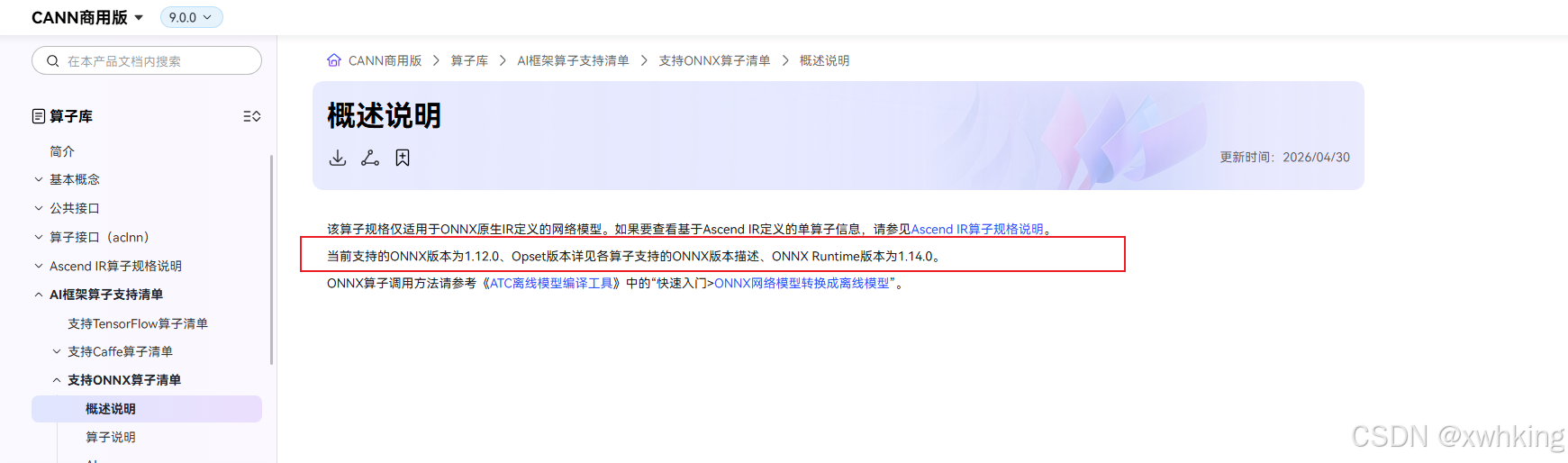
opset 华为支持参考:
通过查看昇腾
CANN对ONNX的支持 链接====>https://www.hiascend.com/document/detail/zh/canncommercial/900/API/aolapi/operatorlist_00177.html通过查看
ONNX对应的ONNX opset链接 ====> https://runtime.onnx.org.cn/docs/reference/compatibility.html这里贴个图
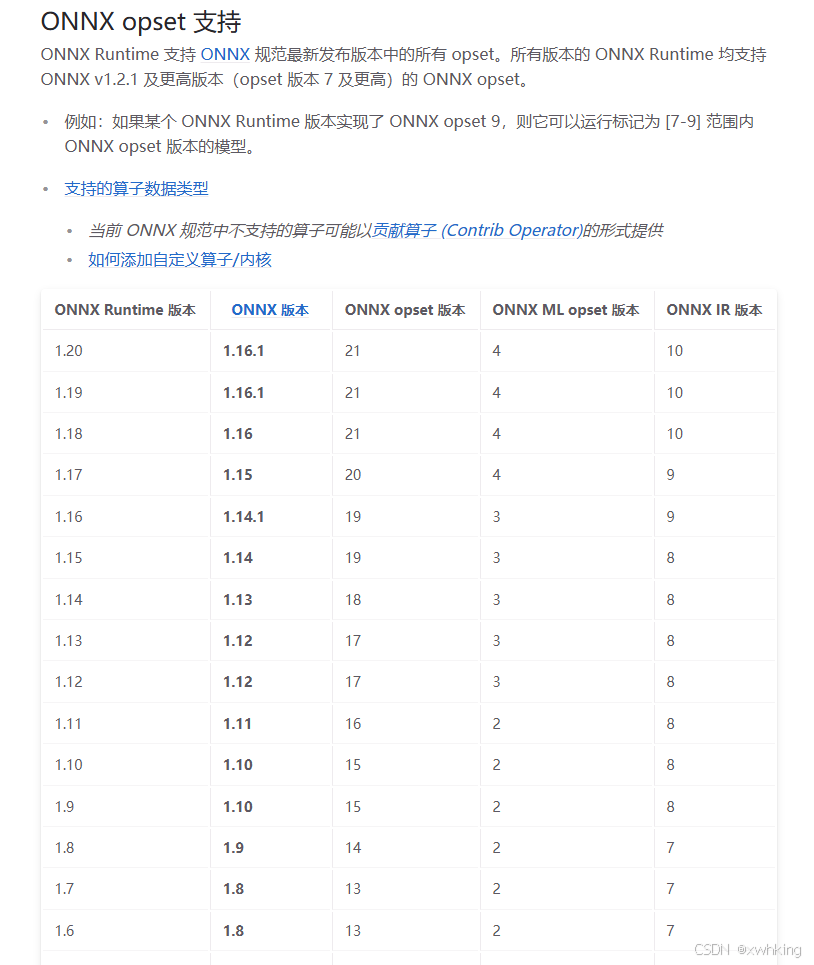
再给一个 AI 推荐的列表
对于昇腾 310B4,所以推荐使用 16
场景 推荐 opset 最稳妥 11 兼容性较好 13 新模型可尝试 16 官方理论上限 18
正确导出案例
代码如下:
from ultralytics import YOLO

# Load a model
model = YOLO("/workstation/testYolo26/YOLO26_code/export_model_test/testOpset18.pt")  # load a custom-trained model

# Export the model
model.export(
    format="onnx",
    opset=16,        # onnx opset 算子版本一般 昇腾支持
    simplify=True,   # 简化模型,避免不支持的算子
    dynamic=True,   # 让模型动态变化,在atc的时候可以动态指定 batch_size,这里在使用opset=18的时候会出错,干脆用16,实践证明,这里如果用batch固定用 opset=18也会有问题
    imgsz=640,        # 固定图片尺寸,这个到时候要和 atc 工具使用时一样
)
下载昇腾离线模型转换工具
这个主要就是一个环境干净吧,我选择了直接在一个新的Ubuntu22.04 的docker 中运行下载工具集
工具集怎么下载根据这个一步一步来就好了
安装的过程中会出现
Driver not install不必理会即可
链接如下 ====> 安装CANN-CANN社区版9.0.0-昇腾社区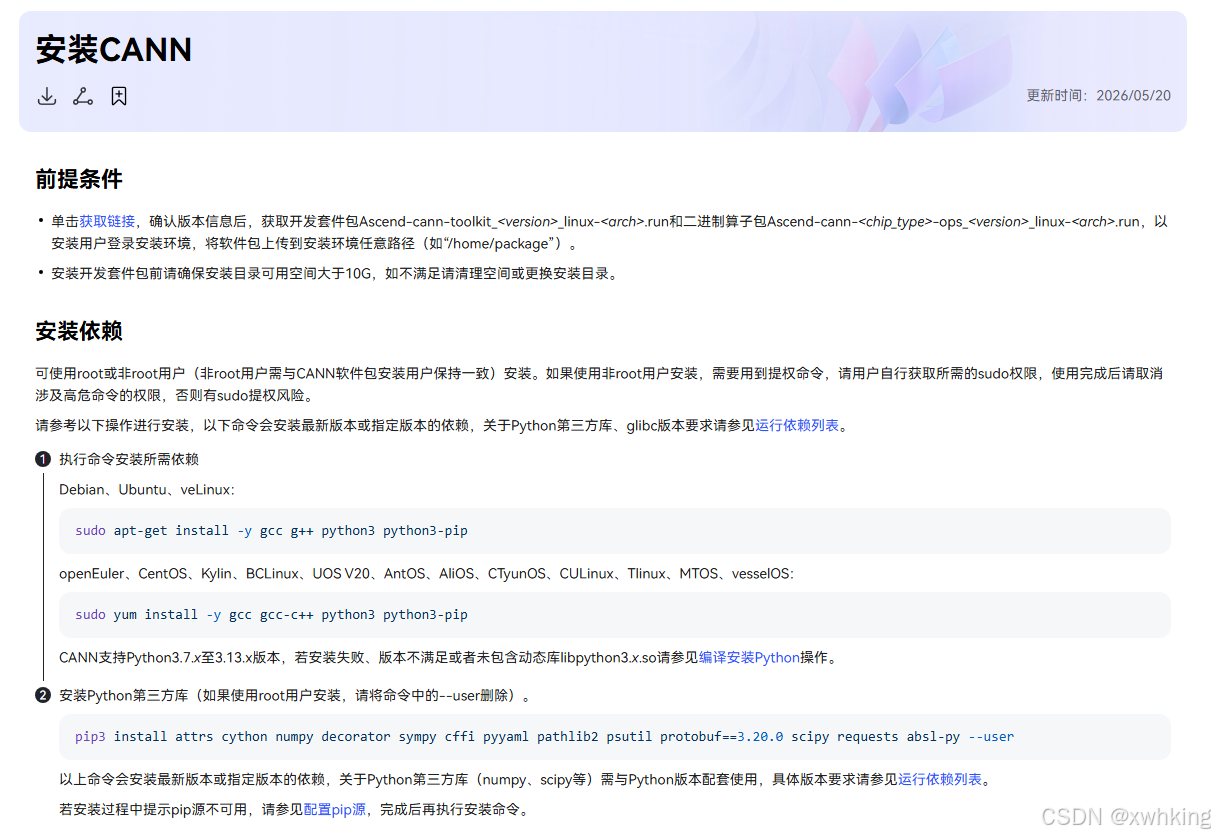
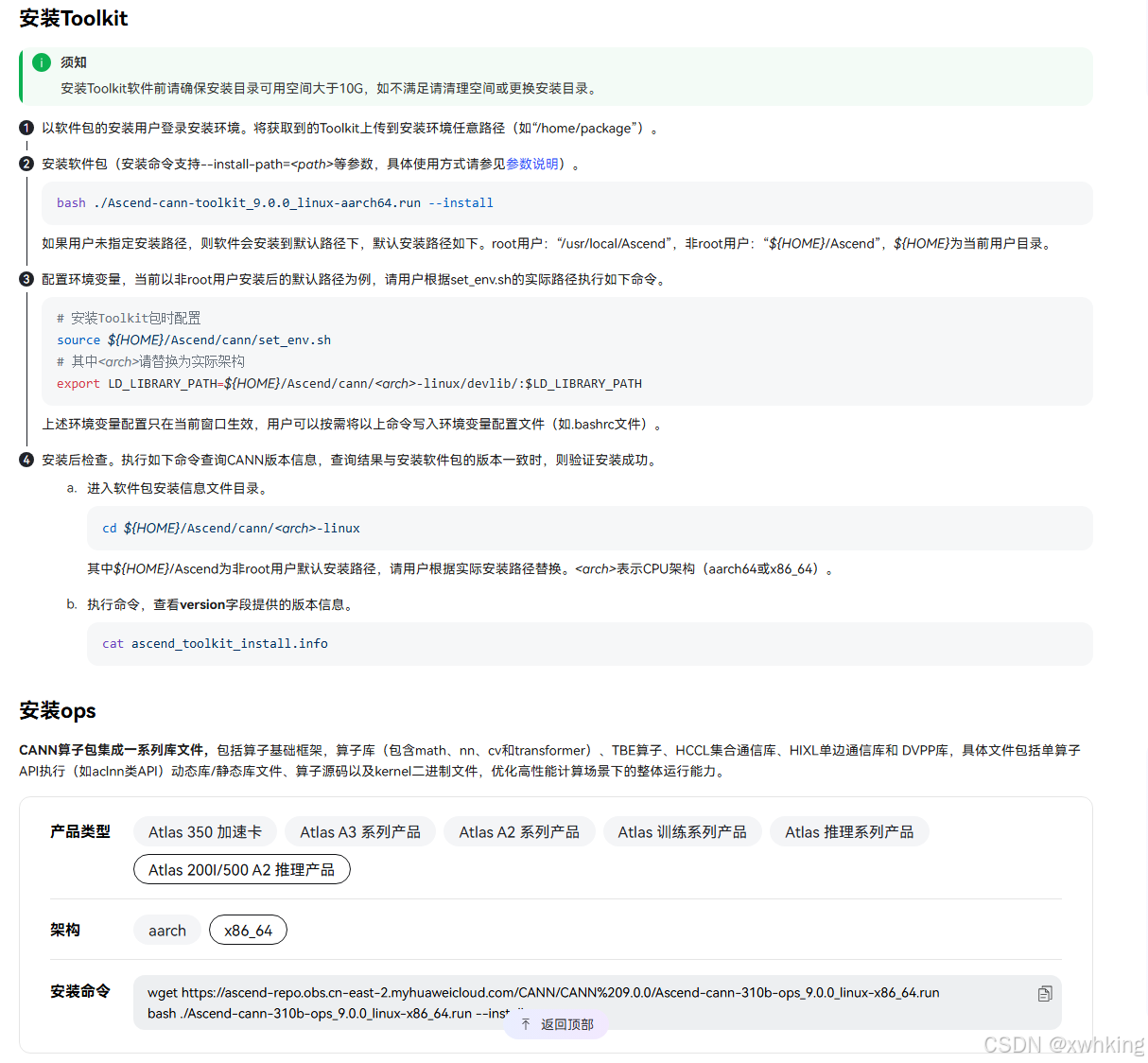
记录一下我这里是 source /usr/local/Ascend/cann/set_env.sh
进行模型转化
昇腾 Atlas 200I A2 的芯片是 310B系列
官网指示 ===> 快速入门-CANN社区版9.0.0-昇腾社区
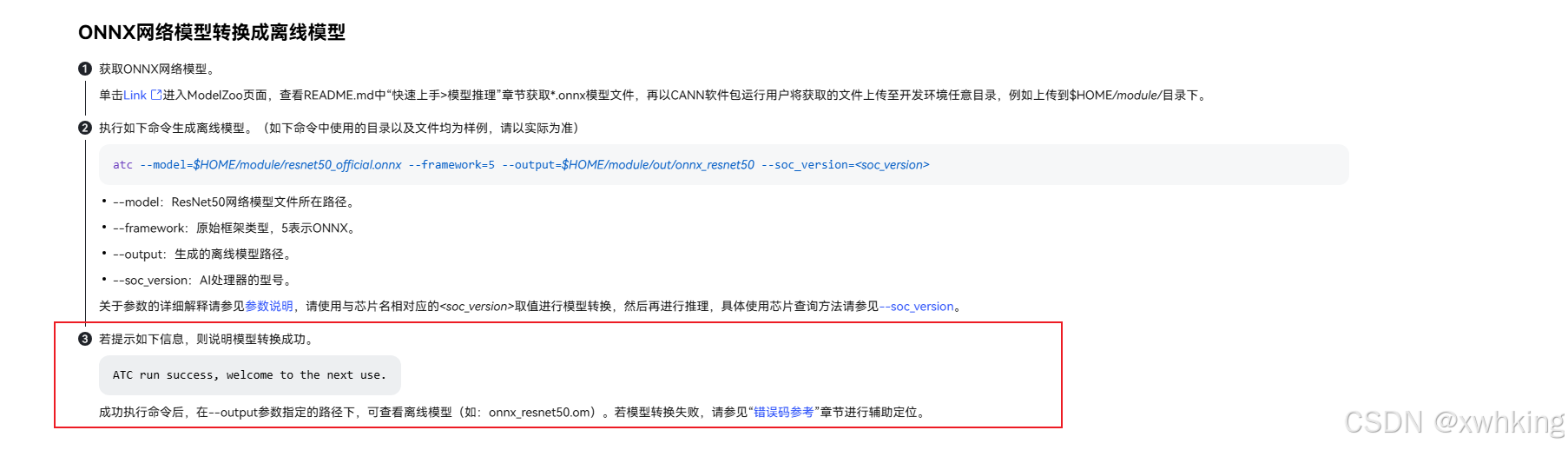
代码示例:
atc --model testOpset16.onnx --framework=5 --output=test_opset16 --soc_version=Ascend310B4 --input_format=NCHW --input_shape="images:32,3,640,640"
导出结果:
root@57cf3cec9f42:/AscendWorkstation# atc --model testOpset16.onnx --framework=5 --output=test_opset16 --soc_version=Ascend310B4 --input_format=NCHW --input_shape="images:32,3,640,640"
ATC start working now, please wait for a moment.
.........
ATC run success, welcome to the next use.
[PID: 18195] 2026-05-28-11:57:36.189.706 Performance_Not_Optimal_Operator(W11001): Op /model.23/Mod does not hit the high-priority operator information library, which might result in compromised performance.
[PID: 18195] 2026-05-28-11:57:36.202.158 Performance_Not_Optimal_Operator(W11001): Op /model.23/GatherElements does not hit the high-priority operator information library, which might result in compromised performance.
[PID: 18195] 2026-05-28-11:57:36.210.960 Performance_Not_Optimal_Operator(W11001): Op /model.23/Div_1 does not hit the high-priority operator information library, which might result in compromised performance.
后面的是警告(性能警告),不影响模型的运行,直接用就好,

鲲鹏昇腾开发者社区是面向全社会开放的“联接全球计算开发者,聚合华为+生态”的社区,内容涵盖鲲鹏、昇腾资源,帮助开发者快速获取所需的知识、经验、软件、工具、算力,支撑开发者易学、好用、成功,成为核心开发者。
更多推荐



 9
9 0
0- 0


 已为社区贡献2条内容

所有评论(0)