
手把手教你用stream做内存带宽压测详解
Stream 内存带宽压测操作指南
适用对象:第一次接触 Stream 压测工具的用户
测试环境:Linux(Anolis OS / CentOS / Ubuntu 等)
测试目标:测量服务器内存带宽性能(单线程 + 多线程)
一、Stream 是什么?
Stream 是业界公认的内存带宽测试标准工具,通过四种操作(Copy / Scale / Add / Triad)测量内存读写带宽,常用于:
- 评估服务器内存性能基线
- 对比不同配置/不同机型的内存带宽差异
- 验证多核并行下的内存带宽扩展能力
📌 不需要测不同内存大小(1G/2G/4G/8G/16G/32G 是错误的理解)
Stream 测的是带宽(GB/s),不是容量。变的是线程数,不是数组大小。
二、准备工作
2.1 确认系统信息
# 查看 CPU 架构(确认是 aarch64 还是 x86_64)
uname -m

# 查看 CPU 核心数
lscpu | grep "^CPU(s)"

# 查看内存大小
free -h

# 查看 L3 缓存大小(用于设置合适的数组大小)
cat /sys/devices/system/cpu/cpu0/cache/index3/size
# 如果不显示,尝试:
dmidecode -t cache | grep -i "L3\|Level 3"
📌 为什么要看 L3 缓存?
Stream 的测试数组必须远大于 L3 缓存,否则测到的是缓存速度,不是内存速度。
建议:STREAM_ARRAY_SIZE≥ 4 × L3 缓存大小(换算成 double 元素个数)。
2.2 操作环境
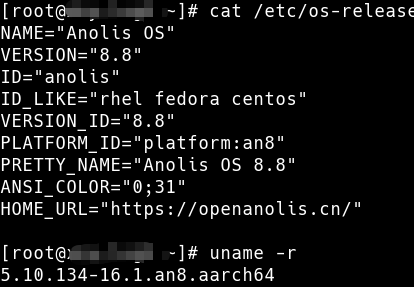
操作系统版本:Anolis OS 8.8(5.10.134-16.1.an8.aarch64)
测试架构:arm,16核32G虚拟机
软件版本:Unixbench 6.0.0
2.3 安装编译工具
# Anolis OS / CentOS / RHEL
yum install -y gcc gcc-c++ make

# Ubuntu / Debian
apt-get install -y build-essential
2.4 下载 Stream 源码
# 方法1:从官网下载(推荐)
wget https://www.cs.virginia.edu/stream/FTP/Code/stream.c -O /tmp/stream.c

# 方法2:如果上面地址不通,用国内镜像
wget https://github.com/jeffhammond/STREAM/raw/master/stream.c -O /tmp/stream.c
📌 只需要一个
stream.c文件,不需要安装任何软件包。
三、编译 Stream
3.1 确定数组大小
| L3 缓存大小 | 建议 STREAM_ARRAY_SIZE | 实际占用内存 |
|---|---|---|
| 16 MB | 80,000,000 | ~640 MB |
| 32 MB | 160,000,000 | ~1.2 GB |
| 64 MB | 320,000,000 | ~2.5 GB |
计算公式:STREAM_ARRAY_SIZE = 4 × L3缓存字节数 ÷ 8
(每个 double 占 8 字节,再留 4 倍余量)
📌 你的机器 L3 缓存大小未知时,直接用
200000000(约 1.6GB),足够大。
3.2 编译单线程版本
# 进入工作目录
cd /tmp

# 编译(-O3 最高优化,-march=native 针对当前 CPU 优化)
gcc -O3 -march=native /tmp/stream.c -DSTREAM_ARRAY_SIZE=200000000 -DNTIMES=30 -o singlestream
参数说明:
| 参数 | 含义 |
|---|---|
-O3 |
最高级别编译优化,让测试结果更准确 |
-march=native |
针对当前 CPU 架构优化(鲲鹏920 用这个) |
-DSTREAM_ARRAY_SIZE=200000000 |
设置测试数组大小(double 元素个数) |
-DNTIMES=30 |
每个测试项重复 30 次,取最好成绩 |
-o singlestream |
输出可执行文件名 |
3.3 编译多线程版本
# 加 -fopenmp 启用 OpenMP 多线程支持
gcc -O3 -march=native -fopenmp /tmp/stream.c -DSTREAM_ARRAY_SIZE=200000000 -DNTIMES=30 -o multithreadstream
📌
-fopenmp是关键,没有这个参数只能用单线程跑,测不到多核内存带宽。
3.4 验证编译成功
# 应该能看到这两个文件
ls -lh /tmp/singlestream /tmp/multithreadstream

# 测试运行(单线程,应该能正常输出结果)
export OMP_NUM_THREADS=1
/tmp/singlestream

四、运行测试
4.1 单线程测试(基准测试)
# 限制只用 1 个线程(单核基准)
export OMP_NUM_THREADS=1

# 运行单线程版本
/tmp/singlestream
输出示例:
[root@log3 ~]# /tmp/singlestream
-------------------------------------------------------------
STREAM version $Revision: 5.10 $
-------------------------------------------------------------
This system uses 8 bytes per array element.
-------------------------------------------------------------
Array size = 200000000 (elements), Offset = 0 (elements)
Memory per array = 1525.9 MiB (= 1.5 GiB).
Total memory required = 4577.6 MiB (= 4.5 GiB).
Each kernel will be executed 30 times.
 The *best* time for each kernel (excluding the first iteration)
 will be used to compute the reported bandwidth.
-------------------------------------------------------------
Your clock granularity/precision appears to be 1 microseconds.

Each test below will take on the order of 545701 microseconds.
   (= 545701 clock ticks)
Increase the size of the arrays if this shows that
you are not getting at least 20 clock ticks per test.
-------------------------------------------------------------
WARNING -- The above is only a rough guideline.
For best results, please be sure you know the
precision of your system timer.
-------------------------------------------------------------

Function    Best Rate MB/s  Avg time     Min time     Max time
Copy:            5653.4     0.571495     0.566030     0.580045
Scale:           6760.0     0.478261     0.473376     0.483596
Add:             6505.3     0.742290     0.737855     0.749112
Triad:           6489.4     0.744692     0.739663     0.755710
-------------------------------------------------------------
Solution Validates: avg error less than 1.000000e-13 on all three arrays
-------------------------------------------------------------
📌 重点看
Triad的带宽值,这是业界最常用的内存带宽指标。
4.2 多线程测试(全核压榨)
# 设置线程数为 CPU 核心数(你的机器是 16 核)
export OMP_NUM_THREADS=16

# 运行多线程版本
/tmp/multithreadstream
输出示例:
[root@log3 ~]# export OMP_NUM_THREADS=16
[root@log3 ~]# /tmp/multithreadstream
-------------------------------------------------------------
STREAM version $Revision: 5.10 $
-------------------------------------------------------------
This system uses 8 bytes per array element.
-------------------------------------------------------------
Array size = 200000000 (elements), Offset = 0 (elements)
Memory per array = 1525.9 MiB (= 1.5 GiB).
Total memory required = 4577.6 MiB (= 4.5 GiB).
Each kernel will be executed 30 times.
 The *best* time for each kernel (excluding the first iteration)
 will be used to compute the reported bandwidth.
-------------------------------------------------------------
Number of Threads requested = 16
Number of Threads counted = 16
-------------------------------------------------------------
Your clock granularity/precision appears to be 1 microseconds.
Each test below will take on the order of 56701 microseconds.
   (= 56701 clock ticks)
Increase the size of the arrays if this shows that
you are not getting at least 20 clock ticks per test.
-------------------------------------------------------------
WARNING -- The above is only a rough guideline.
For best results, please be sure you know the
precision of your system timer.
-------------------------------------------------------------
Function    Best Rate MB/s  Avg time     Min time     Max time
Copy:           57097.9     0.057647     0.056044     0.061057
Scale:          61916.0     0.052702     0.051683     0.054609
Add:            63000.4     0.077859     0.076190     0.080006
Triad:          62745.9     0.078042     0.076499     0.079690
-------------------------------------------------------------
Solution Validates: avg error less than 1.000000e-13 on all three arrays
-------------------------------------------------------------
📌 线程数设置建议:
- 物理核心数 =
lscpu | grep "Core(s)" | awk '{print $NF}'- 如果想测不同线程数的扩展效率,依次测试 1/2/4/8/16:
for t in 1 2 4 8 16; do
  export OMP_NUM_THREADS=$t
  echo "=== ${t}T 测试结果 ==="
  /tmp/multithreadstream | grep Triad
done
4.3 NUMA 绑定(多路服务器才需要)
如果你的服务器有多个 CPU 插槽(NUMA 节点),建议绑定核心和内存:
# 查看 NUMA 节点
numactl -H

# 绑定到 NUMA 节点 0(避免跨节点访问影响结果)
numactl --cpunodebind=0 --membind=0 /tmp/multithreadstream
📌 你的机器是单路 16 核(NUMA node(s): 1),不需要 NUMA 绑定。
五、结果解读
5.1 四项指标含义
| 测试项 | 操作 | 含义 |
|---|---|---|
| Copy | a(i) = b(i) |
内存读取 + 写入,最简单操作 |
| Scale | a(i) = q × b(i) |
内存读取 + 乘法 + 写入 |
| Add | a(i) = b(i) + c(i) |
两次读取 + 一次写入 |
| Triad | a(i) = b(i) + q × c(i) |
复合操作,最常用指标 |
5.2 预期性能范围(参考)
| 内存类型 | 单线程带宽 | 16 线程带宽 |
|---|---|---|
| DDR4-2400 | ~15 GB/s | ~100 GB/s |
| DDR4-3200 | ~18 GB/s | ~130 GB/s |
| DDR5-4800 | ~25 GB/s | ~200 GB/s |
📌 鲲鹏 920 通常搭配 DDR4-2400/3200,单线程 ~15-20 GB/s,16 线程 ~80-120 GB/s 属于正常范围。
5.3 扩展效率计算
扩展效率 = (多线程带宽 ÷ 单线程带宽) ÷ 线程数 × 100%
例如:单线程 Triad = 18 GB/s,16 线程 Triad = 120 GB/s
扩展效率 = (120 ÷ 18) ÷ 16 × 100% = 41.7%(内存带宽扩展效率通常 40-60%,低于 CPU 计算扩展)
六、常见问题
Q1:编译报错 fatal error: omp.h: No such file or directory
原因:没有安装 OpenMP 支持库
解决:
# CentOS / Anolis OS
yum install -y gcc gcc-c++ libgomp

# Ubuntu
apt-get install -y build-essential libomp-dev
Q2:编译报错 -march=native: invalid option(aarch64 常见)
原因:部分老版本 GCC 不支持 -march=native
解决:改成 -mcpu=native 或直接去掉这个参数:
gcc -O3 -fopenmp /tmp/stream.c -DSTREAM_ARRAY_SIZE=200000000 -DNTIMES=30 -o multithreadstream
Q3:运行时报错 Killed(测试数组太大)
原因:STREAM_ARRAY_SIZE 设置过大,超出可用内存
解决:调小数组大小,或确认内存足够:
# 查看可用内存
free -m
# 如果可用内存 < 2GB,把数组改成 50000000(约 400MB)
Q4:多线程结果反而比单线程还低?
原因:
- 编译时没有加
-fopenmp,多线程版本实际还是单线程跑 OMP_NUM_THREADS没有正确设置
验证:
# 检查是否真的多线程运行
export OMP_NUM_THREADS=16
/tmp/multithreadstream 2>&1 | head -20
# 输出里应该能看到 "Number of Threads: 16"
Q5:结果波动很大,每次跑不一样?
原因:系统有其他程序在跑,抢占内存带宽
解决:
# 测试前关闭占用内存的程序
# 确认系统空闲
free -m
# 跑 3-5 次取平均值
for i in 1 2 3; do /tmp/multithreadstream | grep Triad; done
七、完整测试脚本(懒人版)
把下面内容保存为 run_stream_test.sh,直接运行:
#!/bin/bash
# Stream 自动化测试脚本

STREAM_SRC="/tmp/stream.c"
ARRAY_SIZE=200000000
NTIMES=30
RESULT_FILE="/tmp/stream_results_$(date +%Y%m%d_%H%M%S).txt"

echo "====== Stream 内存带宽测试 ======" | tee -a $RESULT_FILE
echo "测试时间: $(date)" | tee -a $RESULT_FILE
echo "CPU 信息: $(lscpu | grep 'Model name' | cut -d: -f2)" | tee -a $RESULT_FILE
echo "内存信息: $(free -h | grep Mem)" | tee -a $RESULT_FILE
echo "" | tee -a $RESULT_FILE

# 编译
echo "正在编译..." | tee -a $RESULT_FILE
gcc -O3 -march=native /tmp/stream.c -DSTREAM_ARRAY_SIZE=$ARRAY_SIZE -DNTIMES=$NTIMES -o /tmp/singlestream
gcc -O3 -march=native -fopenmp /tmp/stream.c -DSTREAM_ARRAY_SIZE=$ARRAY_SIZE -DNTIMES=$NTIMES -o /tmp/multithreadstream

# 单线程测试
echo "=== 单线程测试 (1T) ===" | tee -a $RESULT_FILE
export OMP_NUM_THREADS=1
/tmp/singlestream | tee -a $RESULT_FILE

# 多线程测试(1/2/4/8/16)
for t in 1 2 4 8 16; do
    echo "=== 多线程测试 (${t}T) ===" | tee -a $RESULT_FILE
    export OMP_NUM_THREADS=$t
    /tmp/multithreadstream | tee -a $RESULT_FILE
    echo "" | tee -a $RESULT_FILE
done

echo "测试完成!结果保存在: $RESULT_FILE"
运行方式:
chmod +x run_stream_test.sh
./run_stream_test.sh
个人观点,仅供参考,请按照实际环境进行调整

鲲鹏昇腾开发者社区是面向全社会开放的“联接全球计算开发者,聚合华为+生态”的社区,内容涵盖鲲鹏、昇腾资源,帮助开发者快速获取所需的知识、经验、软件、工具、算力,支撑开发者易学、好用、成功,成为核心开发者。
更多推荐


 17
17 0
0- 0


 已为社区贡献1条内容

所有评论(0)