
【昇腾910B4】跑起来910B4的npu占用
notebook配置。
·
具体流程
解决方案
-
问题:
-
notebook配置

-
执行npu计算测试脚本出现报错信息:
Unsupported soc version: Ascend910B4-1
-
-
问题解决
- 原因:cann和torch_npu版本过老导致无法适配910B4芯片(软件栈(CANN + torch_npu)比硬件“老”,不认识这块新卡)
- 测试如下版本配置可以成功使用,
推荐使用8.1.RC1更高的镜像版本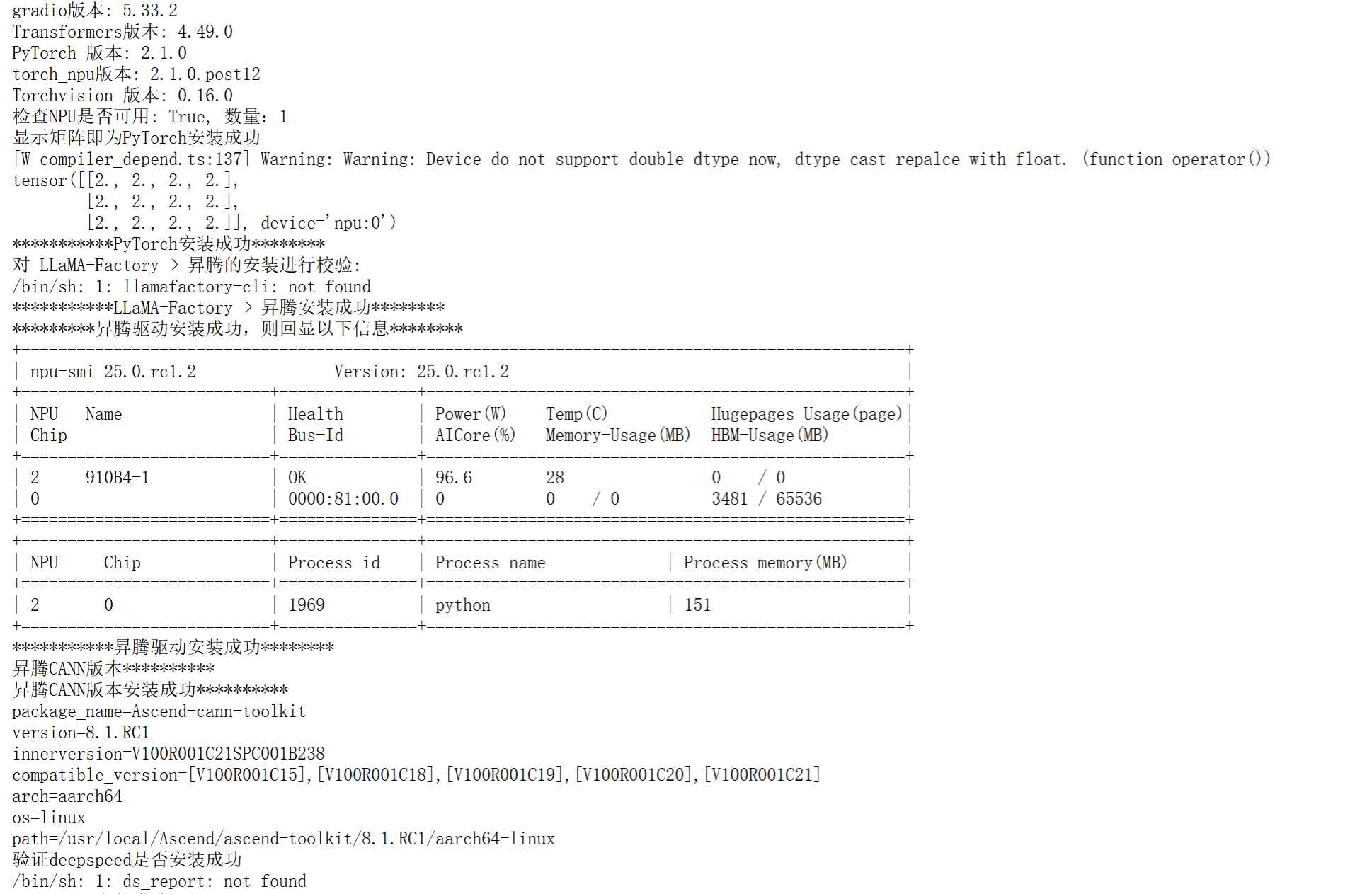
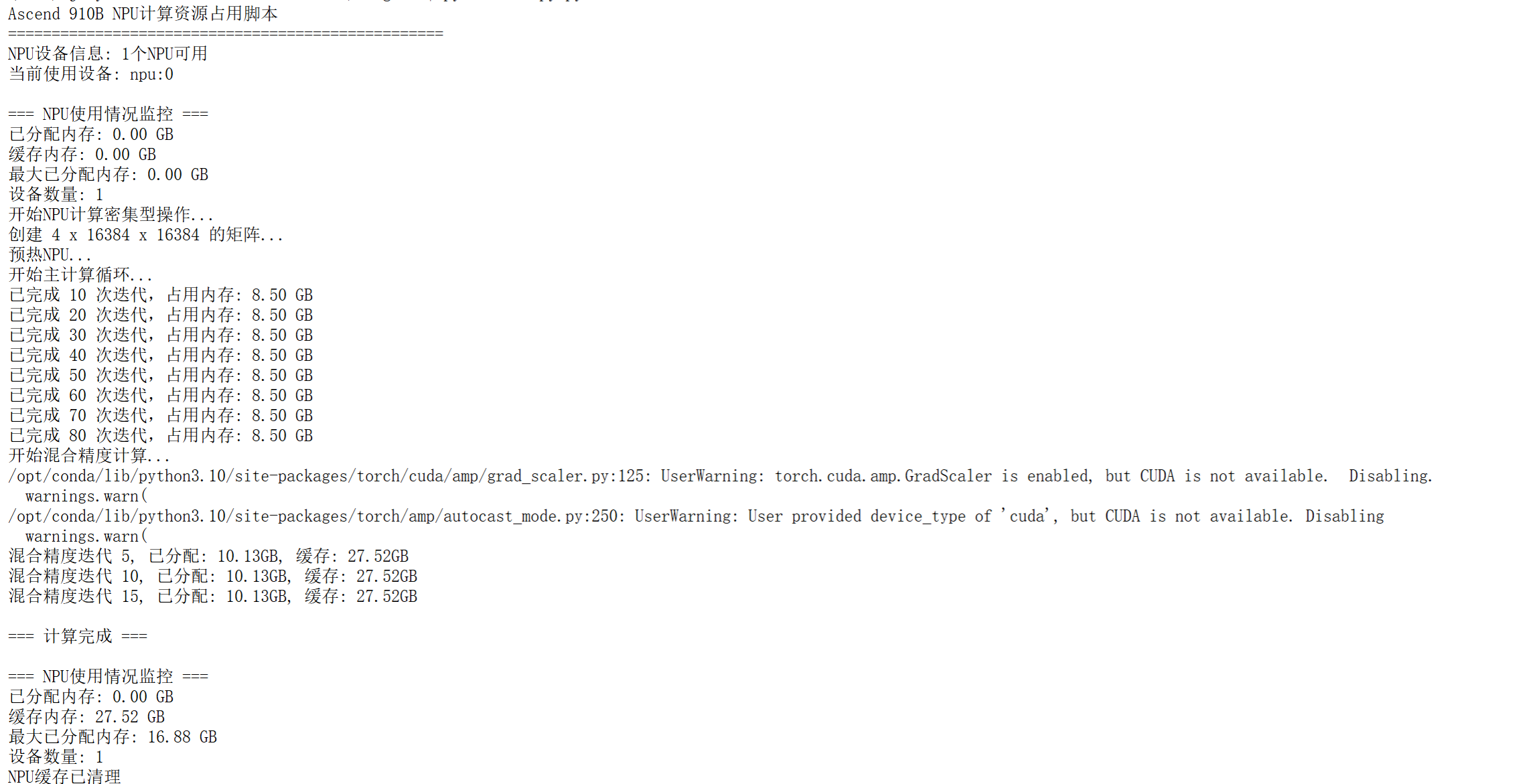
- 计算结果如下
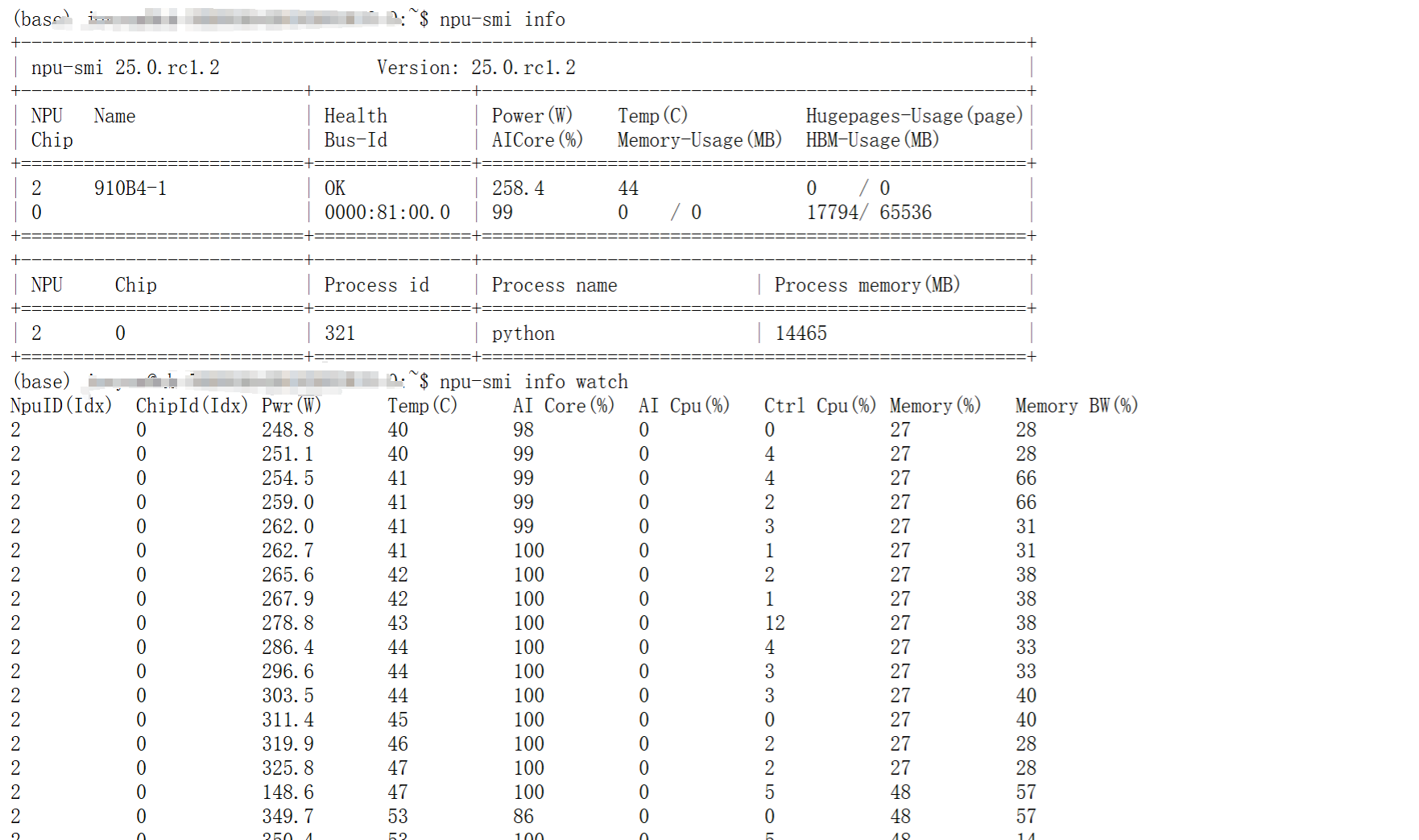
- 显存占用截图如下
-
昇腾论坛官方回答
- 您好,npu-smi info查看版本,社区版-固件与驱动-昇腾社区 (hiascend.com) 我们一般推荐最新的驱动,如果模型部署有特殊要求可以酌情更换版本。torch_npu版本安装可以看这里,这个版本也和python版本和cann版本有关安装torch_npu插件-Ascend Extension for PyTorch6.0.RC1-昇腾社区 (hiascend.com)
相关脚本
- 昇腾环境获取脚本
get_env.py- 脚本需要优化:其中一个获取失败,仍然能够获取剩余全部依赖的版本信息
import torch
import torchvision
import transformers
import gradio as gr
import torch_npu
import os
import subprocess
#import deepspeed


print("gradio版本:",gr.__version__)
print("Transformers版本:", transformers.__version__)  # 同样使用双下划线 [[16]]
print(f"PyTorch 版本: {torch.__version__}")
print(f"torch_npu版本: {torch_npu.__version__}")
print(f"Torchvision 版本: {torchvision.__version__}")
print(f"检查NPU是否可用: {torch.npu.is_available()}, 数量:{torch.npu.device_count()}")

print("显示矩阵即为PyTorch安装成功")
a = torch.ones(3, 4).npu();
print(a + a);
print("***********PyTorch安装成功********")


print("*********昇腾驱动安装成功,则回显以下信息********")
subprocess.run("npu-smi info", shell=True)
print("***********昇腾驱动安装成功********")

print("昇腾CANN版本**********")
command2 = "cat /usr/local/Ascend/ascend-toolkit/latest/aarch64-linux/ascend_toolkit_install.info"
print("昇腾CANN版本安装成功**********")
subprocess.run(command2, shell=True )

print("对 LLaMA-Factory × 昇腾的安装进行校验:")
command1 = "llamafactory-cli env"
subprocess.run(command1, shell=True)
print("***********LLaMA-Factory × 昇腾安装成功********")

print("验证deepspeed是否安装成功")
subprocess.run("ds_report", shell=True )
print("deepspeed安装成功**********")
- npu计算测试脚本
import numpy as np
import torch
import torch_npu
import time
import os

def setup_npu_environment():
    """设置NPU环境"""
    # 设置NPU设备
    torch.npu.set_device(0)

    # 启用NPU性能模式
    torch.npu.set_compile_mode(jit_compile=False)
    torch.npu.config.allow_internal_format = False

    print(f"NPU设备信息: {torch.npu.device_count()}个NPU可用")
    print(f"当前使用设备: npu:0")

def create_large_tensors(batch_size=8, matrix_size=8192):
    """创建大型张量以占用计算资源"""
    # 创建在NPU上的大型矩阵
    matrix_a = torch.randn(batch_size, matrix_size, matrix_size,
                          dtype=torch.float32, device='npu:0')
    matrix_b = torch.randn(batch_size, matrix_size, matrix_size,
                          dtype=torch.float32, device='npu:0')

    return matrix_a, matrix_b

def npu_compute_intensive_operation():
    """NPU计算密集型操作"""
    print("开始NPU计算密集型操作...")

    # 设置矩阵大小和批次大小来占用大量计算资源
    matrix_size = 16384  # 大矩阵尺寸
    batch_size = 4

    try:
        # 创建输入张量
        print(f"创建 {batch_size} x {matrix_size} x {matrix_size} 的矩阵...")
        input_tensor = torch.randn(batch_size, matrix_size, matrix_size,
                                  dtype=torch.float16, device='npu:0')
        weight_tensor = torch.randn(matrix_size, matrix_size,
                                   dtype=torch.float16, device='npu:0')

        # 预热
        print("预热NPU...")
        for _ in range(3):
            _ = torch.matmul(input_tensor, weight_tensor)
        torch.npu.synchronize()

        # 主计算循环
        print("开始主计算循环...")
        start_time = time.time()
        computation_time = 30  # 运行30秒

        iteration = 0
        while time.time() - start_time < computation_time:
            # 执行矩阵乘法
            result = torch.matmul(input_tensor, weight_tensor)

            # 添加一些非线性操作
            result = torch.relu(result)
            result = torch.sigmoid(result)

            # 执行转置和二次乘法
            transposed = result.transpose(1, 2)
            final_result = torch.matmul(result, transposed)

            # 确保计算完成
            torch.npu.synchronize()

            iteration += 1
            if iteration % 10 == 0:
                print(f"已完成 {iteration} 次迭代,占用内存: {torch.npu.memory_allocated() / 1024**3:.2f} GB")

    except RuntimeError as e:
        print(f"内存不足,调整矩阵大小: {e}")
        # 如果内存不足,使用更小的矩阵
        return npu_compute_with_smaller_matrices()

def npu_compute_with_smaller_matrices():
    """使用稍小矩阵的计算操作"""
    print("使用稍小矩阵继续计算...")

    matrix_size = 8192
    batch_size = 8

    input_tensor = torch.randn(batch_size, matrix_size, matrix_size,
                              dtype=torch.float16, device='npu:0')
    weight_tensor = torch.randn(matrix_size, matrix_size,
                               dtype=torch.float16, device='npu:0')

    start_time = time.time()
    computation_time = 30

    iteration = 0
    while time.time() - start_time < computation_time:
        # 复杂计算图
        result1 = torch.matmul(input_tensor, weight_tensor)
        result2 = torch.matmul(result1, weight_tensor.t())

        # 元素级操作
        result3 = result1 * result2
        result4 = torch.tanh(result3)

        # 更多矩阵操作
        final_result = torch.matmul(result4, result4.transpose(1, 2))

        torch.npu.synchronize()

        iteration += 1
        if iteration % 10 == 0:
            memory_usage = torch.npu.memory_allocated() / 1024**3
            print(f"迭代 {iteration}, 内存使用: {memory_usage:.2f} GB")

def mixed_precision_computation():
    """混合精度计算以最大化性能"""
    print("开始混合精度计算...")

    from torch.cuda.amp import autocast, GradScaler

    # 为NPU适配
    scaler = GradScaler('npu:0')

    matrix_size = 12288
    batch_size = 6

    # 创建张量
    with autocast('npu:0'):
        tensor1 = torch.randn(batch_size, matrix_size, matrix_size,
                             device='npu:0')
        tensor2 = torch.randn(batch_size, matrix_size, matrix_size,
                             device='npu:0')

    start_time = time.time()
    computation_time = 25

    iteration = 0
    while time.time() - start_time < computation_time:
        with autocast('npu:0'):
            # 复杂的混合精度计算图
            result = torch.bmm(tensor1, tensor2)
            result = torch.layer_norm(result, result.shape[-1:])
            result = torch.nn.functional.gelu(result)

            # 更多操作
            for _ in range(3):
                result = torch.matmul(result, tensor1.transpose(1, 2))
                result = torch.relu(result)

        torch.npu.synchronize()
        iteration += 1

        if iteration % 5 == 0:
            allocated = torch.npu.memory_allocated() / 1024**3
            cached = torch.npu.memory_reserved() / 1024**3
            print(f"混合精度迭代 {iteration}, 已分配: {allocated:.2f}GB, 缓存: {cached:.2f}GB")

def monitor_npu_usage():
    """监控NPU使用情况"""
    print("\n=== NPU使用情况监控 ===")
    print(f"已分配内存: {torch.npu.memory_allocated() / 1024**3:.2f} GB")
    print(f"缓存内存: {torch.npu.memory_reserved() / 1024**3:.2f} GB")
    print(f"最大已分配内存: {torch.npu.max_memory_allocated() / 1024**3:.2f} GB")
    print(f"设备数量: {torch.npu.device_count()}")

def main():
    """主函数"""
    print("Ascend 910B NPU计算资源占用脚本")
    print("=" * 50)

    try:
        # 设置环境
        setup_npu_environment()

        # 监控初始状态
        monitor_npu_usage()

        # 执行各种计算密集型操作
        npu_compute_intensive_operation()

        # 混合精度计算
        mixed_precision_computation()

        # 最终监控
        print("\n=== 计算完成 ===")
        monitor_npu_usage()

    except Exception as e:
        print(f"执行过程中出现错误: {e}")
    finally:
        # 清理
        torch.npu.empty_cache()
        print("NPU缓存已清理")

if __name__ == "__main__":
    # 设置环境变量(根据实际情况调整)
    os.environ['NPU_VISIBLE_DEVICES'] = '0'

    main()
相关知识
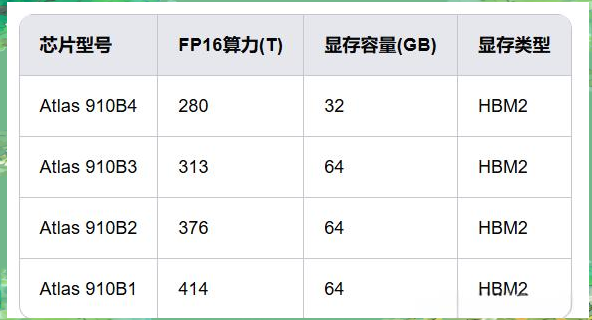
- 910B系列芯片对比
参考博客

鲲鹏昇腾开发者社区是面向全社会开放的“联接全球计算开发者,聚合华为+生态”的社区,内容涵盖鲲鹏、昇腾资源,帮助开发者快速获取所需的知识、经验、软件、工具、算力,支撑开发者易学、好用、成功,成为核心开发者。
更多推荐


 4
4 0
0- 0


 已为社区贡献1条内容

所有评论(0)