
昇思25天打卡-张量
Mindspore张量介绍
·
张量
主要内容:张量的定义、创建张量、张量的属性、张量的索引、张量的运算、与Numpy的转换和稀疏张量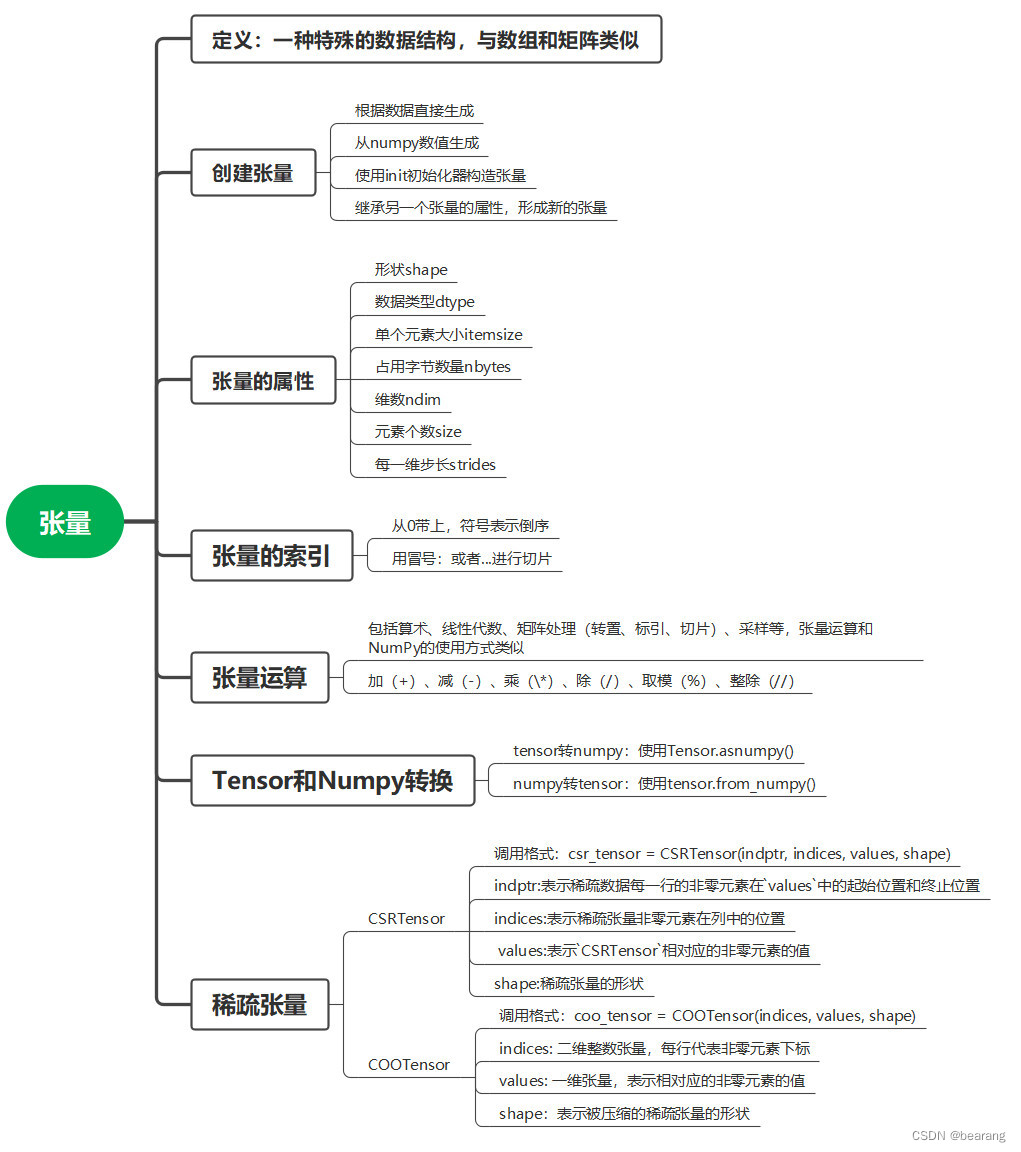
创建张量
# 1 数据直接生成
data = [1, 0, 1, 0]
x_data = Tensor(data)
print(x_data, x_data.shape, x_data.dtype)
# 2 numpy生成
np_array = np.array(data)
x_np = Tensor(np_array)
print(x_np, x_np.shape, x_np.dtype)
# 3 init初始化
from mindspore.common.initializer import One, Normal

# Initialize a tensor with ones
tensor1 = mindspore.Tensor(shape=(2, 2), dtype=mindspore.float32, init=One())
# Initialize a tensor from normal distribution
tensor2 = mindspore.Tensor(shape=(2, 2), dtype=mindspore.float32, init=Normal())
# 4 继承张量属性生成
from mindspore import ops
x_ones = ops.ones_like(x_data)
x_zeros = ops.zeros_like(x_data)
张量的属性
x = Tensor(np.array([[1, 2], [3, 4]]), mindspore.int32)

print("x_shape:", x.shape)
print("x_dtype:", x.dtype)
print("x_itemsize:", x.itemsize)
print("x_nbytes:", x.nbytes)
print("x_ndim:", x.ndim)
print("x_size:", x.size)
print("x_strides:", x.strides)
张量索引
print("First row: {}".format(tensor[0]))
print("value of bottom right corner: {}".format(tensor[1, 1]))
print("Last column: {}".format(tensor[:, -1]))
print("First column: {}".format(tensor[..., 0]))
张量的运算
x = Tensor(np.array([1, 2, 3]), mindspore.float32)
y = Tensor(np.array([4, 5, 6]), mindspore.float32)

output_add = x + y
output_sub = x - y
output_mul = x * y
output_div = y / x
output_mod = y % x
output_floordiv = y // x
# 张量拼接
data1 = Tensor(np.array([[0, 1], [2, 3]]).astype(np.float32))
data2 = Tensor(np.array([[4, 5], [6, 7]]).astype(np.float32))
output = ops.concat((data1, data2), axis=0)
Tensor与Numpy转换
t = Tensor([1., 1., 1., 1., 1.])
n = t.asnumpy()

n = np.ones(5)
t = Tensor.from_numpy(n)
稀疏张量
有CSRTenor和 COOTensor两种
indptr = Tensor([0, 1, 2])
indices = Tensor([0, 1])
values = Tensor([1, 2], dtype=mindspore.float32)
shape = (2, 4)
# Make a CSRTensor
csr_tensor = CSRTensor(indptr, indices, values, shape)

indices = Tensor([[0, 1], [1, 2]], dtype=mindspore.int32)
values = Tensor([1, 2], dtype=mindspore.float32)
shape = (3, 4)
# Make a COOTensor
coo_tensor = COOTensor(indices, values, shape)

鲲鹏昇腾开发者社区是面向全社会开放的“联接全球计算开发者,聚合华为+生态”的社区,内容涵盖鲲鹏、昇腾资源,帮助开发者快速获取所需的知识、经验、软件、工具、算力,支撑开发者易学、好用、成功,成为核心开发者。
更多推荐

 6
6 0
0- 0


 已为社区贡献13条内容

所有评论(0)