
GRIN-MOE模型适配昇腾NPU(二):权重加载、前向对齐
GRIN-MOE模型适配昇腾NPU(二):权重加载、前向对齐
5. 精度调优
上一篇文章中已经成功完成权重转换,本章通过加载转换后的权重做推理进行前向对齐
5.1 推理脚本
推理脚本可以参考Mixtral-8x7B的推理脚本:/home/mytest/MindSpeed-LLM/examples/mcore/mixtral/generate_mixtral_8x7b_ptd.sh,配置参数需要做相应的修改
- 基础配置如下:
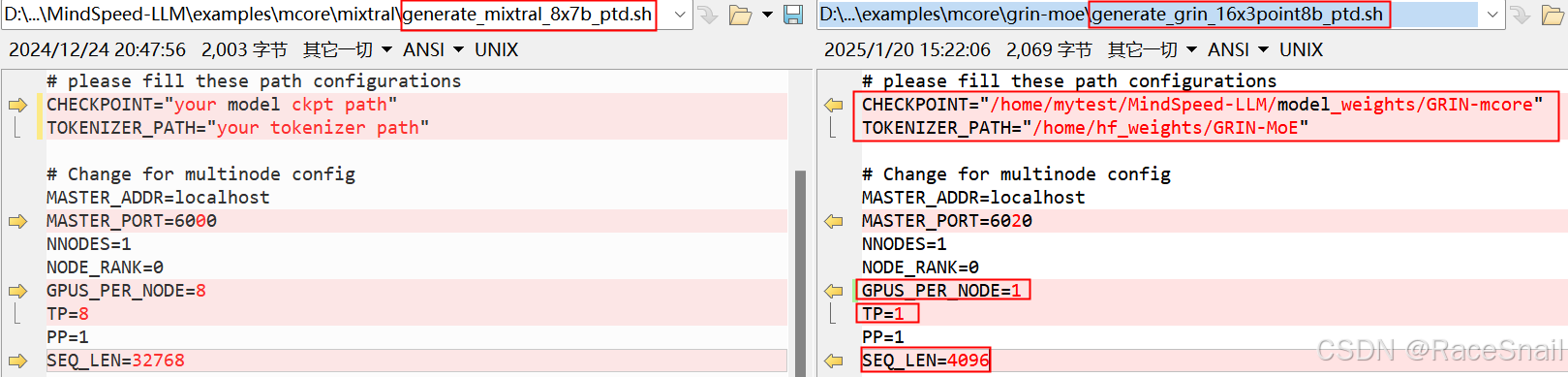
注:
CHECKPOINT:为前面权重转换后生成的megatron权重的保存路径
TOKENIZER_PATH:为词表的路径,即从huggingface上下载的配置文件的路径
GPUS_PER_NODE:当前主要是进行精度调优,为了让模型能在单卡上跑起来设置为1
TP/PP:与权重转换时设置的TP/PP值保持一致
SEQ_LEN:与huggingface上config.json中"max_position_embeddings"的值保持一致
- MOE-ARGS配置

注:
num-experts:与huggingface上config.json中"num_local_experts"的值保持一致
moe-router-topk:与huggingface上config.json中"num_experts_per_tok"的值保持一致
moe-aux-loss-coeff:与huggingface上config.json中"router_aux_loss_coef"的值保持一致
- GPT-ARGS配置
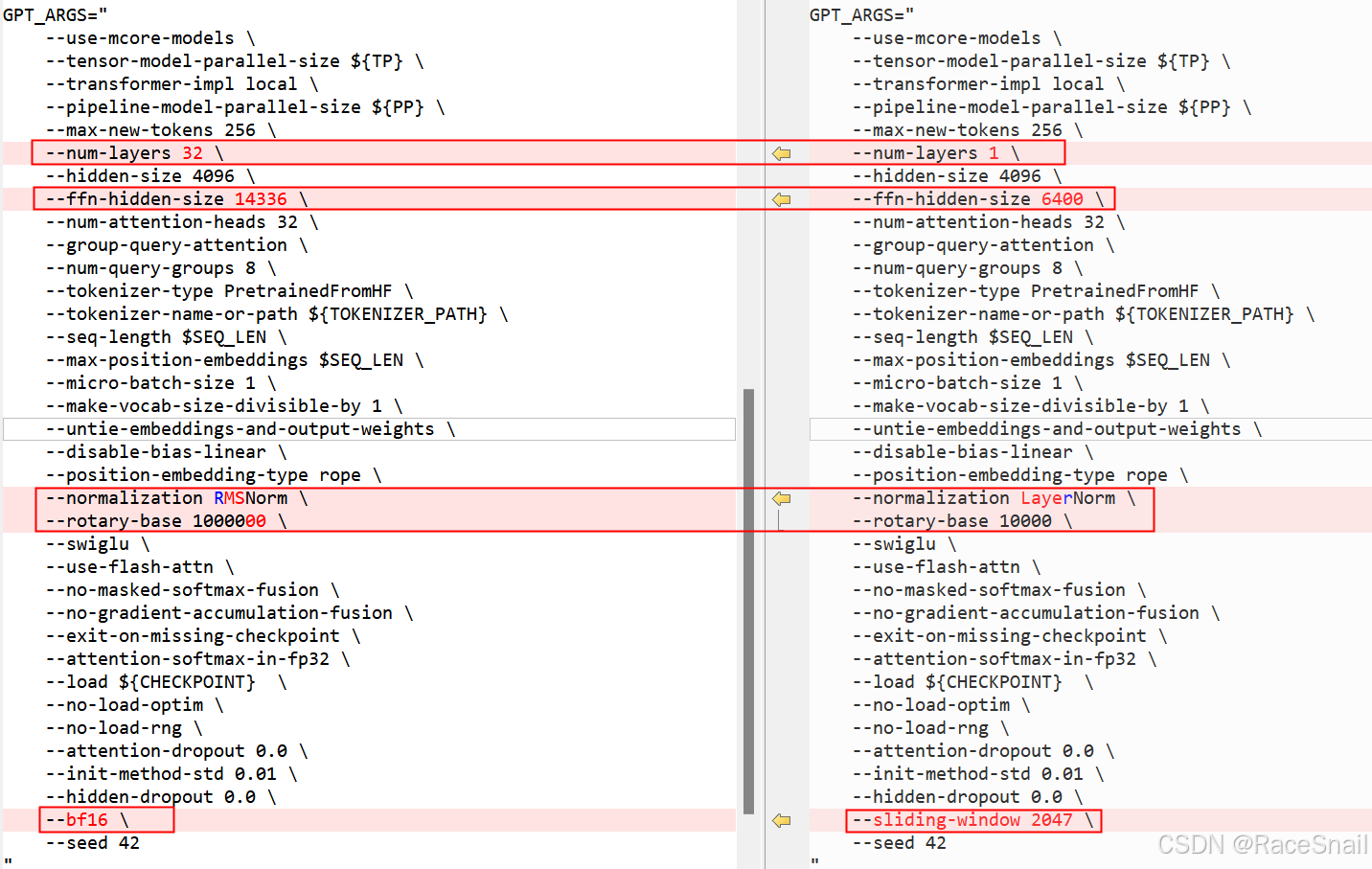
注:
--num-layers 1:当前主要是进行精度调优,为了让模型能在单卡上跑起来可以把模型层数设置小一点
--ffn-hidden-size 6400:与huggingface上config.json中"intermediate_size"的值保持一致
--normalization LayerNorm:从上一篇文章中打印出的模型结构可以看到GRIN-MOE的layernorm用的是LayerNorm而不是RMSNorm
--rotary-base 10000:与huggingface上config.json中"rope_theta"的值保持一致
--sliding-window 2047:与huggingface上config.json中"sliding_window"的值保持一致
执行推理脚本: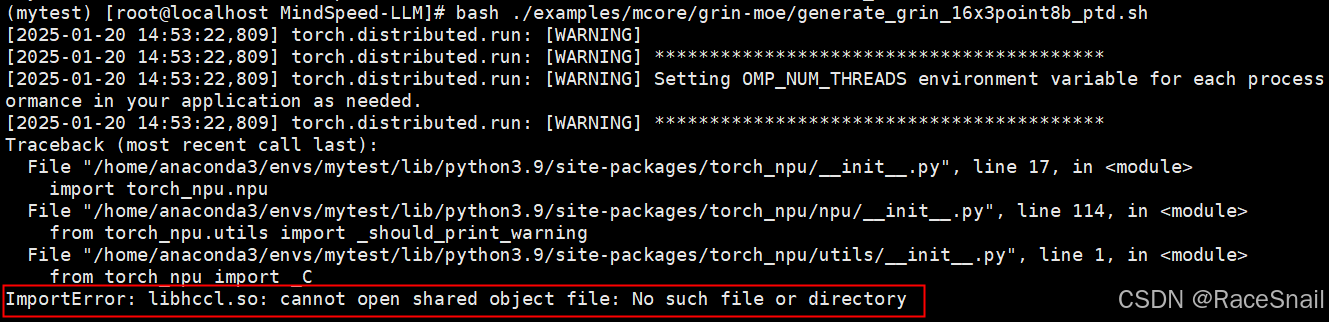
解决方法:配置CANN环境变量

配置CANN环境变量后,重新执行推理脚本:
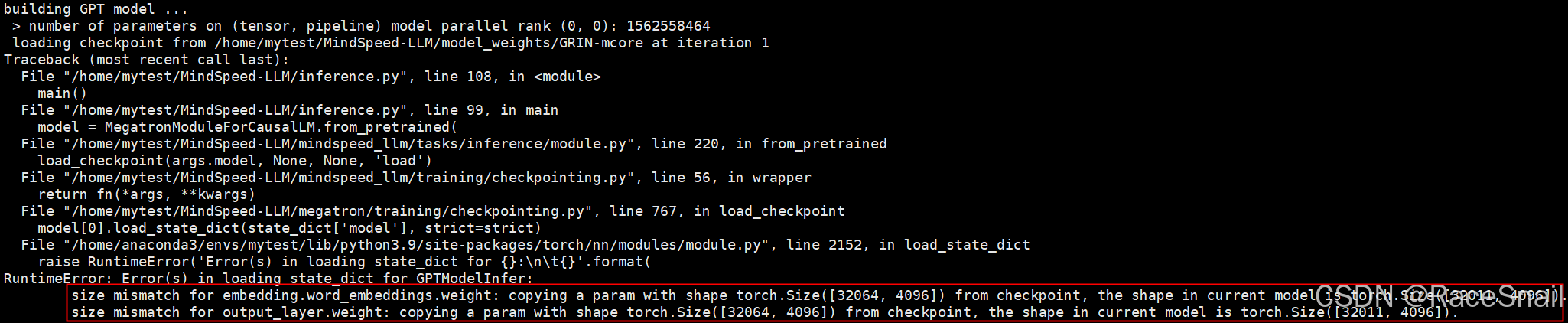
解决方法:GPT-ARGS配置中增加“–padded-vocab-size 32064”项
继续执行推理脚本,执行成功:
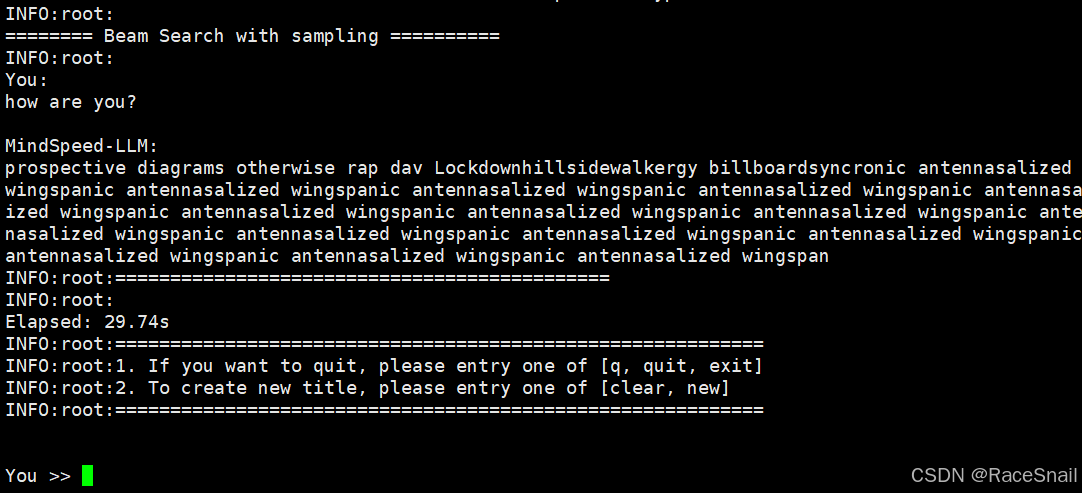
5.2 前向对齐
前向对齐即对齐huggingface以及megatron两边的前向计算结果
5.2.1 huggingface前向计算结果
通过下面脚本代码(huggingface_logits.py)输出huggingface前向计算结果
import torch
import torch_npu
import numpy as np
from torch_npu.contrib import transfer_to_npu
from transformers import AutoTokenizer, AutoModelForCausalLM

MODEL_PATH = "/home/hf_weights/GRIN-MoE/"

def set_device(device_id):
    torch.npu.set_device(torch.device(f"npu:{device_id}"))

def load_model():
    """load model"""
    tokenizer = AutoTokenizer.from_pretrained(MODEL_PATH, trust_remote_code=True)
    model = AutoModelForCausalLM.from_pretrained(MODEL_PATH, trust_remote_code=True).npu().eval()
    return tokenizer, model

def logits_output(model):
    """forward"""
    input_ids = torch.tensor([i for i in range(10000, 10128)]).unsqueeze(0).npu()
    attention_mask = torch.ones(tuple(input_ids.shape)).npu()
    with torch.no_grad():
        logits = model.forward(
            input_ids=input_ids,
            position_ids=None,
            attention_mask=attention_mask,
        )
    print("logits Shape:", logits.logits.shape)
    print("logits dtype:", logits.logits.dtype)
    print("logits: ", logits.logits)
    np.save("/home/mytest/MindSpeed-LLM/examples/mcore/grin-moe/numpy_huggingface_logits.npy",
            logits.logits.cpu().numpy())

if __name__ == '__main__':
    set_device(0)
    tokenizer, grin_moe_model = load_model()
    logits_output(grin_moe_model)
结果如下: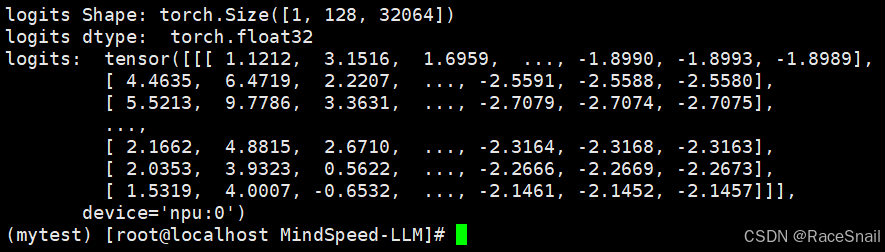
5.2.2 megatron前向计算结果
通过下面脚本代码(megatron_logits.py)输出megatron前向计算结果
import torch
import torch_npu
import numpy as np
from inference import model_provider
from mindspeed_llm.tasks.inference.module import MegatronModuleForCausalLM
from mindspeed_llm.tasks.inference.infer_base import add_text_generate_args
from megatron.training.initialize import initialize_megatron
from megatron.training.global_vars import get_args
from megatron.training.utils import get_ltor_masks_and_position_ids

if __name__ == "__main__":
    initialize_megatron(extra_args_provider=add_text_generate_args,
                        args_defaults={'no_load_rng': True,
                                       'no_load_optim': True})
    args = get_args()

    model = MegatronModuleForCausalLM.from_pretrained(
        model_provider=model_provider,
        pretrained_model_name_or_path=args.load
    )

    if torch.distributed.get_rank() == 0:
        print("start forward")
    input_ids = torch.tensor([i for i in range(10000, 10128)]).unsqueeze(0).npu()
    attention_mask, loss_mask, _ = get_ltor_masks_and_position_ids(
        input_ids,
        0,
        reset_position_ids=False,
        reset_attention_mask=False,
        eod_mask_loss=False)

    with torch.no_grad():
        logits = model.forward(
            input_ids=input_ids,
            position_ids=None,
            attention_mask=attention_mask.npu(),
        )

    if torch.distributed.get_rank() == 0:
        print("logits Shape:", logits.shape)
        print("logits dtype:", logits.dtype)
        print("logits :", logits)

    np.save("/home/mytest/MindSpeed-LLM/examples/mcore/grin-moe/numpy_mindspeed_logits.npy",
            logits.cpu().float().numpy())
通过修改上一章节的推理脚本调用megatron_logits.py输出前向计算结果:
结果如下: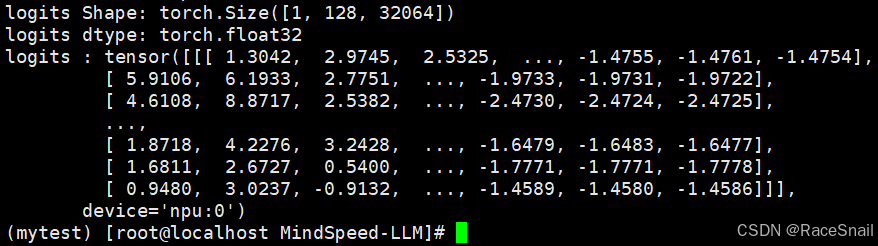
5.2.3 计算两边前向计算结果相似度
通过下面脚本代码计算两边前向输出相似度:
import torch
import numpy as np

def print_all(x):
    print(f"max_similarity:{torch.max(x.reshape(-1))},\
          min_similarity:{torch.min(x.reshape(-1))},\
          mean_similarity:{torch.mean(x.reshape(-1))},\
          std_similarity:{torch.std(x.reshape(-1))}\
        ")

def cos_sim(x, y):
    x = x.clone().detach()
    y = y.clone().detach()

    x = x / torch.norm(x, dim=-1, keepdim=True)
    y = y / torch.norm(y, dim=-1, keepdim=True)
    s = x * y
    s = s.sum(-1)
    return s.numpy()

# 使用np.load正确加载.npy文件,得到numpy数组
data_numpy_x = np.load('/home/mytest/MindSpeed-LLM/examples/mcore/grin-moe/numpy_huggingface_logits.npy')
data_numpy_y = np.load('/home/mytest/MindSpeed-LLM/examples/mcore/grin-moe/numpy_mindspeed_logits.npy')
data_torch_x = torch.from_numpy(data_numpy_x)
data_torch_y = torch.from_numpy(data_numpy_y)

print("===========GRIN-MOE_hf_npu_logits.npy===========")
print(data_torch_x)
print("===========GRIN-MOE_mt_npu_logits.npy===========")
print(data_torch_y)

s = cos_sim(data_torch_x, data_torch_y)
print("===========相似度===========")
print_all(torch.tensor(s))
相似度结果如下: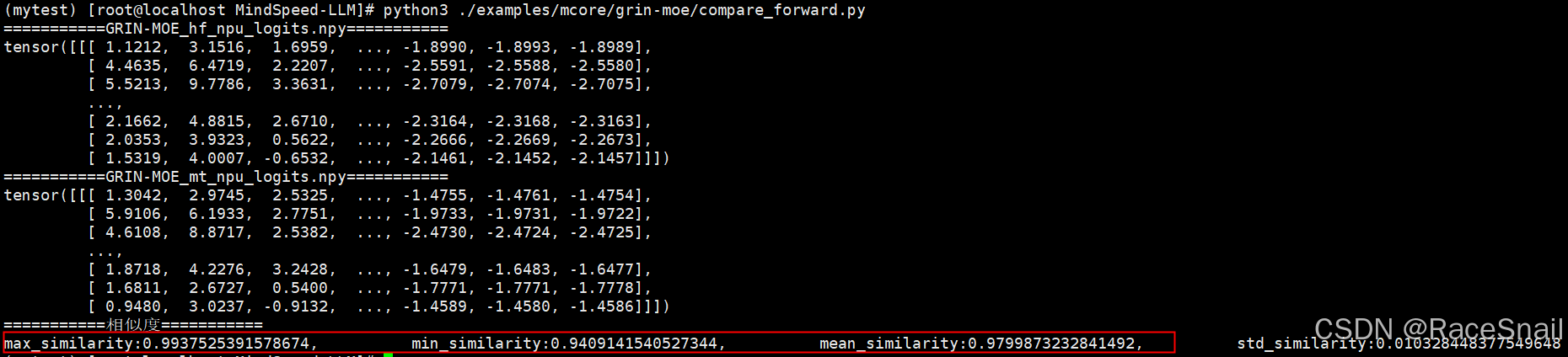
整体相似度较低,需要对模型的每一部分分别对齐。
5.2.4 模型hook挂接
在前向计算中挂接hook,将模型各个模块的前向计算结果打印出来、进行对比,找到最先出现差异的模块,再进一步定位。
hook代码如下:
def com(tensor):
    ab = torch.abs(tensor)
    with open('/home/mytest/MindSpeed-LLM/examples/mcore/grin-moe/hf_output.txt', 'a') as file:
        try:
            print(">sum:, %e" % torch.sum(ab).item(), file=file)
        except:
            print("This tensor do not support sum and abs!", file=file)
        try:
            print(">mean:, %e" % torch.mean(ab).item(), file=file)
        except:
            print("This tensor do not support mean!", file=file)
        try:
            print(">max:, %e" % torch.max(ab).item(), file=file)
        except:
            print("This tensor do not support max!", file=file)
        try:
            print(">min:, %e" % torch.min(ab).item(), file=file)
        except:
            print("This tensor do not support min!", file=file)
        file.close()

def print_tensor(name, tensors):
    if tensors is None:
        return
    with open('/home/mytest/MindSpeed-LLM/examples/mcore/grin-moe/hf_output.txt', 'a') as file:
        if isinstance(tensors, torch.Tensor):
            print(name, tensors.shape, tensors.dtype, file=file)
            print(tensors, file=file)
            com(tensors)
        elif isinstance(tensors, tuple) or isinstance(tensors, list):
            for tensor in tensors:
                print_tensor(name, tensor)
        else:
            print(name, type(tensors), file=file)
            print(tensors, file=file)
        file.close()

def hook_func(name, module):
    def hook_function(module, inputs, outputs):
        with open('/home/mytest/MindSpeed-LLM/examples/mcore/grin-moe/hf_output.txt', 'a') as file:
            print("--------------------------input-------------------------------------", file=file)
            file.close()

        print_tensor(name + ' inputs', inputs)
        with open('/home/mytest/MindSpeed-LLM/examples/mcore/grin-moe/hf_output.txt', 'a') as file:
            print("---------------------------output------------------------------------", file=file)
            file.close()

        print_tensor(name + ' outputs', outputs)

    return hook_function

def hook_for_model(model):
    for name, module in model.named_modules():
        module.register_forward_hook(hook_func('[forward]: ' + name, module))
使用时分别放在huggingface_logits.py和megatron_logits.py文件中,注意修改输出文件名:hf_output.txt/mt_output.txt
在创建model后,调用hook_for_model,huggingface_logits.py调用方式: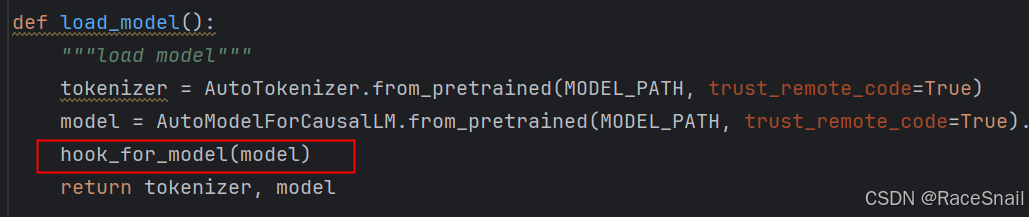
megatron_logits.py调用方式: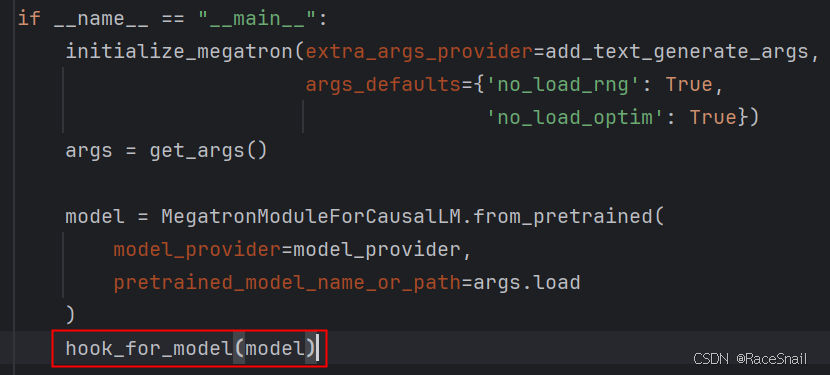
huggingface和megatron的hook输出分别为hf_output.txt和mt_output.txt: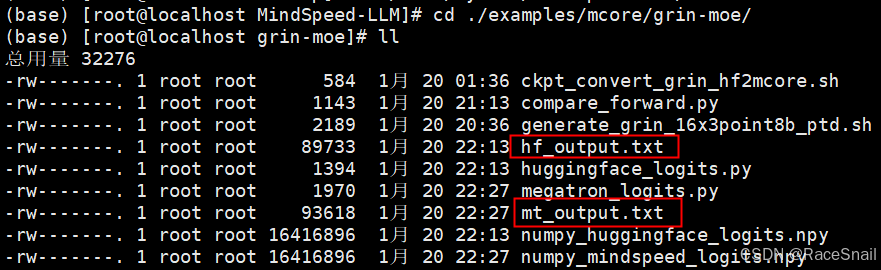
5.2.5 huggingface和megatron模型结构映射关系
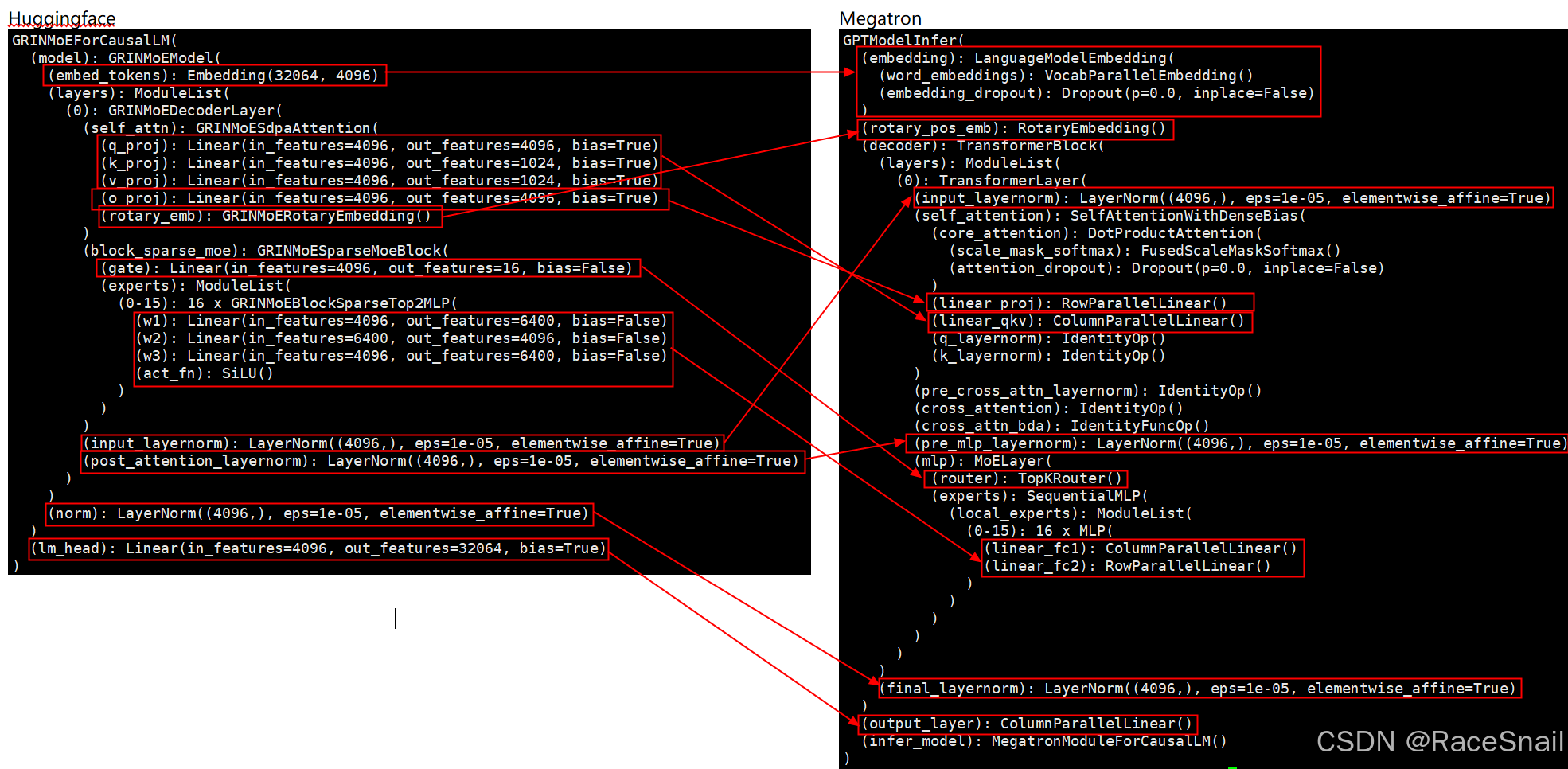
注:
- IdentityOp和IdentityFuncOp操作可忽略,主要功能是实现恒等映射,即输入是什么,输出就是什么;
- embedding_dropout和attention_dropout中 p=0.0,即Dropout概率为 0.0,意味着没有应用 Dropout 技术;
- huggingface中的q_proj、k_proj、v_proj在megatron中合一为linear_qkv;
- huggingface中o_proj对应megatron中linear_proj。
5.2.6 attention部分对齐
5.2.6.1 比较attention部分的输出
对比hf_output.txt(左边)和mt_output.txt(右边)的内容,比较attention部分的输出,两边差异较大,如下图: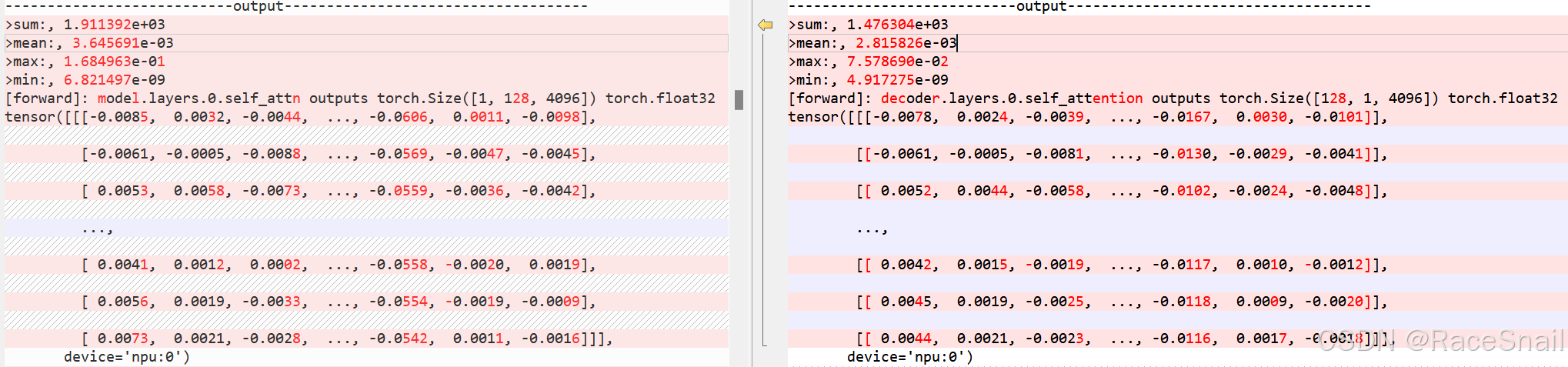
attention部分输出差异较大,原因可能是huggingface和megatron模型结构没对齐、也可能是两边attention内部实现不一致导致,我们先对齐模型结构。
5.2.6.2 huggingface和megatron模型结构对齐
对比Mixtral和GRIN模型结构: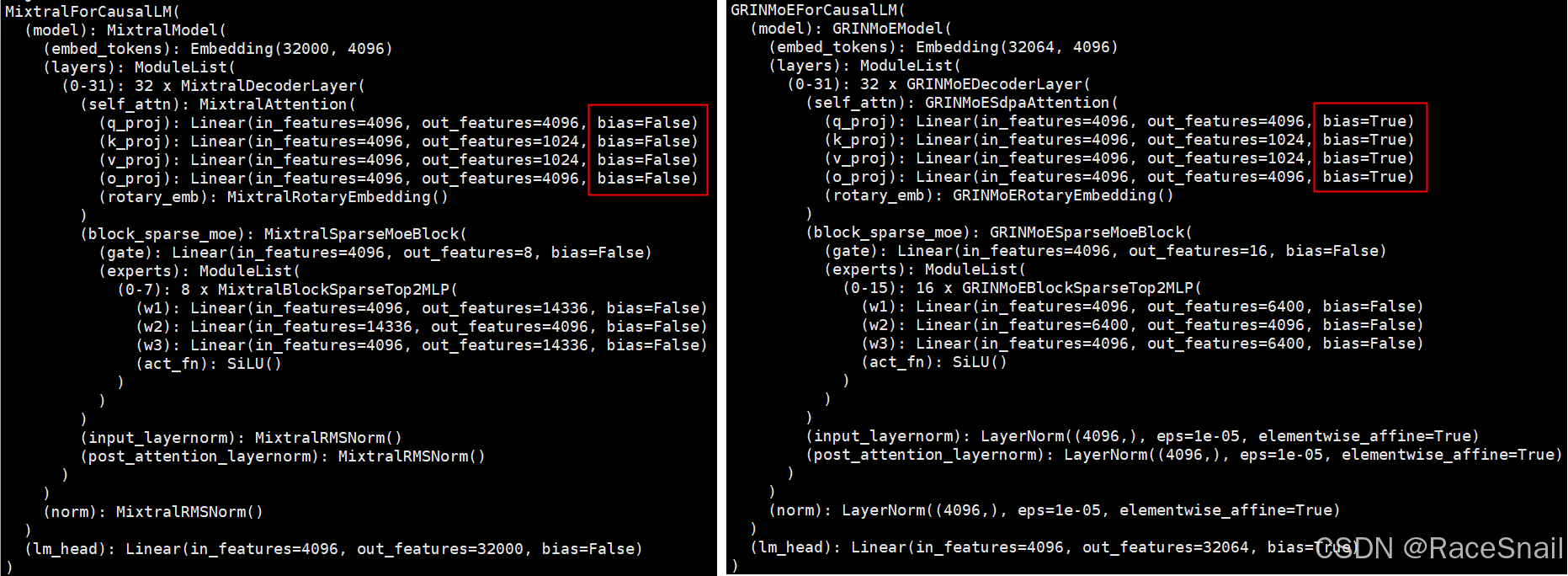
对比两个模型的attention部分,差异主要是计算qkv时是否带了bias,所以怀疑megatron的linear_qkv和linear_proj默认不带bias,需要增加bias。
推理脚本generate_grin_16x3point8b_ptd.sh中增加“--add-qkv-bias”配置,为linear_qkv添加bias。
修改后重新执行推理脚本,有如下报错: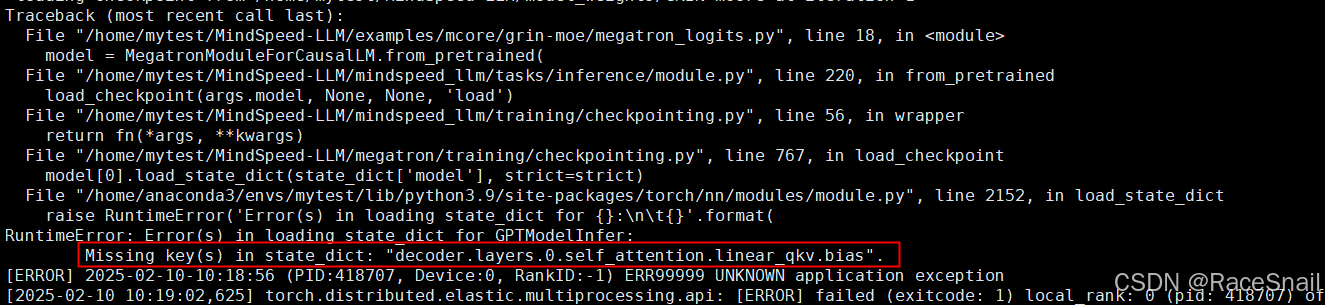
错误原因是权重转换时没有带–add-qkv-bias 配置,导致权重加载失败,需要重新做权重转换再执行推理脚本。
- 增加spec文件:没有专门的配置项为linear_proj增加bias,需要通过spec文件来实现,即在/home/mytest/MindSpeed-LLM/mindspeed_llm/tasks/models/spec/ 目录下增加grin_moe_spec.py文件,内容可完全复制phi35_moe_spec.py文件;
- 引用spec文件:权重转换和推理脚本都增加“--spec mindspeed_llm.tasks.models.spec.grin_moe_spec layer_spec”和“--add-dense-bias”配置,并重新执行;
重新执行后,比较huggingface和megatron的attention部分输出结果如下: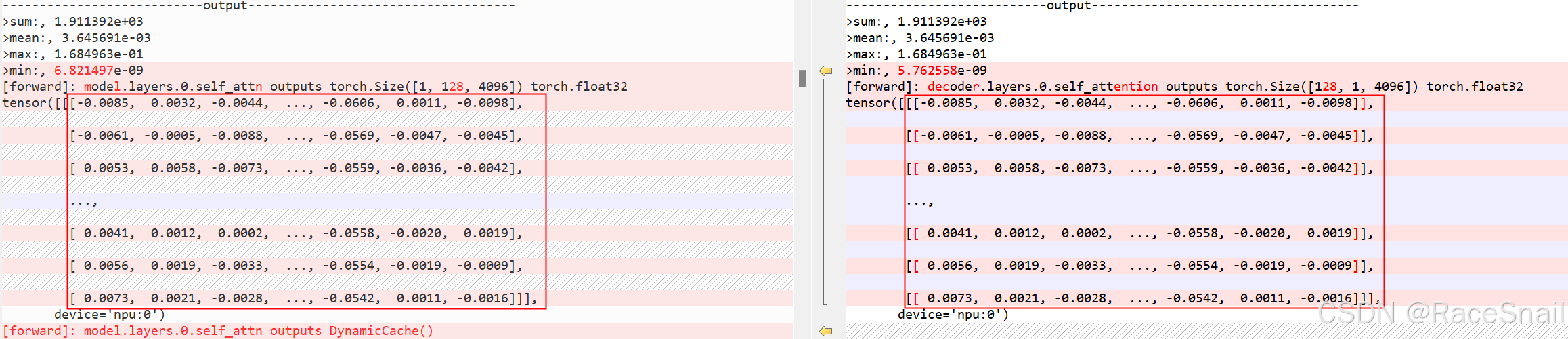
attention部分两边已完成对齐,但是整体的相似度依然偏低,如下图: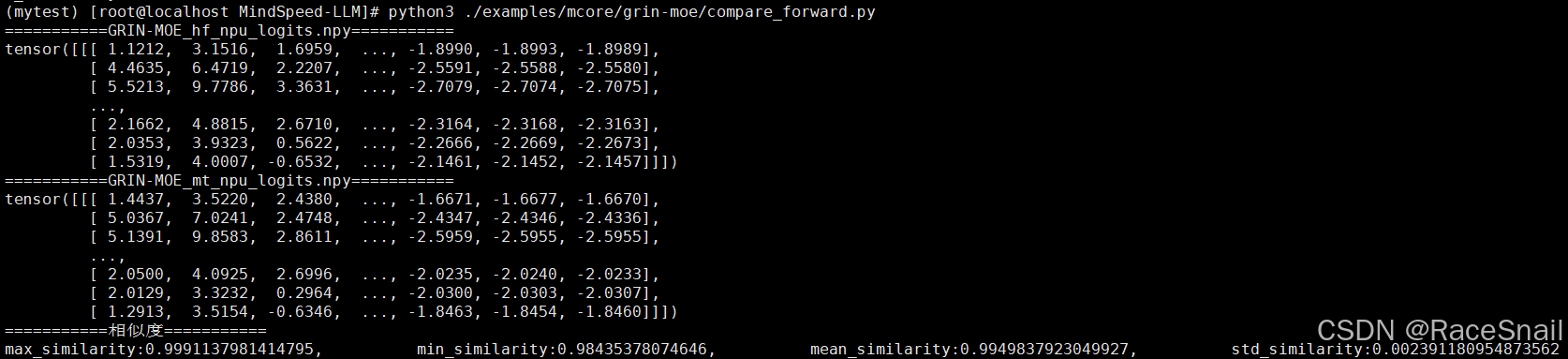
接下来我们还需要对齐MLP部分。
5.2.7 MLP部分对齐
MLP部分经过排查,需要修改推理脚本的如下配置:
此外,还需要增加“–add-output-layer-bias”配置。
修改后,重新执行推理脚本,并比较huggingface和megatron的前向输出结果,如下: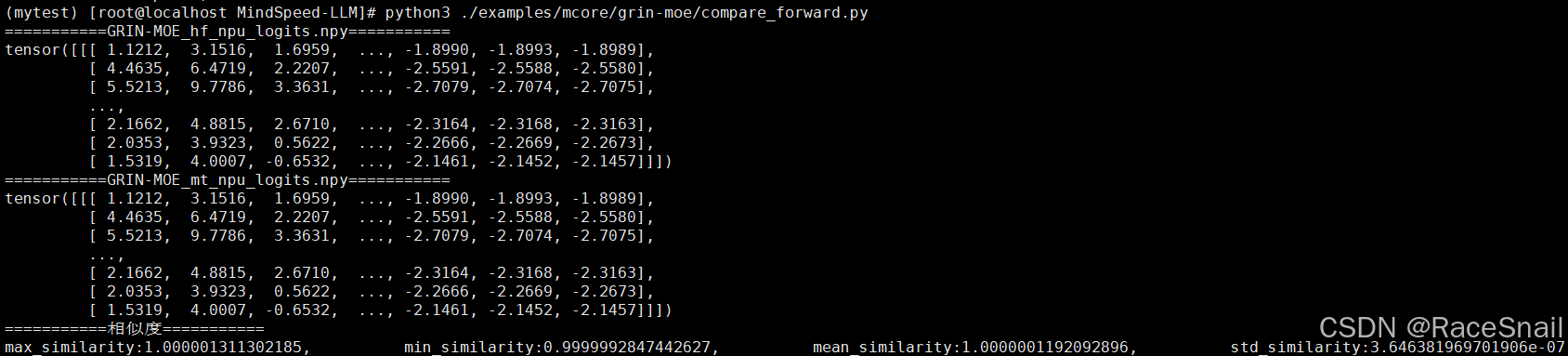
至此,完成前向对齐。

鲲鹏昇腾开发者社区是面向全社会开放的“联接全球计算开发者,聚合华为+生态”的社区,内容涵盖鲲鹏、昇腾资源,帮助开发者快速获取所需的知识、经验、软件、工具、算力,支撑开发者易学、好用、成功,成为核心开发者。
更多推荐


 12
12 0
0- 0


 已为社区贡献9条内容

所有评论(0)