
XRDP会话进程回收
·
我在使用xrdp的时候发现,登录的会话进程在关闭会话后不会自动回收,这样就会导致占用服务器的资源。通过网上查找资料,提供了一个方法是修改xrdp的配置文件sesman.ini里的KillDisconnected参数。修改后不生效,后来搜索发现这个参数早就被丢弃了。
于是,我就创建了一个systemd 服务来实现XRDP会话进程的自动回收。
我使用的是openeuler系统,xrdp使用的Xvnc协议。
1.创建脚本文件
创建一个脚本 /root/xrdp_cleanup.sh 并赋予执行权限:
vim /root/xrdp_cleanup.sh
然后在脚本中添加以下内容:
#!/bin/bash

LOG_FILE="/var/log/xrdp_cleanup.log"

# 记录日志的函数
log() {
    local level="$1"
    local message="$2"
    echo "$(date '+%Y-%m-%d %H:%M:%S') [$level] $message" | tee -a "$LOG_FILE"
}

log "INFO" "XRDP cleanup script started."

while true; do
    # 遍历所有监听中的 Xvnc 进程
    for pid in $(lsof -b -w -n -c /^Xvnc$/b -a -iTCP:5900-5999 | grep L[I]STEN | awk '{print $2}'); do
        sleep 2  # 等待新会话稳定

        # 获取用户和会话状态
        euser=$(lsof -b -w -n -c /^Xvnc$/b -a -iTCP:5900-5999 | grep L[I]STEN | grep "$pid" | awk '{print $3}')
        esta=$(lsof -b -w -n -c /^Xvnc$/b -a -iTCP:5900-5999 | grep E[S]TABLISHED | grep "$pid" | awk '{print $2}')

        if [[ -z "$euser" ]]; then
            log "WARN" "Unable to find user for PID $pid in lsof output!"
        fi

        if [[ -n "$esta" ]]; then
            log "INFO" "User $euser has an established session on PID $pid"
        else
            log "WARN" "Session for user $euser is inactive. Terminating PID $pid..."

            isrunning="yes"
            while [[ -n "$isrunning" ]]; do
                kill "$pid"
                sleep 1
                isrunning=$(ps -ef | grep "$pid" | grep -v grep)

                if [[ -z "$isrunning" ]]; then
                    log "INFO" "PID $pid successfully terminated."
                fi
            done
        fi
    done
done
保存并退出,然后赋予执行权限
2.创建 systemd 服务
创建一个systemd服务
vim /etc/systemd/system/xrdp_cleanup.service
填入以下内容:
[Unit]
Description=XRDP Cleanup Service
After=network.target

[Service]
ExecStart=/root/xrdp_cleanup.sh
Restart=always
User=root
WorkingDirectory=/root
StandardOutput=append:/var/log/xrdp_cleanup.log
StandardError=append:/var/log/xrdp_cleanup.log

[Install]
WantedBy=multi-user.target
3.使服务生效并启动
systemctl daemon-reload
systemctl enable xrdp_cleanup.service
systemctl start xrdp_cleanup.service
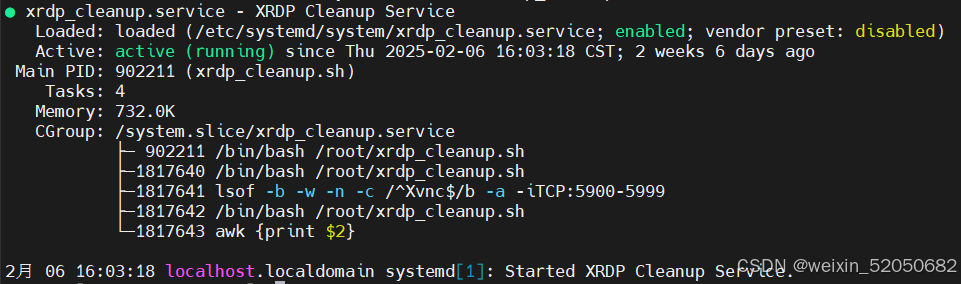
4.检查服务是否运行
systemctl status xrdp_cleanup.service
运行成功,会看到如下:

鲲鹏昇腾开发者社区是面向全社会开放的“联接全球计算开发者,聚合华为+生态”的社区,内容涵盖鲲鹏、昇腾资源,帮助开发者快速获取所需的知识、经验、软件、工具、算力,支撑开发者易学、好用、成功,成为核心开发者。
更多推荐


 7
7 0
0- 0


 已为社区贡献1条内容

所有评论(0)