
[openEuler RISC-V SIG]在openEuler RISC-V上使用sccache分布式异构编译实现编译加速
在openEuler RISC-V上使用sccache分布式异构编译实现编译加速
什么是sccache(Shared Compilation Cache)
(以下内容来自sccache github repo)
sccache is a ccache-like compiler caching tool. It is used as a compiler wrapper and avoids compilation when possible, storing cached results either on local disk or in one of several cloud storage backends.
sccache includes support for caching the compilation of C/C++ code, Rust, as well as NVIDIA’s CUDA using nvcc, and clang.
sccache also provides icecream-style distributed compilation (automatic packaging of local toolchains) for all supported compilers (including Rust). The distributed compilation system includes several security features that icecream lacks such as authentication, transport layer encryption, and sandboxed compiler execution on build servers. See the distributed quickstart guide for more information.
sccache is also available as a GitHub Actions to facilitate the deployment using GitHub Actions cache.
简单来说,sccache支持C/C++/Rust/CUDA(using nvcc/clang)项目,并提供两种能力
- 编译缓存:与ccache类似,通过缓存中间编译文件,加速C/C++/Rust/CUDA项目构建。
- 分布式构建和缓存:与icecream类似,提供跨主机,跨架构的分布式编译和缓存能力。通过在远端主机上进行构建/缓存中间编译文件,加速本地项目构建。
只使用本地构建时,sccache由两个部分组成:用户直接交互的CLI工具sccache(为了便于区分,下称cli),以及实际处理业务的守护进程sccached
当启用分布式构建时,sccache引入了sccache scheduler(下称scheduler)和sccache server(下称server),本地构建时的cli和sccached一起组成了sccache client(下称client)。scheduler负责管理server,并将server的信息告知client。server负责实际进行构建/缓存,需要主动向scheduler注册,并与client通信处理client的请求。
以上组件的工作方式大致如下图所示
理论上虽然sccache可以直接打包RISC-V原生工具链,并在x86 server上通过QEMU User直接运行和编译。但是一方面sccache本身不支持在RISC-V上自动打包工具链, 另一方面QEMU User依然会降低构建性能。
我们的预期目标是:
- RISC-V client使用native工具链,指定x86 server使用交叉编译工具链加速RISC-V项目编译。
- RISC-V client和x86 server使用的工具链行为应当一致(如GCC版本一致),确保可以正常构建。
下面两节均基于该目标推进。
使用sccache加速同架构项目构建
Sccache需要两种可执行文件
- sccache:sccache client所需可执行文件,实现了sccache cli和sccached(本地编译仅需sccache)。
- sccache-dist:sccache scheduler/server所需可执行文件,通过不同参数运行scheduler和server(启用分布式编译必须使用sccache-dist)。
同时,sccache提供了两种安装手段:
- 预编译的可执行文件:github repo中提供了可下载的可执行文件。sccache提供了x86和ARM架构,sccache-dist仅提供了x86架构。
- 通过源码编译release文件:sccache使用Rust编写和管理依赖,可以通过源码构建release版本的sccache(sccache的所有依赖在RISC-V上都完成了移植,虽然未提供RISC-V的预编译文件,但是可以成功构建。而sccache-dist尚未完成在RISC-V上的移植,构建失败)。
本节包括以下几个部分:
- 环境:
- client: WSL2 Ubuntu 24.04 Server on VMware(4c 8g)
- scheduler: openEuler 24.03 x86 on VMware(4c 8g)
- server: openEuler 24.03 x86 on VMware(4c 8g)
- 基础的client,scheduler和server的部署(参照sccache官方文档并对其进行补充)
- 通过server加速client的C/Rust 项目构建。
在openEuler 24.03 x86上部署scheduler和server
参照sccache官方文档。首先获取sccache-dist的可执行文件(可直接从github repo下载,也可以搭建本地Rust开发环境通过源码构建)。
同时为了便于调试,在拉起服务前开启日志宏
export SCCACHE_LOG=debug (trace打印的日志更多)
组件关系大致如下图
部署scheduler
部署scheduler需要指定三个关键配置:
- scheduler的http前端监听的地址, ip + port。
- 用于验证client身份的token。
- 用于验证server身份的key。
- (可选)配置https的证书:scheduler前端是一个HTTP服务器,如果使用https还需配置certificate,测试时可使用http协议绕过这步。
scheduler是sccache分布式构建的桥梁,scheduler可以指定接受的验证方式,并生成相应的验证密钥,这部分详见sccache验证配置。测试时为了方便只开启了server验证,client验证关闭。
本节通过以下命令生成密钥
# scheduler端
export SCHEDULER_KEY=$(sccache-dist auth generate-jwt-hs256-key)
# server端,注意生成密钥时server的地址与启动时必须完全一致,否则无法通过校验
export SERVER_KEY=$(sccache-dist auth generate-jwt-hs256-server-token \
    --secret-key ${SCHEDULER_KEY} \
    --server 192.168.10.134:10501)
下面是参考sccache官方编写的scheduler.conf
# The socket address the scheduler will listen on. It's strongly recommended
# to listen on localhost and put a HTTPS server in front of it.
public_addr = "192.168.10.134:10600"

#client不进行验证
[client_auth]
type = "DANGEROUSLY_INSECURE"
# token = "my client token"

# according to https://github.com/mozilla/sccache/blob/main/docs/Distributed.md
# the key should be generate and add to here mannully
[server_auth]
# type = "DANGEROUSLY_INSECURE"
type = "jwt_hs256"
# 即${SCHEDULER_KEY}
secret_key = "y-jrHHj7qLmLueVdc_mqjj94jF8Zu7_GxVS7lUmhVh4"
完成配置后,通过命令sccache-dist scheduler --config scheduler.conf启动scheduler,scheduler正常拉起。
部署server
完成scheduler拉起之后,可以开始部署server并向scheduler注册。server有几个关键配置需要指定:
- scheduler的http前端的监听地址:ip + port,用于连接到scheduler
- server的http前端的监听地址:ip + port,指定server监听的地址,也是server
- scheduler生成的用于验证的密钥:即前文的${SERVER_KEY}
- build相关配置: 本地的cache directory和build directory
参考sccache官方配置的server.conf如下
# This is where client toolchains will be stored.
cache_dir = "/root/sccache_server/server_cache"
# The maximum size of the toolchain cache, in bytes.
# If unspecified the default is 10GB.
# toolchain_cache_size = 10737418240
# A public IP address and port that clients will use to connect to this builder.
public_addr = "192.168.10.134:10501"
# The URL used to connect to the scheduler (should use https, given an ideal
# setup of a HTTPS server in front of the scheduler)
scheduler_url = "http://192.168.10.134:10600"

[builder]
type = "overlay"
# The directory under which a sandboxed filesystem will be created for builds.
build_dir = "/root/sccache_server/build"
# The path to the bubblewrap version 0.3.0+ `bwrap` binary.
# The build server requires bubblewrap to sandbox execution, at least version 0.3.0. Verify your version of bubblewrap before attempting to run the server. On Ubuntu 18.10+ you can apt install bubblewrap to install it. If you build from source you will need to first install your distro's equivalent of the libcap-dev package.
bwrap_path = "/usr/bin/bwrap"

[scheduler_auth]
# type = "DANGEROUSLY_INSECURE"
type = "jwt_token"
# This will be generated by the `generate-jwt-hs256-server-token` command or
# provided by an administrator of the sccache cluster.
token = "eyJ0eXAiOiJKV1QiLCJhbGciOiJIUzI1NiJ9.eyJleHAiOjAsInNlcnZlcl9pZCI6IjE5Mi4xNjguMTAuMTM0OjEwNTAxIn0.j5QS048Iu5QgwDjxf6nbo_TOCt0P0LymAAUDZi6Nrk0"
完成配置后,通过命令sccache-dist server --config server.conf拉起server服务,server正常拉起,并定时向scheduler发送心跳包。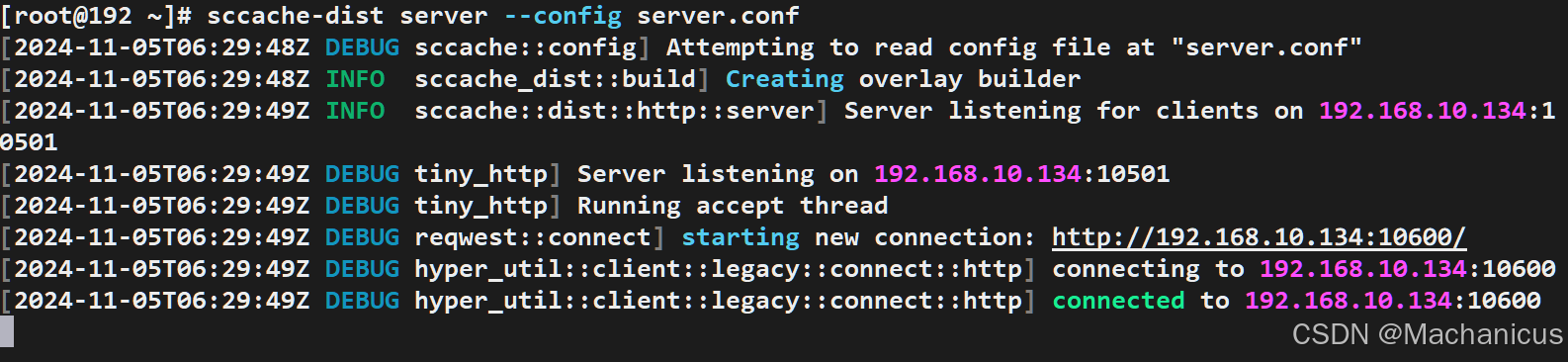
使用sccache加速构建
测试使用WSL2 Ubuntu24.04作为sccache client
配置sccache client
client有几个关键配置需要指定:
- scheduler的http前端的监听地址:ip + port
- client验证用的密钥(为了便于测试测试时关闭了client验证)
- (可选)指定工具链:提供了定制化编译行为的能力,下一节交叉编译会详细说明
client的config文件是~/.config/sccache/config,如果没有该目录需要手动创建。下面是参考sccache官方编写的client config文件(如果config文件为空则禁用分布式编译,本地编译使能方式和分布式编译没有区别,不单独演示)。
[dist]
# The URL used to connect to the scheduler (should use https, given an ideal
# setup of a HTTPS server in front of the scheduler)
scheduler_url = "http://192.168.10.131:10600"
# Used for mapping local toolchains to remote cross-compile toolchains. Empty in
# this example where the client and build server are both Linux.
# Size of the local toolchain cache, in bytes (5GB here, 10GB if unspecified).
toolchain_cache_size = 5368709120

# scheduler关闭了client验证,client侧也需要禁用
#[dist.auth]
#type = "token"
# This should match the `client_auth` section of the scheduler config.
#token = "my client token"
注意每次修改config之后都需要使用sccache --stop-server然后重启sccached才能生效配置。完成配置之后,可以通过sccache --dist-status命令拉起sccached并查看分布式编译配置是否正确。理想情况下,完成scheduler,server和client的配置后,该命令打印如下,可以看到当前已注册一个4核的server。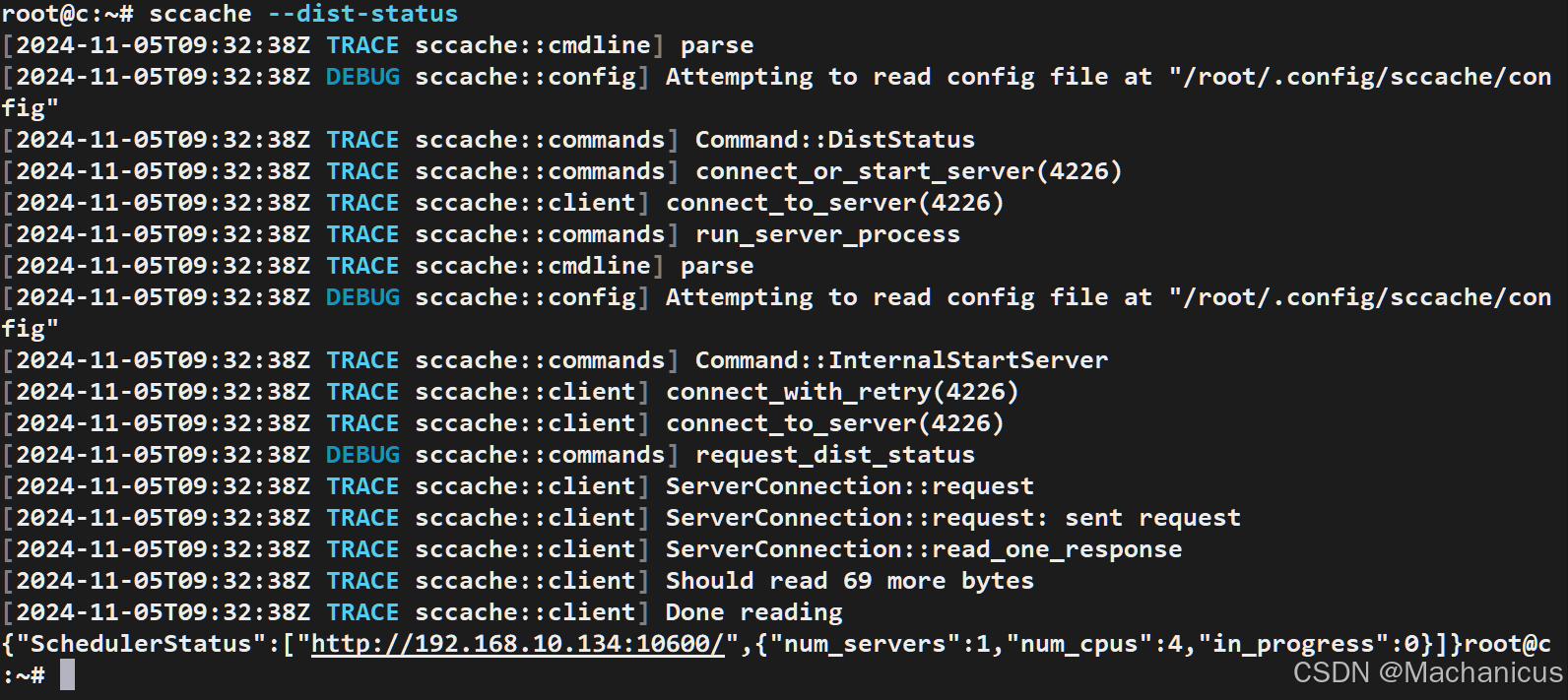
加速构建Rust项目
测试使用一个Rust编写的Type1型hypervisor——Rust shyper项目。参照sccache介绍文档,为了启用对Rust的加速,需要用sccache作为rustc的wrapper,我们选取比较简单的方法。
export RUSTC_WRAPPER=/path/to/sccache
左侧是server的日志,右侧是client的日志。client将编译请求发送到scheduler,scheduler再将该请求调度到实际的server上处理,当server完成处理后将结果返回给scheduler,再由scheduler返回给client。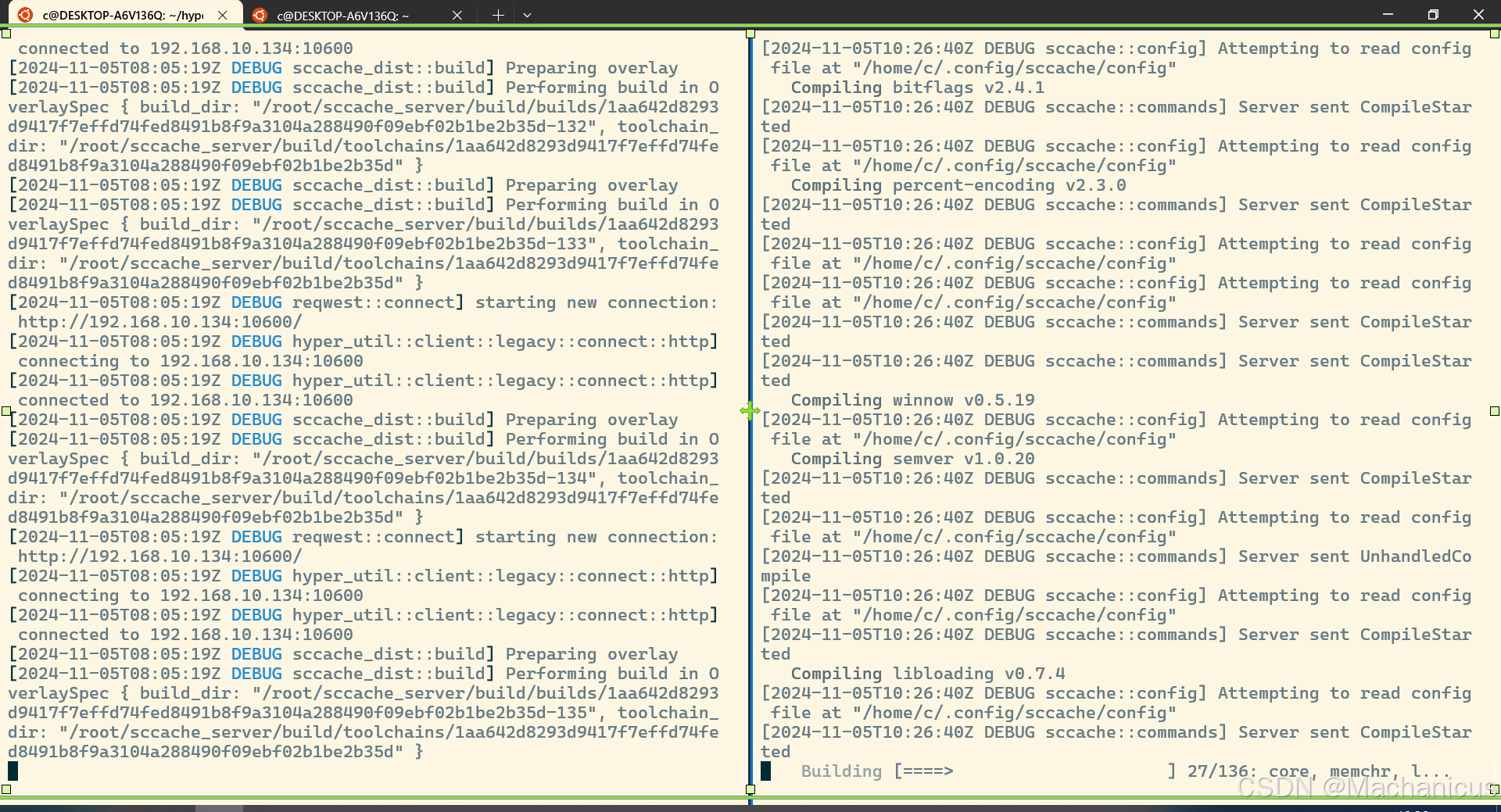
使用sccache加速分布式异构项目构建
上一节介绍了sccache分布式构建的基础,实现了基础的分布式同构项目构建。本节将介绍基础的分布式异构项目构建。
本节包括以下几个部分:
- 环境:
- client: openEuler 24.03 RISC-V on QEMU(4c 8g)
- scheduler: openEuler 24.03 x86 on VMware(4c 8g)
- server: openEuler 24.03 x86 on VMware(4c 8g)
- 在openEuler RISC-V上部署sccache client
- 打包指定工具链并修改client conf
- 通过x86 server加速RISC-V client构建。
在openEuler RISC-V上部署sccache client
如何运行openEuler RISC-V镜像参考该文档。sccache没有提供RISC-V架构的sccache的预编译可执行文件。但是可以直接通过源码成功构建。可以在x86主机上通过交叉编译工具链编译之后通过scp命令传输到RISC-V主机上。
打包工具链
sccache分布式编译与icecream类似,包括用于传输工具链的包的结构。sccache默认打包工具链的是tar包,使用gzip压缩,其打包方式和使用sccache --package-toolchain命令相同,也可以使用icecc_create_env.sh(这是icecream专门用于制作工具链包的脚本,建议使用该脚本生成工具链)。
下面是通过该命令打包交叉编译工具链的步骤:
- 首先拉取RISC-V交叉编译工具链,解压后可以在解压目录riscv/bin目录下找到所有可执行文件(如GCC等)。
- 获取icecc_create_env.sh
- Ubuntu可以直接使用apt install icecc
- 其他发行版可以通过:curl https://raw.githubusercontent.com/icecc/icecream/master/client/icecc-create-env.in > icecc-create-env && chmod +x icecc-create-env
- 使用icecc_create_env.sh打包工具链:测试时使用的是GCC,根据脚本指示进行打包。

- 如果由额外的文件需要(如ar),需要在打包时添加–addfile选项添加文件
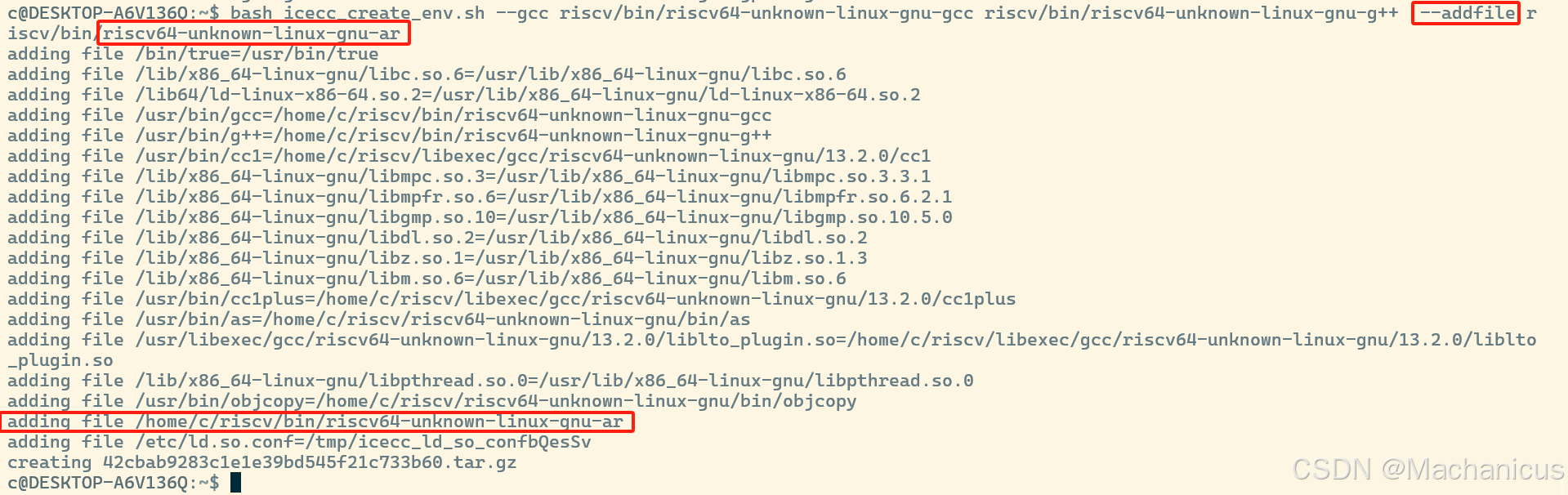
注意,如果是手动添加的文件,因为icecream打包是将可执行文件和其绝对路径添加到tar包中,而且要求直接解压就可以正常使用,当编译涉及自定义工具使用时,需要用户自行控制编译行为确保可以找到对应工具!
完成打包之后,可以通过tar命令查看包的结构,可以看到打包最主要的工作是在tar包中的/usr/bin目录下添加了对应的工具,而我们手动添加进去的文件是放置在和client绝对路径相同地方,需要用户自行控制编译行为进行使用。
-rwxr-xr-x 1000/1000     26936 2024-04-05 22:36 bin/true
-rw-r--r-- 1000/1000       603 2024-11-05 20:59 etc/ld.so.cache
-rw------- 1000/1000        35 2024-11-05 20:59 etc/ld.so.conf
-rwxr-xr-x 1000/1000   1225480 2024-09-03 08:35 home/c/riscv/bin/riscv64-unknown-linux-gnu-ar
-rwxr-xr-x 1000/1000   2125328 2024-08-08 22:47 lib/x86_64-linux-gnu/libc.so.6
-rw-r--r-- 1000/1000     14408 2024-08-08 22:47 lib/x86_64-linux-gnu/libdl.so.2
-rw-r--r-- 1000/1000    534896 2024-04-14 15:57 lib/x86_64-linux-gnu/libgmp.so.10
-rw-r--r-- 1000/1000    952616 2024-08-08 22:47 lib/x86_64-linux-gnu/libm.so.6
-rw-r--r-- 1000/1000    134440 2024-04-09 00:13 lib/x86_64-linux-gnu/libmpc.so.3
-rw-r--r-- 1000/1000    760464 2024-04-09 00:13 lib/x86_64-linux-gnu/libmpfr.so.6
-rw-r--r-- 1000/1000     14408 2024-08-08 22:47 lib/x86_64-linux-gnu/libpthread.so.0
-rw-r--r-- 1000/1000    113000 2024-08-09 10:33 lib/x86_64-linux-gnu/libz.so.1
-rwxr-xr-x 1000/1000    236616 2024-08-08 22:47 lib64/ld-linux-x86-64.so.2
-rwxr-xr-x 1000/1000   1919024 2024-09-03 08:35 usr/bin/as
-rwxr-xr-x 1000/1000  28367552 2024-09-03 09:13 usr/bin/cc1
-rwxr-xr-x 1000/1000  30558816 2024-09-03 09:13 usr/bin/cc1plus
-rwxr-xr-x 1000/1000   2457440 2024-09-03 09:13 usr/bin/g++
-rwxr-xr-x 1000/1000   2453344 2024-09-03 09:13 usr/bin/gcc
-rwxr-xr-x 1000/1000   1340232 2024-09-03 08:35 usr/bin/objcopy
-rwxr-xr-x 1000/1000     88792 2024-09-03 09:13 usr/libexec/gcc/riscv64-unknown-linux-gnu/13.2.0/liblto_plugin.so
在conf中指定工具链
我们目前已经获得了打包的工具链,还需要主动指定sccache分布式构建时server使用我们的工具链,前文提过可以通过在client conf文件中添加工具链相关字段指定工具链。
下面是根据sccache官方修改的client conf文件。
[dist]
# The URL used to connect to the scheduler (should use https, given an ideal
# setup of a HTTPS server in front of the scheduler)
scheduler_url = "http://192.168.10.134:10600"
# Used for mapping local toolchains to remote cross-compile toolchains. Empty in
# this example where the client and build server are both Linux.
# Size of the local toolchain cache, in bytes (5GB here, 10GB if unspecified).
toolchain_cache_size = 5368709120

#[dist.auth]
#type = "token"
# This should match the `client_auth` section of the scheduler config.
#token = "hOvcZMgxvszusBDG"
#type = "mozilla"

[[dist.toolchains]]
type = "path_override"
compiler_executable = "/usr/bin/gcc"
archive = "/root/rvcc-tc-v1"
archive_compiler_executable = "/usr/bin/gcc"
compiler_executable标识sccache使用此配置时要匹配的路径(在 Windows 上你需要小心——路径中可以包含两种方向的斜杠,你可能需要转义反斜杠,如示例所示)archive是包含要分发的编译器工具链的压缩 tar 归档文件,当匹配到compiler_executable时使用archive_compiler_executable是归档内部的路径,当匹配到compiler_executable时,分布式编译应该调用该路径下的文件
指定compiler_executable为/usr/bin/gcc意味着当RISC-V client调用native GCC时sccache会使用打包的工具链进行分布式构建。因为archive_compiler_executable,sccache理论上拥有了更大的自由性(因为工具不用严格放置在/usr/bin目录下了),但是在实践中大部分仍然沿用icecream-style,使用icecc脚本直接打包的工具链。
通过x86 server加速RISC-V client构建
完成工具链打包和配置之后,可以在RISC-V上尝试使用sccache分布式构建能力了。测试使用基于C实现的Type1型hypervisor——xVisor项目作为演示。
因为该项目使用Makefile编译,如果需要用sccache修改gcc,只需要在希望分布式协作的命令前添加sccache。
# Setup compilation environment
ifdef CROSS_COMPILE
CC              =       sccache $(CROSS_COMPILE)gcc
CPP             =       sccache $(CROSS_COMPILE)cpp
AR              =       $(CROSS_COMPILE)ar
LD              =       $(CROSS_COMPILE)ld
NM              =       $(CROSS_COMPILE)nm
OBJCOPY         =       $(CROSS_COMPILE)objcopy
else
CC              =       sccache gcc
CPP             =       sccache cpp
AR              =       ar
LD              =       ld
NM              =       nm
OBJCOPY         =       objcopy
endif
AS              =       $(CC)
DTC             =       dtc
下面展示的是构建过程,左边是x86 server,右边是RISC-V client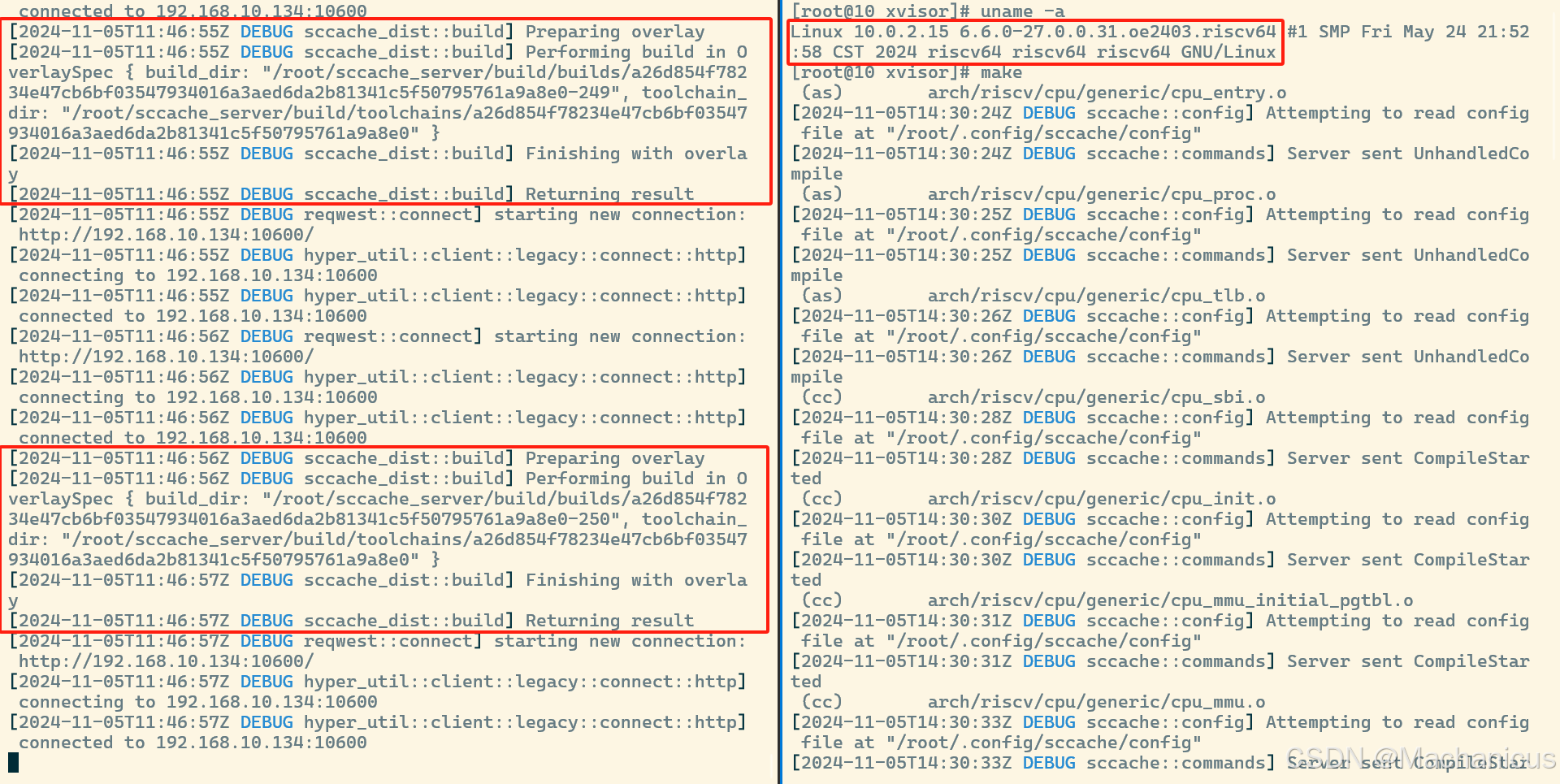
结语
我们目前仅在openEuler RISC-V上测试了使用sccache分布式异构编译加速C项目的测试。后续会继续尝试加速Rust项目的编译,并尝试将sccache整合到通过OBS构建openEuler RISC-V发行版的流程中。

鲲鹏昇腾开发者社区是面向全社会开放的“联接全球计算开发者,聚合华为+生态”的社区,内容涵盖鲲鹏、昇腾资源,帮助开发者快速获取所需的知识、经验、软件、工具、算力,支撑开发者易学、好用、成功,成为核心开发者。
更多推荐

 12
12 0
0- 0


 已为社区贡献3条内容

所有评论(0)