gh_mirrors/exam/examples开发工具:模型可视化与解释工具
gh_mirrors/exam/examples是一个基于TensorFlow的深度学习示例项目,提供了丰富的模型训练、转换和部署案例。本工具聚焦于模型可视化与解释功能,帮助开发者直观理解模型行为、诊断预测结果,并通过可视化手段优化模型性能。## 核心功能模块### 1. 数据可视化工具数据可视化是模型开发的第一步,该模块提供了训练数据分布、样本展示和特征分析功能。通过[lite/exa...
gh_mirrors/exam/examples开发工具:模型可视化与解释工具
【免费下载链接】examples  项目地址: https://gitcode.com/gh_mirrors/exam/examples
项目概述
gh_mirrors/exam/examples是一个基于TensorFlow的深度学习示例项目,提供了丰富的模型训练、转换和部署案例。本工具聚焦于模型可视化与解释功能,帮助开发者直观理解模型行为、诊断预测结果,并通过可视化手段优化模型性能。
核心功能模块
1. 数据可视化工具
数据可视化是模型开发的第一步,该模块提供了训练数据分布、样本展示和特征分析功能。通过lite/examples/digit_classifier/ml/mnist_tflite.ipynb中的show_sample函数,可快速生成数据集样本网格图:
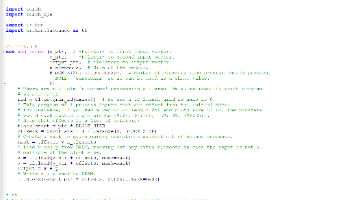
def show_sample(images, labels, sample_count=25):
    grid_count = math.ceil(math.sqrt(sample_count))
    plt.figure(figsize=(2*grid_count, 2*grid_count))
    for i in range(sample_count):
        plt.subplot(grid_count, grid_count, i+1)
        plt.xticks([])
        plt.yticks([])
        plt.grid(False)
        plt.imshow(images[i], cmap=plt.cm.gray)
        plt.xlabel(labels[i])
    plt.show()
2. 训练过程可视化
模型训练期间的指标变化可视化有助于评估模型收敛情况。在lite/examples/digit_classifier/ml/mnist_tflite.ipynb中,通过训练日志可生成精度和损失变化曲线:
# 训练模型并记录指标
history = model.fit(train_images, train_labels, epochs=5, validation_split=0.2)

# 可视化训练过程
plt.figure(figsize=(12, 4))
plt.subplot(1, 2, 1)
plt.plot(history.history['accuracy'], label='训练精度')
plt.plot(history.history['val_accuracy'], label='验证精度')
plt.title('模型精度变化')
plt.xlabel('Epoch')
plt.ylabel('Accuracy')
plt.legend()

plt.subplot(1, 2, 2)
plt.plot(history.history['loss'], label='训练损失')
plt.plot(history.history['val_loss'], label='验证损失')
plt.title('模型损失变化')
plt.xlabel('Epoch')
plt.ylabel('Loss')
plt.legend()
plt.show()
3. 模型解释工具
该工具提供预测结果解释功能,通过可视化热力图展示输入图像中对模型决策影响最大的区域。在courses/udacity_intro_to_tensorflow_lite/tflite_c04_exercise_convert_model_to_tflite_solution.ipynb中实现了预测结果可视化:
def plot_image(i, predictions_array, true_label, img):
    true_label, img = true_label[i], img[i]
    plt.grid(False)
    plt.xticks([])
    plt.yticks([])
    plt.imshow(img, cmap=plt.cm.binary)
    predicted_label = np.argmax(predictions_array)
    if predicted_label == true_label:
        color = 'blue'
    else:
        color = 'red'
    plt.xlabel("{} {:2.0f}% ({})".format(
        class_names[predicted_label],
        100*np.max(predictions_array),
        class_names[true_label]),
        color=color)
4. 超分辨率可视化
针对图像增强类模型,提供输入输出对比可视化功能。在lite/examples/super_resolution/ml/super_resolution.ipynb中实现了低分辨率和高分辨率图像的并排展示:
def plot_results(lr_image, sr_image):
    plt.figure(figsize=(15, 5))
    plt.subplot(1, 2, 1)
    plt.title('Low Resolution Image')
    plt.imshow(lr_image)
    plt.subplot(1, 2, 2)
    plt.title('Super Resolution Image')
    plt.imshow(sr_image)
    plt.show()
使用流程
1. 环境准备
克隆项目仓库并安装依赖:
git clone https://gitcode.com/gh_mirrors/exam/examples.git
cd examples
pip install -r requirements.txt
2. 数据可视化
运行MNIST数据集可视化示例:
jupyter notebook lite/examples/digit_classifier/ml/mnist_tflite.ipynb
执行"Download and explore the MNIST dataset"章节代码,生成训练样本可视化结果:
3. 模型训练与评估
在同一notebook中执行模型训练代码,训练过程中可实时查看精度和损失变化:
model.fit(train_images, train_labels, epochs=5)
test_loss, test_acc = model.evaluate(test_images, test_labels)
print('Test accuracy:', test_acc)
4. 模型解释与可视化
执行"Evaluate our model"章节代码,查看模型预测结果可视化:
predictions = model.predict(test_images)
show_sample(test_images, ['Predicted: %d' % np.argmax(result) for result in predictions])
应用场景
1. 模型调试
通过可视化工具快速定位模型错误,例如在数字识别任务中,可直观发现模型容易混淆的数字对(如6和8)。
2. 教学演示
在courses/udacity_deep_learning课程材料中,可视化工具帮助学生理解神经网络工作原理。
3. 论文与报告
自动生成的可视化结果可直接用于学术论文和技术报告,如lite/examples/super_resolution/ml/super_resolution.ipynb中的超分辨率对比图。
扩展与定制
自定义可视化函数
可根据需求扩展可视化功能,例如添加混淆矩阵可视化:
from sklearn.metrics import confusion_matrix
import seaborn as sns

def plot_confusion_matrix(y_true, y_pred):
    cm = confusion_matrix(y_true, y_pred)
    plt.figure(figsize=(10, 8))
    sns.heatmap(cm, annot=True, fmt='d', cmap='Blues')
    plt.xlabel('Predicted')
    plt.ylabel('True')
    plt.title('Confusion Matrix')
    plt.show()
集成TensorBoard
对于更复杂的模型可视化需求,可集成TensorBoard:
tensorboard_callback = tf.keras.callbacks.TensorBoard(log_dir="./logs")
model.fit(train_images, train_labels, epochs=5, callbacks=[tensorboard_callback])
总结
模型可视化与解释工具是gh_mirrors/exam/examples项目的重要组成部分,通过直观的可视化手段降低了深度学习模型的开发门槛。无论是初学者还是专业开发者,都能通过这些工具更好地理解数据特性、评估模型性能和解释预测结果。更多使用示例可参考项目教程和各模块具体实现代码。
通过结合lite/examples/digit_classifier/android/minst.gif等动态演示素材,开发者可以更生动地展示模型效果,加速模型迭代优化过程。
【免费下载链接】examples 项目地址: https://gitcode.com/gh_mirrors/exam/examples

鲲鹏昇腾开发者社区是面向全社会开放的“联接全球计算开发者,聚合华为+生态”的社区,内容涵盖鲲鹏、昇腾资源,帮助开发者快速获取所需的知识、经验、软件、工具、算力,支撑开发者易学、好用、成功,成为核心开发者。
更多推荐
 16
16 0
0- 0


 已为社区贡献2条内容

所有评论(0)