记录解决问题--maven打包Cannot transfer matedata耗时太久
修改完配置之后,将本地仓库中的所有_remote.repositories文件删除。这个文件主要作用是确保依赖的版本与远程仓库一致,如果远程仓库连不上就耗时。使用idea Maven打包时,输出日志有大量的Cannot transfer matedata,导致打包非常耗时。maven使用了私仓nexus,本地依赖每次打包时回去私仓校验,如果私仓没有依赖导致非常耗时。4、注意不同的jdk版本,需要激
1.场景
使用idea Maven打包时,输出日志有大量的Cannot transfer matedata,导致打包非常耗时。
2.原因
maven使用了私仓nexus,本地依赖每次打包时回去私仓校验,如果私仓没有依赖导致非常耗时。
3.解决
修改maven配置文件settings.xml
<profile>
            <id>jdk-21</id>
            <activation>
                <activeByDefault>false</activeByDefault>
                <jdk>21</jdk>
            </activation>
            <properties>
                <maven.compiler.source>21</maven.compiler.source>
                <maven.compiler.target>21</maven.compiler.target>
                <maven.compiler.compilerVersion>21</maven.compiler.compilerVersion>
            </properties>
        </profile>
		<profile>
            <id>jdk-11</id>
            <activation>
                <activeByDefault>true</activeByDefault>
                <jdk>11</jdk>
            </activation>
            <properties>
                <maven.compiler.source>11</maven.compiler.source>
                <maven.compiler.target>11</maven.compiler.target>
                <maven.compiler.compilerVersion>11</maven.compiler.compilerVersion>
            </properties>
        </profile>
		<profile>
            <id>jdk-17</id>
            <activation>
                <activeByDefault>false</activeByDefault>
                <jdk>17</jdk>
            </activation>
            <properties>
                <maven.compiler.source>17</maven.compiler.source>
                <maven.compiler.target>17</maven.compiler.target>
                <maven.compiler.compilerVersion>17</maven.compiler.compilerVersion>
            </properties>
        </profile>
<activeProfiles>
        <activeProfile>jdk-17</activeProfile>
    </activeProfiles>
注释掉私仓,激活对应的jdk编译版本。
<mirrors>
		<mirror>
			<id>aliyunmaven</id>
			<url>https://maven.aliyun.com/repository/public</url>
			<mirrorOf>central,jcenter,!nexus-snapshots</mirrorOf>
		</mirror>
    </mirrors>
注意:国内镜像不要忘了配置。
注意:本地仓库localRepository不要忘了配置。
------------------------------------分割线----------------------------------------
修改完配置之后,将本地仓库中的所有_remote.repositories文件删除。这个文件主要作用是确保依赖的版本与远程仓库一致,如果远程仓库连不上就耗时。
至此打包快了很多。
4.结论
1、不去远程仓库校验依赖。
2、使用本地仓库。
3、注意如果需要下载依赖,需要修改仓库连接去下载。
4、注意不同的jdk版本,需要激活对应的jdk编译版本。在idea上可以快捷激活,如下图。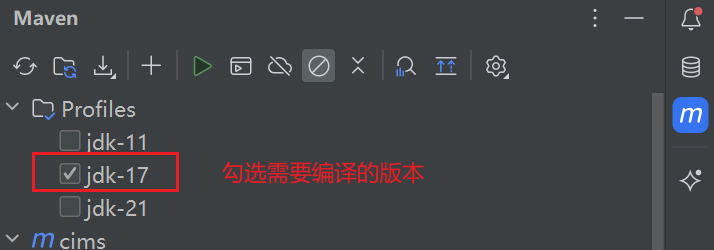

鲲鹏昇腾开发者社区是面向全社会开放的“联接全球计算开发者,聚合华为+生态”的社区,内容涵盖鲲鹏、昇腾资源,帮助开发者快速获取所需的知识、经验、软件、工具、算力,支撑开发者易学、好用、成功,成为核心开发者。
更多推荐

 10
10 0
0- 0


 已为社区贡献1条内容

所有评论(0)